# Why Your Marketing Numbers Don't Match, and How to Fix It.
> Learn why analytics numbers don't match, how one spreadsheet join turns $100 of ad spend into $180, and how to report what is missing.
Source: https://scayverstaging.1wp.site/blog/marketing-data-discrepancies/
A plain guide for small business owners on why ad, analytics and CRM numbers disagree, and how to combine spend and leads without double counting.
Start reading [All articles](https://scayverstaging.1wp.site/blog/)
**Written by**
Scayver
**Published**
23 November 2026
**Reading time**
15 min
Your analytics numbers don’t match because each tool counts a slightly different thing, on a different date, with its own rules about who gets the credit. Some gap between your ad platform, your analytics and your CRM is normal. The bigger problem is often one you can fix yourself: a spreadsheet or dashboard join that quietly repeats your ad spend.
That second problem is the one most guides skip. They explain why Google Ads and your analytics disagree, then stop. But the moment you paste spend and leads into one sheet to work out cost per lead, you can create a brand new mismatch. It shows no error message, and it can make a campaign look far more expensive than it was.
This guide covers both layers. First, the five usual reasons two tools disagree. Then a small worked example where $100 of ad spend turns into $180 after a join, why that happens and how to fix it. You’ll also get a reconciliation sheet you can rebuild in Google Sheets or Excel, plus a monthly checklist.
Every number in the worked example is hypothetical. The figures are kept small on purpose so you can check each step with a calculator.
## Five reasons your marketing tools disagree.
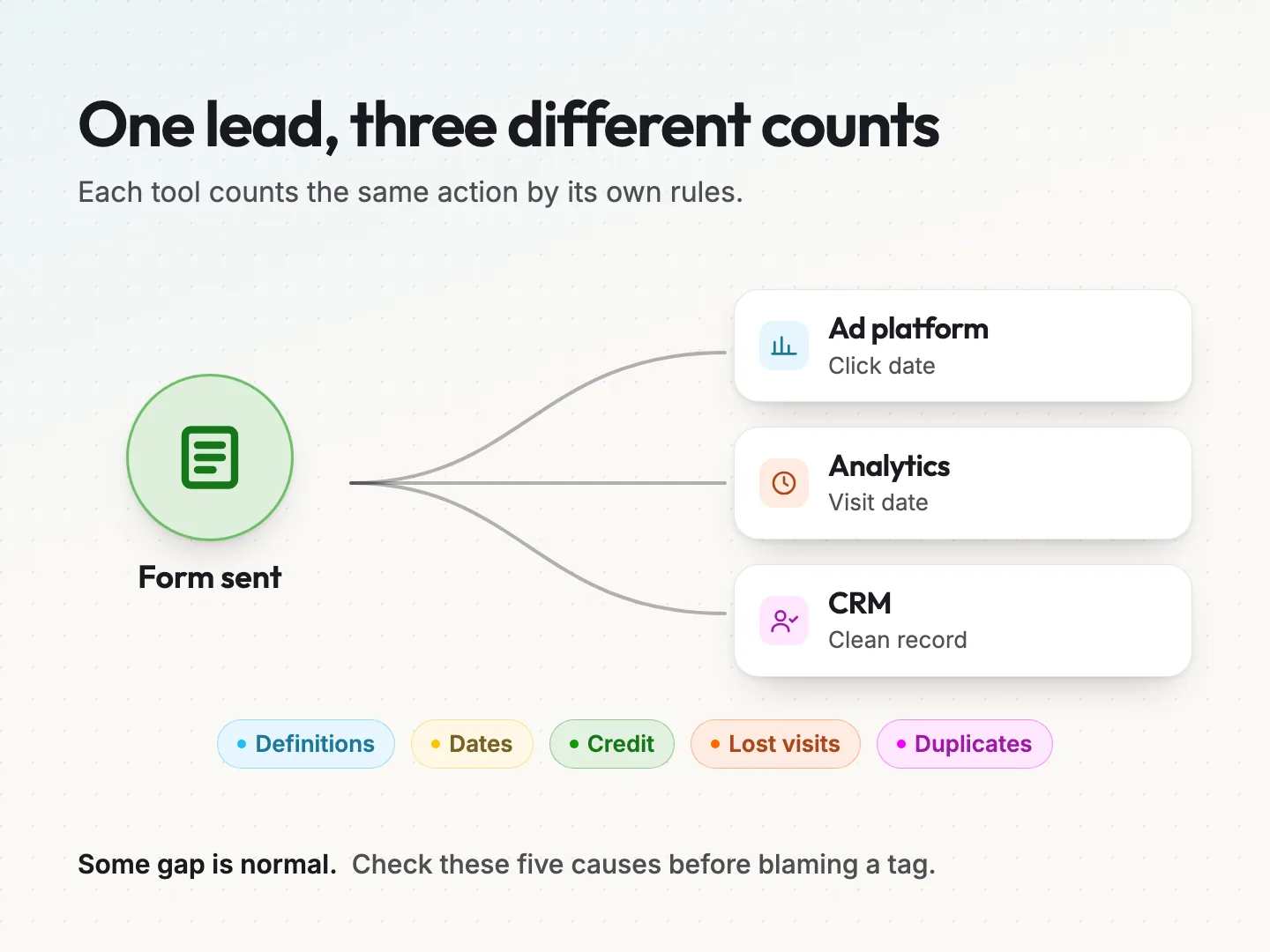
Before you blame a broken tag, it helps to know that your tools were never built to agree. Each one answers a slightly different question. Most gaps come from five places, and you can check each of them in a few minutes.
### They define the event differently.
An ad platform might count a lead the moment someone submits a form. Your analytics tool might count the thank-you page view instead. Your CRM only counts a lead once a contact record exists, often after spam and test entries are filtered out.
All three can be right by their own definition. If your team has never agreed what a lead is, start there. Our guide on [choosing business conversion goals](https://scayverstaging.1wp.site/resources/search-content-decisions/choose-business-conversion-goals/) walks through that decision.
### They put the same conversion on different dates.
Google’s own help article on this topic says that Google Ads reports a conversion against the date of the click that led to it. Analytics uses the date of the conversion itself. That article is marked as a legacy Universal Analytics page, so check current GA4 behaviour for your own setup ([Google Help, data discrepancies between Google Ads and Analytics](https://support.google.com/analytics/answer/1034383?hl=en)).
Here is what that means in practice. Someone clicks your ad on Monday and fills in your form on Thursday. Google Ads files the lead under Monday. Analytics files it under Thursday. A weekly total can match while every single day looks wrong.
Time zones do the same thing at the edges. If your ad account runs on Eastern time and your CRM export uses UTC, a lead late in the evening can land on two different dates.
### They give credit to different channels.
Each platform decides which touchpoint earned the conversion. An ad platform tends to credit its own ads. Your analytics tool might credit the last channel the visitor used, such as an organic search the next day.
So if you add up the conversions each ad platform claims, the total can be higher than the number of real customers in your CRM. Each platform is telling its own version of the same story.
### Some visits never reach the tag.
Ad blockers, declined cookie banners, scripts that load late and people switching from phone to laptop all leave gaps. Each tool loses a different slice, so the gap is uneven.
This is a measurement limit, not always a bug. You can reduce it, but you rarely remove it.
### Duplicates and test entries slip in.
Someone refreshes the thank-you page. A customer submits the form twice because the button felt slow. Your team sends a test lead before launch. Each of these can inflate one tool and not the others.
## The mismatch you create when you combine the data.
The five causes above live inside the tools. The next one lives in your own spreadsheet, dashboard or report.
To work out cost per lead, you need spend from the ad platform and leads from your CRM in one place. So you match them up by campaign and date. In a spreadsheet that might be a lookup. In a dashboard tool or database it’s called a join.
A join has a simple rule that catches people out. The PostgreSQL documentation explains the standard inner join plainly ([PostgreSQL, table expressions](https://www.postgresql.org/docs/current/queries-table-expressions.html)). For each row in the first table, the result gets one row for every matching row in the second table. Spreadsheet lookups and dashboard blends follow similar matching logic.
That rule is fine when each side has one row per match. It goes wrong when one side has several. A single cost row that matches three lead rows appears three times. Its spend appears three times too.
The key idea here is called grain. Grain means what one row represents. Your cost export usually has one row per campaign per day. Your lead export has one row per form submission. Those tables have different grains, even though both have a campaign column and a date column.
## A worked example: how $100 of ad spend becomes $180.
Here is a hypothetical local service business. It runs two campaigns, Spring Sale and Brand, over two days, October 1 and October 2. The owner wants cost per lead for the two days.
The ad platform export has one row per campaign per day.
| Campaign | Date | Spend |
| --- | --- | --- |
| Spring Sale | Oct 1 | $40 |
| Spring Sale | Oct 2 | $60 |
| Brand | Oct 1 | $0 |
| Brand | Oct 2 | blank |
Brand was paused on October 1, so its spend is a real zero. The October 2 Brand row came through blank because the export failed for that day. Hold on to that difference, because it matters later.
The known spend is $40 plus $60 plus $0, which is $100.
The CRM export has one row per form submission.
| Lead ID | Campaign | Date |
| --- | --- | --- |
| L1 | Spring Sale | Oct 1 |
| L1 | Spring Sale | Oct 1 |
| L2 | Spring Sale | Oct 1 |
| L3 | Spring Sale | Oct 2 |
| L4 | Brand | Oct 2 |
Lead L1 submitted the form twice. So there are five rows but only four real people.
Now the owner joins the two tables on campaign and date and sums the spend column.
| Campaign | Date | Lead ID | Spend in joined row |
| --- | --- | --- | --- |
| Spring Sale | Oct 1 | L1 | $40 |
| Spring Sale | Oct 1 | L1 | $40 |
| Spring Sale | Oct 1 | L2 | $40 |
| Spring Sale | Oct 2 | L3 | $60 |
| Brand | Oct 2 | L4 | blank |
The $40 cost row for Spring Sale on October 1 matched three lead rows, so it appears three times. That is $40 times 3, or $120. The $60 row matched one lead, so it stays $60. The sheet now shows $120 plus $60, which is $180 of spend.
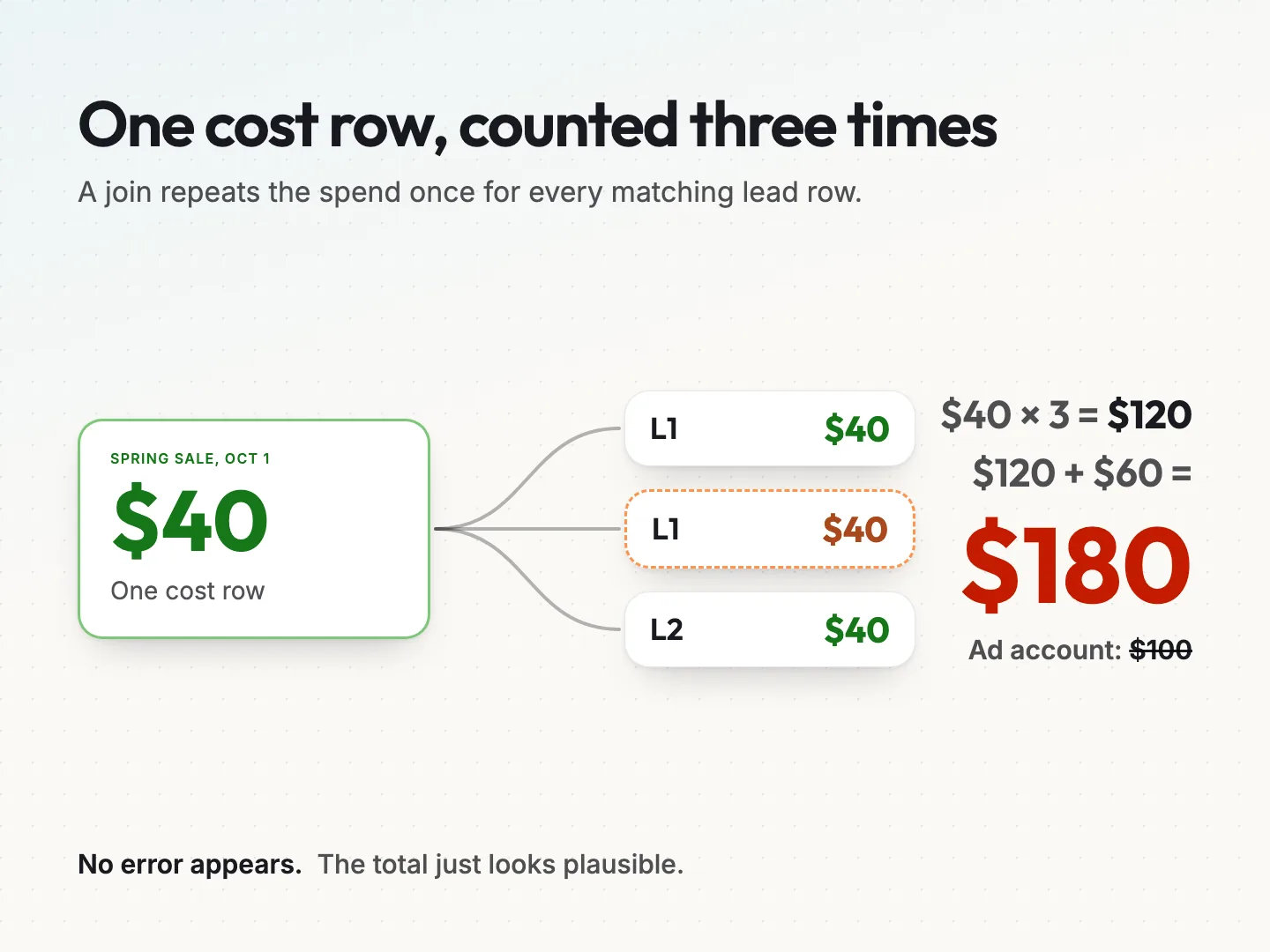
The report then divides $180 by five lead rows and shows a cost per lead of $36. Both numbers are wrong. The cost export says $100, the sheet says $180, and nobody touched the ad account.
## Matching on campaign and date still repeats the cost.
It’s tempting to think the join was wrong because the key was too loose. Matching on campaign and date sounds careful. The real problem is that the two tables had different grains when they met.
Three separate errors happened in that one join.
1. **Spend was repeated.** One campaign day of cost met three lead rows, so its spend was counted three times.
2. **A lead was double counted.** L1 submitted twice, so it counted as two leads instead of one.
3. **A row disappeared.** Brand on October 1 had $0 spend and no leads. An inner join keeps only rows that match on both sides, so that day vanished from the report.
The blank Brand row survived, but it now looks like a normal row with no spend. A reader skimming the total has no idea one day of data is missing.
None of this throws an error. The formulas run, the chart draws and the total looks plausible. That is why this kind of mismatch can sit in a monthly report for a long time.
If you only need to remember one rule, make it this one. Never join two tables until each one has exactly one row per key.
## Fix it by aggregating each table first, then joining.
The fix is to bring both tables to the same grain before they meet. In this example, that grain is one row per campaign per day.
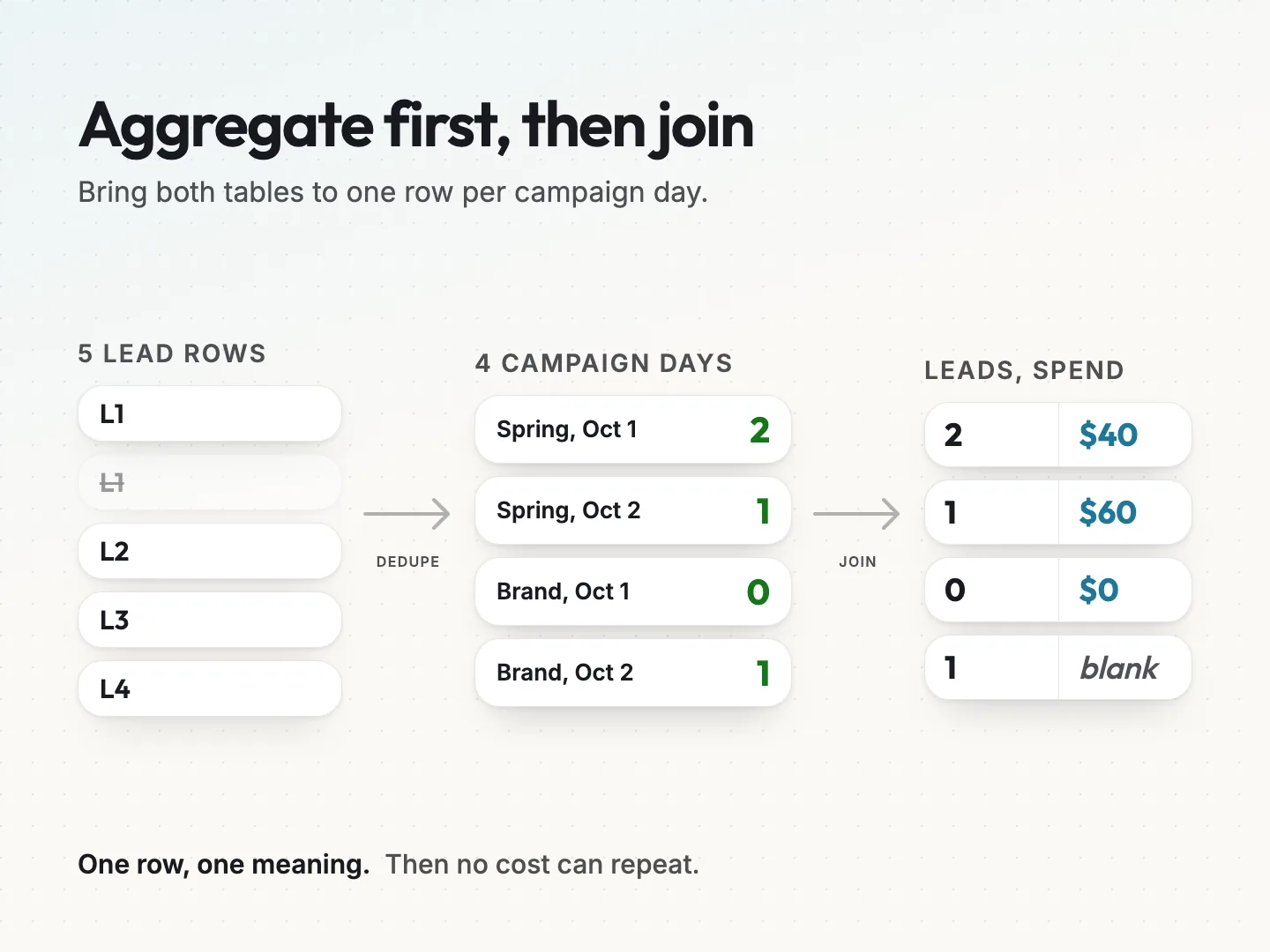
Work through these steps in order.
1. **Pick the grain for the report.** Decide what one row of the final table means. For cost per lead by campaign and day, it means one campaign on one day.
2. **Remove duplicate leads.** Use a stable ID such as the CRM contact ID or email address. L1 appears once after this step, so you have four leads.
3. **Count leads per campaign day.** Spring Sale on October 1 has 2 leads. Spring Sale on October 2 has 1. Brand on October 1 has 0. Brand on October 2 has 1.
4. **Make sure cost has one row per campaign day.** If an export contains two versions of the same day, keep one on purpose and note which one you kept.
5. **List every expected campaign day.** Two campaigns over two days gives you four rows. This list is your spine.
6. **Join cost and leads onto the spine.** Use a left join or a lookup from the spine, so no day can disappear.
7. **Check the totals against the sources.** Spend in your final table must equal spend in the cost export. Leads must equal distinct leads in the CRM.
Here is the corrected table.
| Campaign | Date | Spend | Distinct leads | Spend status |
| --- | --- | --- | --- | --- |
| Spring Sale | Oct 1 | $40 | 2 | Complete |
| Spring Sale | Oct 2 | $60 | 1 | Complete |
| Brand | Oct 1 | $0 | 0 | Complete |
| Brand | Oct 2 | blank | 1 | Missing |
Now the known spend adds up to $100 again, matching the cost export. You have 4 distinct leads, matching the CRM. Every row in the report has one clear meaning.
The same idea works in any tool. In a pivot table you summarise each tab first. In a database you aggregate each table in its own query before the join. In a dashboard tool you blend summary tables rather than raw exports.
## Report what is missing instead of hiding it.
The corrected table still has a hole. Brand spend for October 2 is blank, and the fix above didn’t fill it. That’s deliberate.
A blank and a zero mean different things. Zero means you know nothing was spent. Blank means you don’t know. Most spreadsheet sums treat blank as zero, so a missing day quietly lowers your total and makes cost per lead look better than it was.
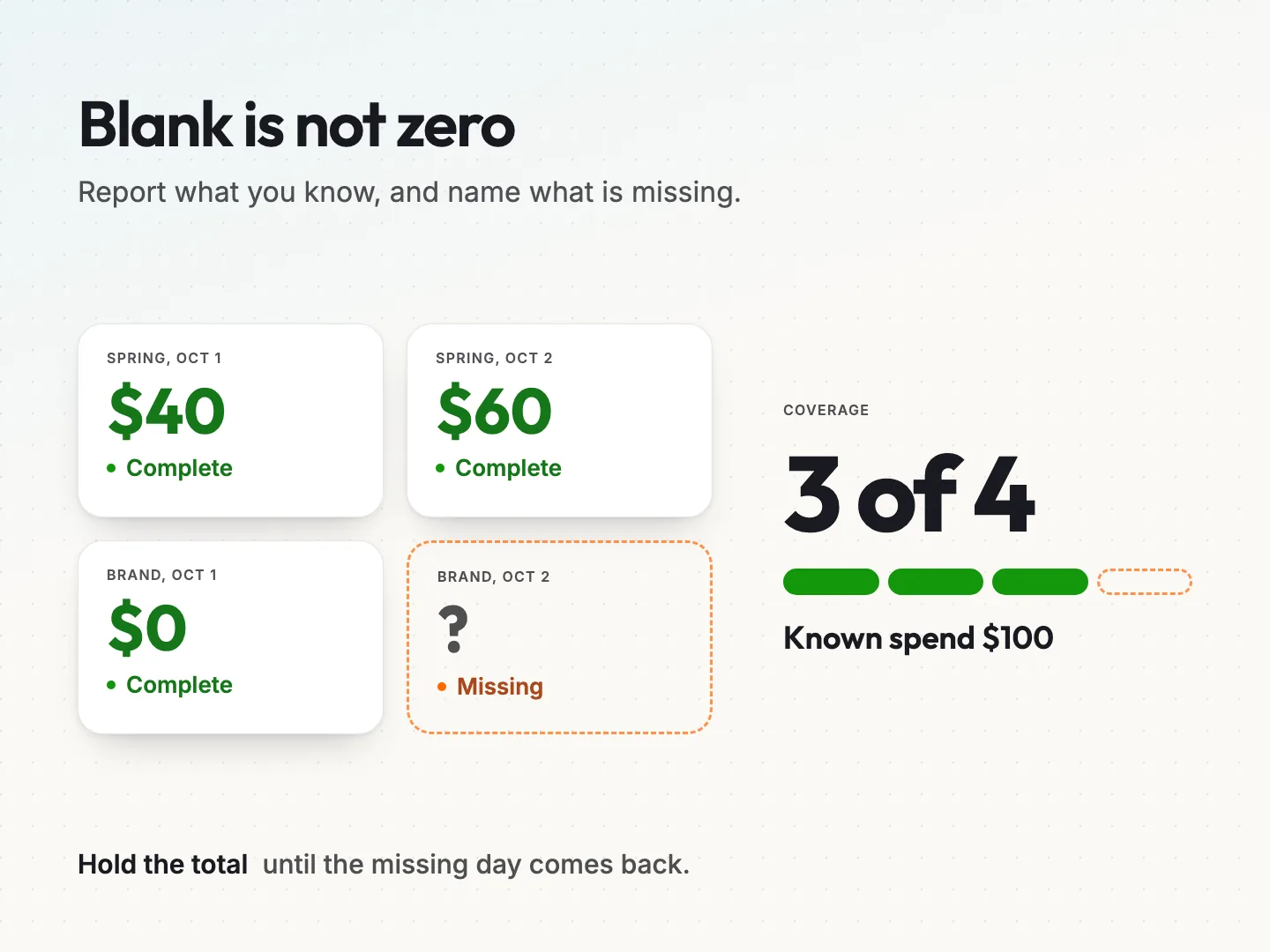
So the honest report says what it knows and what it doesn’t. For this example, it might read like this.
> Known spend is $100 across 3 of 4 campaign days. There were 4 distinct leads. Brand spend for October 2 is missing, so total spend and blended cost per lead are not reported yet.
You can still give a useful number for the rows that are complete. On the three complete campaign days, $100 of spend produced 3 distinct leads. That is about $33.33 per lead for those days only.
Notice what the report does not say. It doesn’t call $100 the total for the period. It doesn’t claim Spring Sale beat Brand, because one Brand day has no cost data. Two days and four leads are also far too few to judge any campaign. This example only shows the arithmetic.
Three habits keep missing data visible.
- **Keep a status column.** Mark each row complete or missing next to the number it describes.
- **Write a coverage line.** Put “3 of 4 campaign days complete” beside the total, not in a footnote.
- **Fix the source, then rerun.** Pull the missing export again rather than typing a guess into the sheet.
## Build the reconciliation sheet in Google Sheets or Excel.
You don’t need a script or a data warehouse to do this. A spreadsheet with three tabs will handle a small business’s monthly data.
Set it up like this.
- **Cost tab.** Paste the ad platform export with columns for campaign, date and spend. Leave blank cells blank. Don’t type zero into a missing day.
- **Leads tab.** Paste the CRM export with columns for lead ID, campaign and date.
- **Recon tab.** List every expected campaign and date, one row each. This is your spine.
Then add these formula columns to the Recon tab, starting in row 2. On the Recon tab, campaign sits in column A and date in column B. The formulas also assume campaign in column A, date in column B and the value in column C on the Cost tab. On the Leads tab they assume lead ID in column A, campaign in column B and date in column C.
| Recon column | What it shows | Formula for row 2 |
| --- | --- | --- |
| C Spend | Spend for that campaign day | `=SUMIFS(Cost!C:C,Cost!A:A,A2,Cost!B:B,B2)` |
| D Spend status | Whether spend exists | `=IF(COUNTIFS(Cost!A:A,A2,Cost!B:B,B2,Cost!C:C,”<>”)=0,”Missing”,”Complete”)` |
| E Lead rows | Raw submissions, duplicates included | `=COUNTIFS(Leads!B:B,A2,Leads!C:C,B2)` |
| F Distinct leads | Real people, duplicates removed | `=IFERROR(ROWS(UNIQUE(FILTER(Leads!A2:A1000,(Leads!B2:B1000=A2)*(Leads!C2:C1000=B2)))),0)` |
| G Cost per lead | Only where the row is complete | `=IF(OR(D2=”Missing”,F2=0),”Not reported”,C2/F2)` |
Copy those formulas down for every row in the spine. UNIQUE and FILTER work in Google Sheets and in recent versions of Excel. Older Excel versions need a pivot table instead.
Finally, add three check cells at the top of the Recon tab.
| Check | Formula | It should equal |
| --- | --- | --- |
| Spend matches source | `=SUM(C:C)` | `=SUM(Cost!C:C)` |
| Leads match source | `=SUM(F:F)` | The CRM’s distinct lead count |
| Coverage | `=COUNTIF(D:D,”Complete”)&” of “&COUNTA(A2:A1000)` | Every expected day |
If you rebuild the worked example in this sheet, spend shows $100, distinct leads show 4 and coverage shows 3 of 4. Lead rows show 5, which tells you a duplicate exists. If the spend check ever shows more than the cost tab, a join or lookup somewhere is repeating rows.
If you’d rather have an assistant help with the formulas and checks, our [marketing analytics AI skill](https://scayverstaging.1wp.site/resources/marketing-analytics-ai-skill/) is built for this kind of reporting work.
## A reconciliation checklist to run every month.
Once the sheet exists, the monthly work takes less time than you might expect. Run through this list before anyone makes a budget decision from the numbers.
1. **Match the date range in every export.** Use the same start date, end date and time zone.
2. **Confirm the lead definition.** Check that the CRM and the ad platform are counting the same action.
3. **Check campaign names.** A campaign called “spring-sale” in one tool and “Spring Sale” in another won’t match. A consistent [UTM naming convention for campaign links](https://scayverstaging.1wp.site/resources/search-content-decisions/track-campaign-links-cleanly/) prevents most of this.
4. **Remove duplicates and test leads.** Do this in the CRM export before counting.
5. **Aggregate before you join.** Bring each table to one row per campaign day.
6. **Keep blanks blank.** Mark each row complete or missing.
7. **Run the three checks.** Spend, leads and coverage should all match the sources.
8. **Write the coverage line.** Report what is missing alongside the total.
9. **Note what changed.** Record any fix you made so next month’s numbers compare fairly.
Keep the checklist next to the report. When someone asks why the dashboard and the ad account disagree, you’ll have the answer written down.
## A normal gap between tools, and when to dig in.
There is no official standard for how far your tools should disagree. You’ll find rules of thumb in agency and vendor guides, but they vary.
For example, one agency guide published in March 2026 treats a 10 to 15 percent variance between GA4, Google Ads and CRM data as normal. It flags gaps of 30 percent or more for investigation ([Krish TechnoLabs, March 12, 2026](https://www.krishtechnolabs.com/blog/ga4-vs-google-ads-crm-data-mismatch)). That is one firm’s guidance, not a benchmark, and your own normal depends on your setup and sales cycle.
A more useful test is whether the gap is stable. If your CRM has run a similar distance below your ad platform for months, that gap is probably measurement. If it suddenly widens, flips direction or doubles, something changed. Look for a new form, a broken tag, a renamed campaign or a new join in your report.
Compare one step at a time when you investigate. Check the ad platform against analytics first, then analytics against the CRM. A gap that appears in only one step tells you where to look.
And remember the worked example. If your dashboard shows more spend than your ad account, the tools aren’t the problem. Your join is.
## Final thoughts.
Mismatched numbers feel like a data problem, but they’re usually a definition problem. Each tool counts something different, and every report built on top of them makes its own choices. Once you know which choices were made, most gaps stop being mysterious.
The fix that matters most is small. Bring each table to one row per campaign day before you join them. Keep blanks apart from zeros. Write down what is missing next to the total. Those three habits stop a $100 spend from turning into $180 in front of your team.
If you’d like a dashboard that does this checking for you, our [analytics dashboards service](https://scayverstaging.1wp.site/services/optimization/analytics-dashboards/) builds reports on matched, documented data. Or [talk to a specialist](https://scayverstaging.1wp.site/talk-to-a-specialist/) about why your own numbers don’t line up, and bring one month of exports to the call.
Was this article helpful?
Same category
## The rest of Digital Marketing.
-
### [Podcast Episode Planning Before You Book a Guest.](https://scayverstaging.1wp.site/blog/podcast-episode-planning/)
Podcast episode planning starts before you book a guest. Set the listener decision, pick an angle and write six prompts with a brief you can copy.
20 November 2026.
-
### [Lead Magnet Delivery Email and Follow-Up Sequence.](https://scayverstaging.1wp.site/blog/lead-magnet-delivery-email/)
Write a lead magnet delivery email that gets the file used, then add five optional follow-ups with clear rules for who gets each one.
17 November 2026.
-
### [Social Media Approval Workflow for Small Teams.](https://scayverstaging.1wp.site/blog/social-media-approval-workflow/)
Build a social media approval workflow that signs off copy, image, account and time together, with a recovery rule for failed scheduled posts.
16 November 2026.
-
### [How to Launch an Online Community: Your First 30 Days.](https://scayverstaging.1wp.site/blog/launch-an-online-community/)
Learn how to launch an online community with one first contribution, a staff reply budget, a welcome post and a 30-day prompt queue.
11 November 2026.
-
### [How to Answer on Reddit and Quora Without Self-Promotion.](https://scayverstaging.1wp.site/blog/reddit-quora-marketing/)
Reddit marketing for small business works when you answer the real question, follow the rules, disclose your affiliation and pass the link test.
10 November 2026.
-
### [UTM Naming Convention: Track Campaign Links Cleanly.](https://scayverstaging.1wp.site/blog/utm-naming-convention/)
Set a UTM naming convention your team can follow. Use seven rules, a spreadsheet link builder and a route check so campaign counts stay comparable.
6 November 2026.
-
### [Weekly Social Media Content Plan Your Team Can Finish.](https://scayverstaging.1wp.site/blog/weekly-social-media-plan/)
Build a weekly social media content plan from the hours your team truly has. Size the post count, write full copy and use the free plan sheet.
5 November 2026.
-
### [Trade Show Demo Script Your Booth Team Can Deliver.](https://scayverstaging.1wp.site/blog/trade-show-demo/)
Get a trade show demo script with full spoken words, seven visitor branches, fallbacks and follow-ups that never promise a meeting nobody booked.
4 November 2026.
-
### [How to Run a Small Marketing Experiment, Step by Step.](https://scayverstaging.1wp.site/blog/small-marketing-experiment/)
Run a small marketing experiment that answers a real decision. Set a budget cap, an end date and a stop rule, then fill in the free worksheet.
2 November 2026.
-
### [Sponsorship Report: Check Delivery Against the Deal.](https://scayverstaging.1wp.site/blog/sponsorship-report/)
A sponsorship report should prove each sponsor benefit was delivered. Use a six-line ledger to match evidence to the deal and fix shortfalls.
21 October 2026.
-
### [Co-Marketing Partnership Brief: Deliverables and Rights.](https://scayverstaging.1wp.site/blog/co-marketing-partnership/)
Plan a co-marketing partnership with a brief that names each deliverable, who accepts it, the rights for each use and who owns the leads.
19 October 2026.
-
### [Cancellation Flow: Match the Response to the Reason.](https://scayverstaging.1wp.site/blog/cancellation-flow/)
Build a cancellation flow that matches each churn reason to a remedy you can deliver. See six worked cases and copy the ledger template.
15 October 2026.
-
### [Creating Evergreen Content That Earns Year-Round.](https://scayverstaging.1wp.site/blog/creating-evergreen-content/)
Learn how to create evergreen content that keeps bringing leads and sales. Pick lasting topics, build each page to convert and refresh it on a schedule.
11 August 2025.
-
### [Niche Affiliate Marketing: How to Choose Your Niche.](https://scayverstaging.1wp.site/blog/niche-affiliate-marketing/)
Niche affiliate marketing starts with the right niche. Score yours on five tests, vet the programs and disclose links properly before you build.
30 July 2025.
-
### [How Email Segmentation Improves Engagement.](https://scayverstaging.1wp.site/blog/email-segmentation/)
Email segmentation sends each group of subscribers the message that fits. Build your first three segments, set them up in your tool and measure clicks.
3 June 2025.
-
### [How to Improve Email Open Rates and Reach the Inbox.](https://scayverstaging.1wp.site/blog/improve-email-open-rates/)
Improve email open rates the honest way. Fix SPF, DKIM and DMARC, meet Gmail and Yahoo sender rules, and write subject lines people trust.
3 June 2025.
-
### [Personal Branding on Social Media for Business Owners.](https://scayverstaging.1wp.site/blog/personal-branding-on-social-media/)
Personal branding on social media for business owners. Set up a profile that backs your company brand, post on a steady rhythm and track the inquiries.
3 June 2024.
-
### [How to Write Blog Articles That Bring In Customers.](https://scayverstaging.1wp.site/blog/articles-that-bring-in-customers/)
Learn how to write blog articles that bring in customers. Seven steps from buyer question to inquiry, with safe AI use and simple tracking. Start today.
3 June 2024.
-
### [Integrated Marketing for Small Business: A Simple Plan.](https://scayverstaging.1wp.site/blog/integrated-marketing-for-small-business/)
Learn integrated marketing for small business. Give each channel one job, connect your CRM and email, and measure the whole path from click to reply.
3 June 2024.
-
### [Easy Affiliate Marketing for Automated Income.](https://scayverstaging.1wp.site/blog/easy-affiliate-marketing-for-automated-income/)
Covers picking a niche, judging which affiliate products actually pay, and building the site and product setup behind more automated affiliate income.
3 June 2024.
-
### [100 Actionable SEO Tips for Driving More Website Traffic.](https://scayverstaging.1wp.site/blog/100-actionable-seo-tips-for-driving-more-website-traffic/)
One hundred short, numbered SEO tips covering domain choice, keyword research, content quality, images, competitors, and making sure your site can be crawled.
3 June 2024.
-
### [Copywriting Basics and Terminology.](https://scayverstaging.1wp.site/blog/copywriting-basics-and-terminology/)
The vocabulary and the fundamentals: what copywriting is for, how to define a target market, and how to sharpen and edit your own copy.
2 June 2024.
Keep reading
## More articles.
The rest of the blog, newest first.
- [24 November 2026 Contact Form Testing Checklist: 11 Checks Before Launch.](https://scayverstaging.1wp.site/blog/contact-form-testing-checklist/)
- [20 November 2026 Podcast Episode Planning Before You Book a Guest.](https://scayverstaging.1wp.site/blog/podcast-episode-planning/)
- [19 November 2026 Loyalty Program Rules Customers Can Actually Follow.](https://scayverstaging.1wp.site/blog/loyalty-program-rules/)
- [18 November 2026 Sales Pipeline Stages: Define When a Deal Moves.](https://scayverstaging.1wp.site/blog/sales-pipeline-stages/)
- [17 November 2026 Lead Magnet Delivery Email and Follow-Up Sequence.](https://scayverstaging.1wp.site/blog/lead-magnet-delivery-email/)
- [16 November 2026 Social Media Approval Workflow for Small Teams.](https://scayverstaging.1wp.site/blog/social-media-approval-workflow/)
- [13 November 2026 TAM SAM SOM for Small Businesses: Size a Real Market.](https://scayverstaging.1wp.site/blog/tam-sam-som/)
- [12 November 2026 How to Brief a Website Editor on a Page Change.](https://scayverstaging.1wp.site/blog/brief-a-website-editor/)
- [11 November 2026 How to Launch an Online Community: Your First 30 Days.](https://scayverstaging.1wp.site/blog/launch-an-online-community/)
- [10 November 2026 How to Answer on Reddit and Quora Without Self-Promotion.](https://scayverstaging.1wp.site/blog/reddit-quora-marketing/)
- [9 November 2026 Marketing Campaign Brief Template for Small Teams.](https://scayverstaging.1wp.site/blog/campaign-brief-template/)
- [6 November 2026 UTM Naming Convention: Track Campaign Links Cleanly.](https://scayverstaging.1wp.site/blog/utm-naming-convention/)
- [5 November 2026 Weekly Social Media Content Plan Your Team Can Finish.](https://scayverstaging.1wp.site/blog/weekly-social-media-plan/)
- [4 November 2026 Trade Show Demo Script Your Booth Team Can Deliver.](https://scayverstaging.1wp.site/blog/trade-show-demo/)
- [3 November 2026 Customer Segmentation That Changes What You Do Next.](https://scayverstaging.1wp.site/blog/customer-segmentation/)
- [2 November 2026 How to Run a Small Marketing Experiment, Step by Step.](https://scayverstaging.1wp.site/blog/small-marketing-experiment/)
- [30 October 2026 How to Analyze Customer Feedback From Mixed Sources.](https://scayverstaging.1wp.site/blog/customer-feedback-analysis/)
- [29 October 2026 Automation Permissions: What to Approve Before You Connect.](https://scayverstaging.1wp.site/blog/automation-permissions/)
- [28 October 2026 Choose an Automation Platform: Who Fixes It When It Fails?](https://scayverstaging.1wp.site/blog/choose-an-automation-platform/)
- [27 October 2026 What Should a Web Form Change in Your CRM?](https://scayverstaging.1wp.site/blog/web-form-crm-update-rules/)
- [26 October 2026 Integration Requirements to Write Before Connecting Apps.](https://scayverstaging.1wp.site/blog/integration-requirements/)
- [23 October 2026 WordPress Plugin or Custom Build? Define the Process First.](https://scayverstaging.1wp.site/blog/plugin-or-custom-development/)
- [22 October 2026 AI Marketing Workflow vs Manual Work: A Fair Test.](https://scayverstaging.1wp.site/blog/ai-marketing-workflow-vs-manual/)
- [21 October 2026 Sponsorship Report: Check Delivery Against the Deal.](https://scayverstaging.1wp.site/blog/sponsorship-report/)
- [20 October 2026 How to Prioritize Marketing When Your Team Is Small.](https://scayverstaging.1wp.site/blog/prioritize-marketing-small-team/)
- [19 October 2026 Co-Marketing Partnership Brief: Deliverables and Rights.](https://scayverstaging.1wp.site/blog/co-marketing-partnership/)
- [16 October 2026 How to Do a Competitor Analysis You Can Keep Current.](https://scayverstaging.1wp.site/blog/competitor-analysis/)
- [15 October 2026 Cancellation Flow: Match the Response to the Reason.](https://scayverstaging.1wp.site/blog/cancellation-flow/)
- [6 October 2026 Why We Rebuilt the Scayver Graphix Website.](https://scayverstaging.1wp.site/blog/scayver-graphix-website-rebuild/)
- [3 October 2026 Five AI System Design Mistakes to Avoid.](https://scayverstaging.1wp.site/blog/ai-system-design-mistakes/)
- [3 October 2026 100 AI Terms Explained in Plain English.](https://scayverstaging.1wp.site/blog/ai-terms-explained/)
- [11 August 2025 Website Design That Increases Sales: 6 Page Fixes.](https://scayverstaging.1wp.site/blog/website-design-that-increases-sales/)
- [3 June 2025 How Email Segmentation Improves Engagement.](https://scayverstaging.1wp.site/blog/email-segmentation/)
- [3 June 2025 Best CRM for Customer Retention: 5 Tools Compared.](https://scayverstaging.1wp.site/blog/best-crm-for-customer-retention/)
- [3 June 2025 How to Improve Email Open Rates and Reach the Inbox.](https://scayverstaging.1wp.site/blog/improve-email-open-rates/)
- [16 August 2024 Professional Logo Design Process: Steps, Costs, Files.](https://scayverstaging.1wp.site/blog/professional-logo-design-process/)
- [3 June 2024 Personal Branding on Social Media for Business Owners.](https://scayverstaging.1wp.site/blog/personal-branding-on-social-media/)
- [3 June 2024 How to Build a Brand for a Small Business in 8 Steps.](https://scayverstaging.1wp.site/blog/how-to-build-a-brand/)
- [3 June 2024 How to Write Blog Articles That Bring In Customers.](https://scayverstaging.1wp.site/blog/articles-that-bring-in-customers/)
- [3 June 2024 Integrated Marketing for Small Business: A Simple Plan.](https://scayverstaging.1wp.site/blog/integrated-marketing-for-small-business/)
- [3 June 2024 100 Actionable SEO Tips for Driving More Website Traffic.](https://scayverstaging.1wp.site/blog/100-actionable-seo-tips-for-driving-more-website-traffic/)
- [2 June 2024 Copywriting Basics and Terminology.](https://scayverstaging.1wp.site/blog/copywriting-basics-and-terminology/)
FAQ
## Questions about mismatched marketing numbers
The things people ask on the first call. If yours is not here, ask us directly.
[Ask us directly](https://scayverstaging.1wp.site/talk-to-a-specialist/?form=book)
**Which number should I trust, the ad platform, analytics or my CRM?**
Trust each tool for the question it was built to answer. Use the ad account for what you spent, because that is what you are billed. Use the CRM for how many real leads and customers you got. Use analytics for how visitors moved through your site. Then reconcile them in one sheet with clear definitions.
**Can I join my spend and leads on campaign name alone?**
Only if both tables are already summed to one row per campaign for the whole period. A raw cost export has one row per campaign per day, so a name-only join matches every day’s cost to every lead from that campaign. Spend then repeats across days. Aggregate both sides to the same grain first.
**My dashboard tool blends data sources. Can it still repeat spend?**
Yes. A blend is a join, so the same rule applies. If one source has one row per campaign per day and the other has one row per lead, the cost repeats for each lead. Build a summary table for each source at the same grain, then blend those summaries rather than the raw exports.
**Why did last month's spend change after I already reported it?**
Recent days in an ad account can change after you export them, for example when late data or billing adjustments arrive. Re-export the last few days before you close the month, and note the date you pulled each file. If a number changes later, record the new version instead of overwriting the old one silently.
**How often should a small business reconcile its marketing numbers?**
Once a month is enough for most small businesses, ideally before any budget decision. Check weekly for the first few weeks after you launch a new campaign, form or tracking setup, because that is when broken tags and mismatched names usually appear. Keep the same sheet so each month compares fairly.