# UTM Naming Convention: Track Campaign Links Cleanly.
> Set a UTM naming convention your team can follow. Use seven rules, a spreadsheet link builder and a route check so campaign counts stay comparable.
Source: https://scayverstaging.1wp.site/blog/utm-naming-convention/
A practical guide for small business owners on naming UTM parameters, building campaign links from one sheet and checking each link before it goes out.
Start reading [All articles](https://scayverstaging.1wp.site/blog/)
**Written by**
Scayver
**Published**
6 November 2026
**Reading time**
16 min
A UTM naming convention is a short written rulebook for the tags you add to campaign links, so every click from one campaign lands in one row of your report. Use lowercase, hyphens and a fixed list of approved values for source, medium, campaign and placement. Build every link from one sheet, and test the real route before it goes out.
Without that rulebook, small spelling choices pile up. One person types Facebook, another types facebook, and a third types fb. Google Analytics treats each spelling as a different source, so a single campaign spreads across several rows and nobody trusts the total. This guide gives you the rules, a spreadsheet link builder you can copy and a quick check that catches broken links before your audience does.
## A UTM naming convention keeps each campaign in one row.
UTM parameters are the short tags added to the end of a link after a question mark. They tell your analytics tool where a visitor came from, such as a newsletter, a social post or a paid ad. The part after the question mark is called the query string.
A naming convention decides exactly how those tags are spelled. It covers the words you use, the order of parts inside a value, the separator between words and who approves a new value. The point is simple. If two people tag the same campaign, they should produce the same link.
Google is clear about why this matters. Its help page on [collecting campaign data with custom URLs](https://support.google.com/analytics/answer/10917952) states that parameter values are case sensitive, and gives the example that utm_source=google is different from utm_source=Google. That page showed no publish date when we read it on 13 October 2026, so check it for changes.
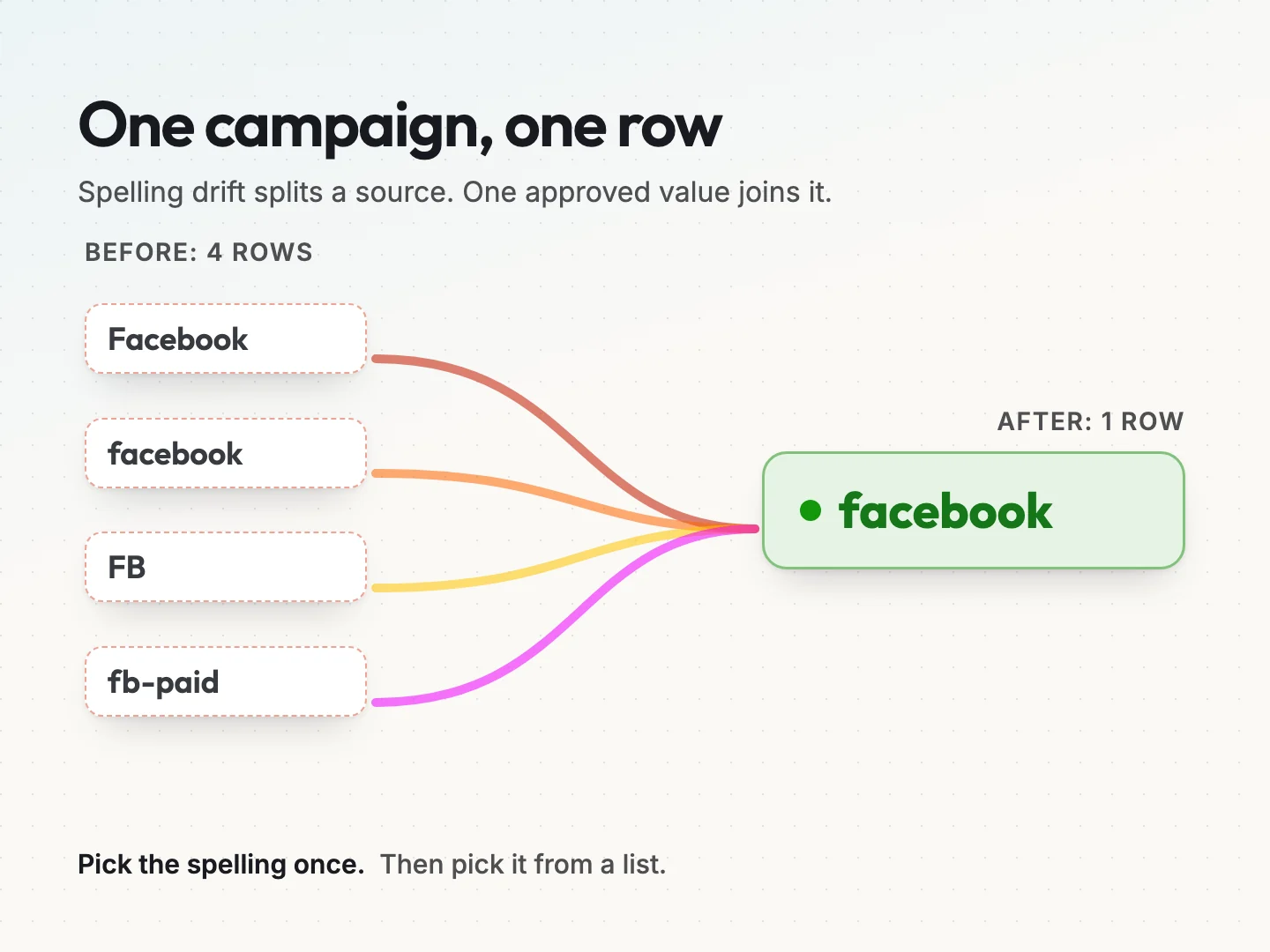
Here is how that plays out. Imagine a hypothetical bakery that promotes a spring offer on social media. Over three weeks, four people post links tagged Facebook, facebook, FB and fb-paid. The report now shows 4 rows for one source. Each row looks small, so the campaign looks weaker than it was. With one approved value, you get 1 row and a number you can act on.
A convention also saves time. Without one, someone has to clean the data by hand every month, guessing which rows belong together. With one, the cleanup step mostly disappears, because the data arrives already grouped.
## The five UTM parameters you will actually use.
Google lists nine campaign parameters on its URL builder page. Most small businesses need five of them every week, plus one optional ID. Google says utm_source, utm_medium and utm_campaign should always be used. When a value is missing, reports show it as “(not set)”.
- **utm_source** names who sent the click. Examples are newsletter, facebook, google or a partner’s name.
- **utm_medium** names the type of channel. Examples are email, social, cpc or referral.
- **utm_campaign** names the push you are running. An example is 2026-04-spring-offer.
- **utm_content** names the exact spot or version inside that push. An example is header-button.
- **utm_term** names a paid keyword. Most businesses only use it for search ads.
- **utm_id** is an optional campaign ID. It helps when you later import cost data that needs to join on an ID.
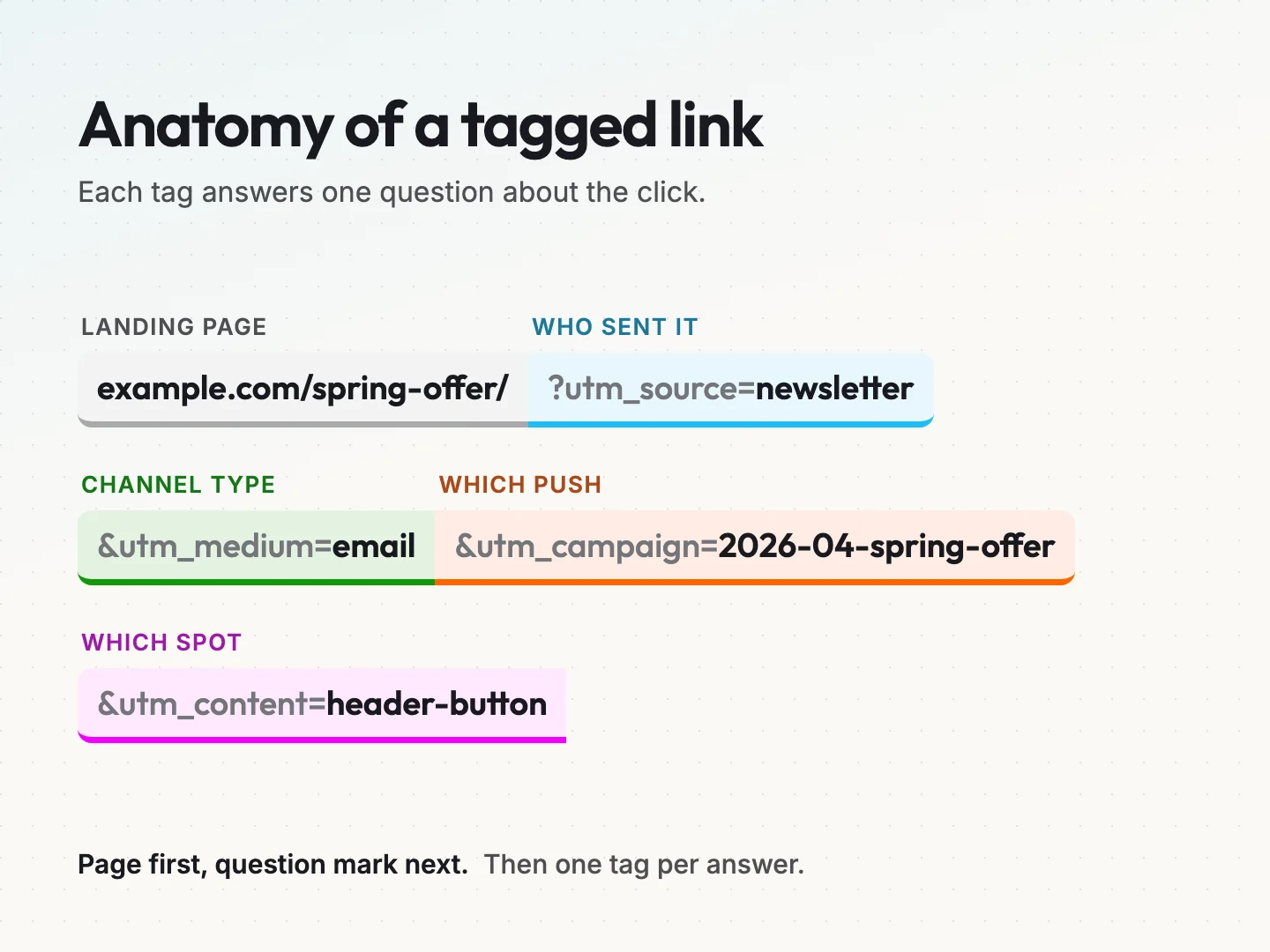
Put together, a full link looks like this example for a hypothetical store: example.com/spring-offer/?utm_source=newsletter&utm_medium=email&utm_campaign=2026-04-spring-offer&utm_content=header-button. The page comes first, then a question mark, then each tag joined by an ampersand.
The other parameters on Google’s list are newer. Google notes that two of them, utm_creative_format and utm_marketing_tactic, are not currently reported in Google Analytics properties. You can skip them until you have a clear use.
## Seven naming rules that keep campaign data clean.
These seven rules cover most of what goes wrong. Write them at the top of your link sheet so everyone sees them before they build a link.
### 1. Use lowercase for every value.
Values are case sensitive, so Spring-Offer and spring-offer become two campaigns. Lowercase everything, with no exceptions for brand names. A source of linkedin is fine even though the brand spells it with capitals.
There is one detail that confuses people. Google’s [default channel group](https://support.google.com/analytics/answer/9756891) page says channel definitions are not case sensitive. So Email and email may land in the same channel. Your source, medium and campaign rows will still split, and those are the rows you compare.
### 2. Separate words with hyphens.
Pick one separator and never mix. Hyphens read well and survive copying. Spaces are the worst choice, because they turn into %20 in a link and become hard to read. If your team already uses underscores everywhere, keep them. Consistency matters more than the choice.
### 3. Pick values from a set list.
Nobody types a new source or medium from memory. They pick it from an approved list in the sheet. If a value is missing, they ask the list owner to add it. This one habit removes most spelling drift.
### 4. Give campaign names a fixed pattern.
Use the same order every time, for example year, month and a short name. A value like 2026-04-spring-offer sorts by date and still reads as plain English. Keep it short enough to scan in a report.
### 5. Use utm_content for the placement.
When one email has a header button and a footer link, they share source, medium and campaign. Only utm_content tells them apart. Name the placement, such as header-button, footer-link or bio-link, so you can see which spot earned the click.
### 6. Never tag links on your own site.
UTM tags are for links that bring people in from outside, such as emails, ads, social posts and partner pages. If you tag a link from your homepage to your pricing page, the visit can be credited to that made-up campaign. The real source of that visitor gets lost.
### 7. Give the rulebook one owner.
One person approves new values and keeps the lists tidy. That person does not need to build every link. They make sure the lists stay short and the rules stay written down.
## Match utm_medium to the channels GA4 already knows.
GA4 sorts traffic into channels, such as Email or Paid Social, using its default channel group. It decides mostly from the medium and source you send. If your medium matches one of its rules, your campaign lands in the right channel automatically. If nothing matches, GA4 uses a channel called Unassigned.
The table below is based on Google’s default channel group page, read on 13 October 2026. Google can change these rules, so check the page before you set your list.
| Medium value to use | Channel it fits | Condition from Google’s rules |
| --- | --- | --- |
| email | Email | Source or medium is email, e-mail, e_mail or e mail |
| social | Organic Social | Medium is social, social-network, social-media, sm or similar, or the source is a known social site |
| paid-social | Paid Social | Source is a known social site and medium starts with paid, contains cp, or is ppc or retargeting |
| cpc | Paid Search | Source is a known search site and the same paid medium pattern matches |
| referral | Referral | Medium is referral, app or link |
| affiliate | Affiliates | Medium is affiliate |
| display | Display | Medium is display, banner, expandable, interstitial or cpm |
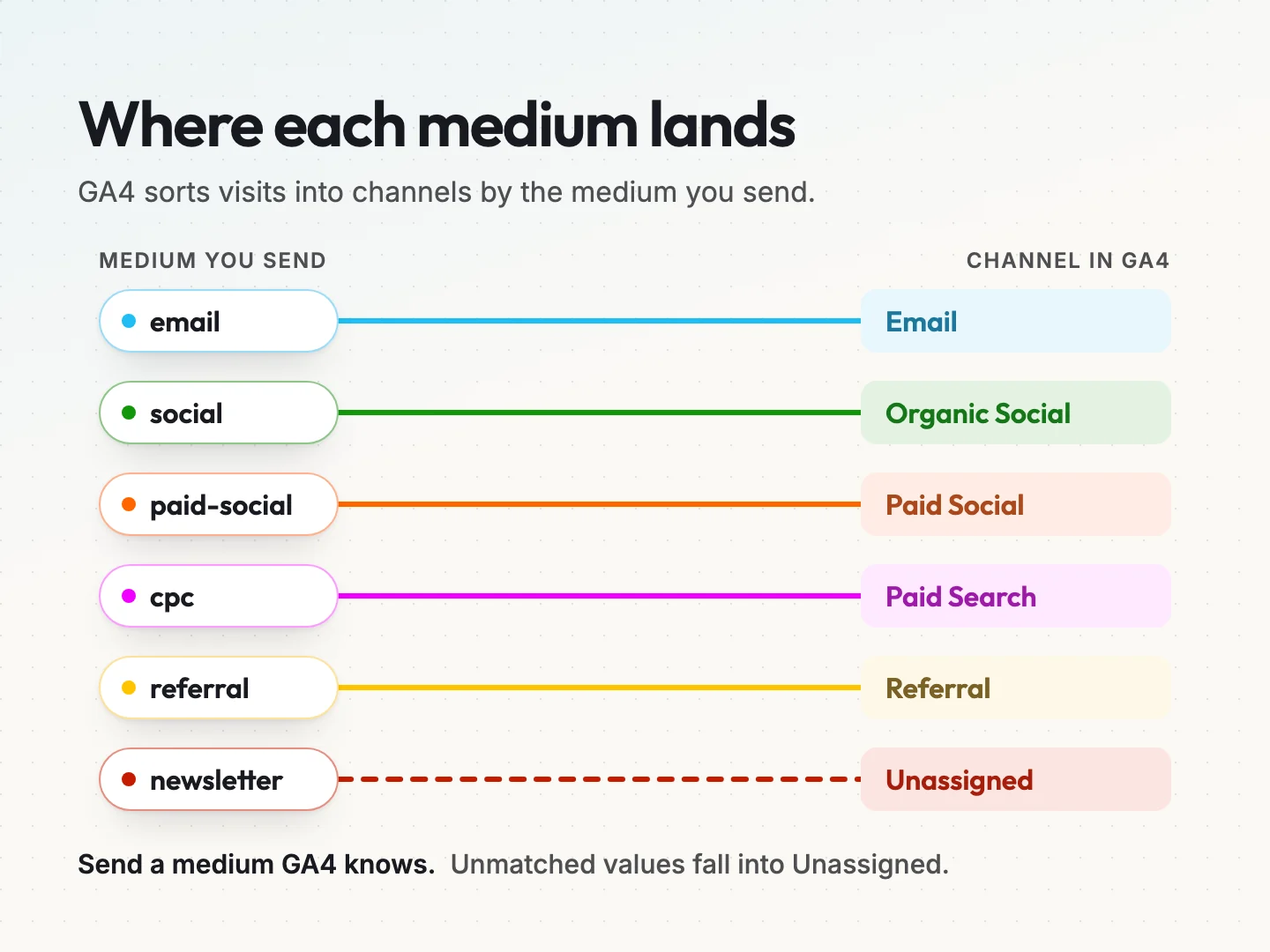
Notice what happens to a value like newsletter used as a medium. It matches none of these rules. Unless the source happens to be an email variant, the visit lands in Unassigned and your email report looks thin. The fix is to put newsletter in the source and email in the medium.
The paid rows need two parts to match. A medium of paid-social only counts as Paid Social when the source is a social site GA4 recognises, such as facebook or instagram. So the source list and the medium list work together. Treat them as a pair.
If you want help setting this up inside your property, see our [Google Analytics integration](https://scayverstaging.1wp.site/integrations/google-analytics/) page.
## Write your allowed values down before anyone builds a link.
Your allowed values are the heart of the convention. Keep each list short. A small business rarely needs more than ten sources and eight mediums. Here is a starting set for a hypothetical local service business. Change it to fit your own channels.
| Parameter | Allowed values (starter set) |
| --- | --- |
| utm_source | newsletter, facebook, instagram, linkedin, google, partner-name, print |
| utm_medium | email, social, paid-social, cpc, referral, display, qr |
| utm_campaign | year-month-short-name, such as 2026-04-spring-offer |
| utm_content | header-button, footer-link, bio-link, story-link, flyer-front |
The qr medium does not match a GA4 channel rule. That is fine when you choose it on purpose and report on it yourself. Write that choice down beside the list, so nobody “fixes” it later.
Add a short note under each list. Say what each value means and when to use it. For example, partner-name is replaced with the partner’s actual name in lowercase, and google is only for paid search, never for organic search, because Google adds organic data on its own.
Before you set campaign names, agree on what a successful visit means. A click count alone tells you little. Our guide on how to [choose business conversion goals](https://scayverstaging.1wp.site/resources/search-content-decisions/choose-business-conversion-goals/) walks through that step.
## Build every link from one sheet.
You do not need a paid tool to build clean links. A shared spreadsheet with drop-down lists and one formula does the job for most small teams. This is the link builder you can copy today.
Set up the sheet with the seven columns below.
| Column | What goes in it | How it is filled |
| --- | --- | --- |
| A. Landing page | The full page address, without tags | Typed, then checked |
| B. Source | One value from the source list | Drop-down |
| C. Medium | One value from the medium list | Drop-down |
| D. Campaign | Year, month and short name | Typed, following the pattern |
| E. Content | One placement value | Drop-down |
| F. Final link | The built link | Formula |
| G. Built by and date | Name and date | Typed |
In most spreadsheet apps, a formula in column F can join the parts for you. One version is =A2&”?utm_source=”&B2&”&utm_medium=”&C2&”&utm_campaign=”&LOWER(D2)&”&utm_content=”&E2. The LOWER part forces the campaign name into lowercase, which catches the most common slip.
Use the data validation feature in your spreadsheet to turn columns B, C and E into drop-downs. Point each one at its allowed list on a second tab. Now nobody can type FB by accident, because it is not on the list.
A few small rules make the sheet safer.
1. **Check the landing page first.** If the page address already contains a question mark, the formula needs an ampersand instead. Flag those rows by hand.
2. **Lock the formula column.** Protect column F so people copy links from it but never type over it.
3. **Never edit a sent link.** If something changes, add a new row. The old row is your record of what went out.
4. **Keep one tab per year.** Old campaigns stay readable, and the current tab stays short.
Google also offers its own campaign URL builder, linked from the same help page. It works well for a single link. The sheet is better for a team, because it keeps the rules and the history in one place.
## Check the real route before a link goes out.
A perfectly named link can still fail. The tags only count if they reach the final page in the visitor’s browser. Many links take a longer route than you think, through a short link, a QR code or a redirect.
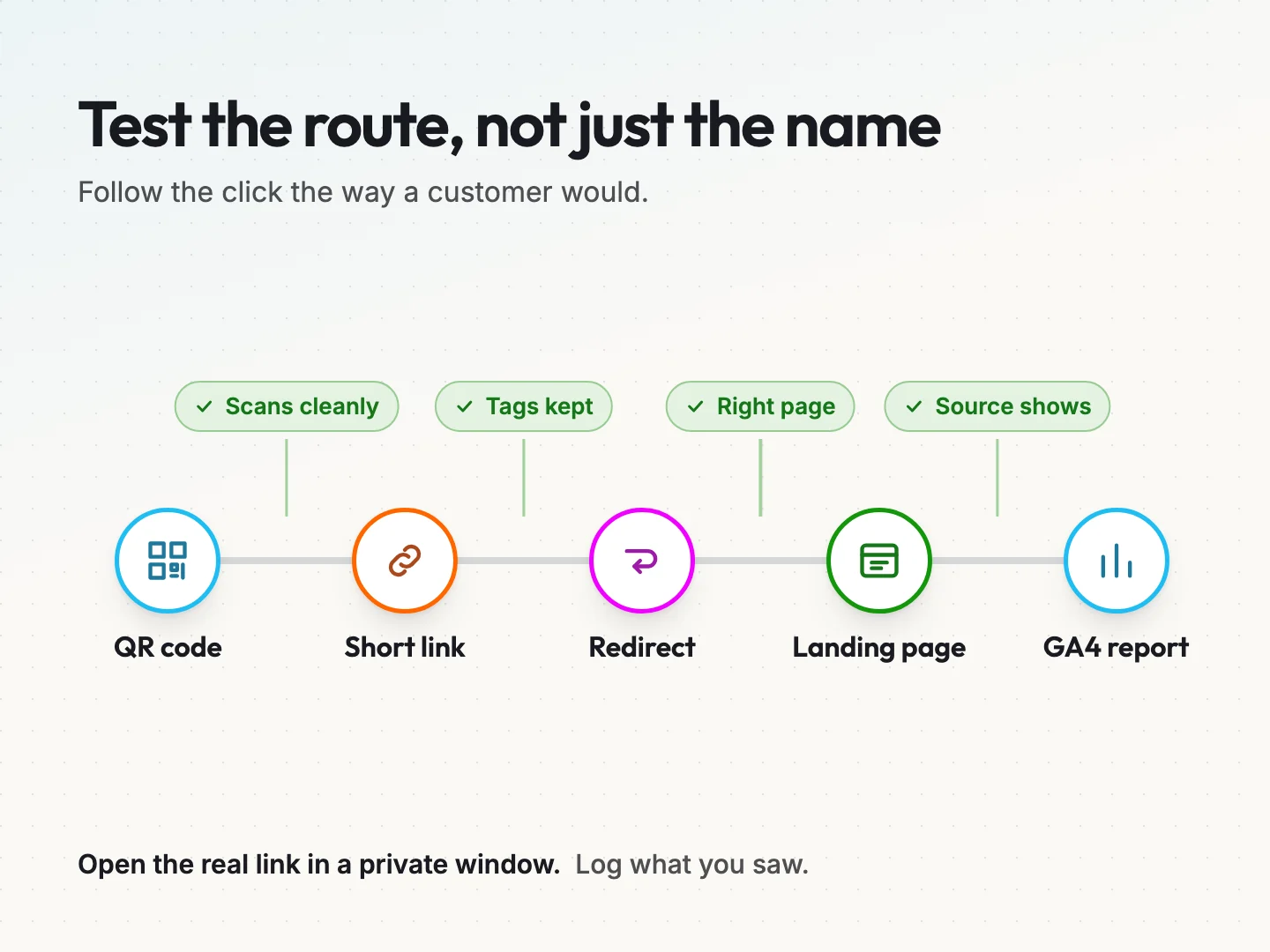
Some redirects drop the query string on the way. When that happens, the visit arrives with no tags, and GA4 credits it to direct traffic or another source.
Uplifter’s [guide to UTM naming conventions](https://uplifter.ai/article/utm-naming-conventions) warns that linking to pages which redirect can strip UTM parameters. It showed a date of 8 May with no year when we read it on 13 October 2026. The safest habit is to test every route rather than assume.
Run this check for each new link, before it is printed, scheduled or sent.
1. **Open the final link in a private browser window.** Use the exact link people will click, including any short link or QR code.
2. **Read the address bar when the page loads.** The tags should still be there after the question mark.
3. **Look for a hash sign before the question mark.** Anything after a # is a fragment, and analytics tools generally do not read tags from it. The question mark must come first.
4. **Confirm the page is the one you meant.** A link to a page that has moved may land on a different page, or on an error page.
5. **Check GA4 in real time.** Open the realtime report and confirm your source and medium appear while you browse.
6. **Write the result in the sheet.** Add two columns, Final URL seen and Tags kept, and fill them in.
If a check fails, do not send the link. Find the step that dropped the tags. Often the fix is to point the short link or QR code straight at the final page address, so there is no redirect in the middle. If a redirect is unavoidable, ask whoever manages your site to make sure it passes the query string along. Then run the check again.
Those two extra columns turn your builder into a link log. Months later, when a number looks odd, you can see exactly what was sent and whether it worked on the day.
Test the route again if anything changes after launch. A page move, a new short link or a site migration can break links that worked last month. If you would rather have someone watch this for you, see our [analytics reporting service](https://scayverstaging.1wp.site/services/maintenance/analytics-reporting/).
## Compare counts only when they measure the same thing.
Clean names make comparison possible. They do not make every comparison fair. Before you say one link beat another, check four things.
- **Same unit.** Sessions, users and key events are different counts. Compare sessions with sessions, never sessions with clicks reported by an email tool.
- **Same period.** A link that ran for two weeks and one that ran for two days cannot be compared on totals. Use the same dates, or compare per day.
- **Same page.** Two placements that send people to different pages will convert differently for reasons that have nothing to do with the placement.
- **Same audience size.** A footer link seen by everyone and a button seen only by recent buyers are reaching different people.
Here is a hypothetical example. A newsletter header button shows 120 sessions and a footer link shows 30. If both went to the same page in the same send, over the same week, the comparison is fair and the header won. If the footer pointed to a different page, you are comparing pages, not placements.
Your email platform and GA4 will rarely agree on click counts. One counts clicks, and the other counts sessions that loaded the page and accepted analytics. Read the two counts side by side using each tool’s definition.
## Mistakes that split or erase your campaign data.
Most UTM problems come from a short list of habits. Check your own links against these.
- **Tagging organic search links.** Google sends organic data on its own. Adding tags to your website address in a Google Business Profile is a choice some teams make on purpose, but write it down if you do.
- **Mixing source and medium.** A source of email and a medium of newsletter reverses the meaning. The source is who sent it, and the medium is the type of channel.
- **Changing a campaign name mid-flight.** Renaming spring-offer to spring-sale halfway through splits the campaign into two rows. Finish with the name you started with.
- **Using spaces or capitals.** Spaces turn into %20 and capitals create new rows. Both are covered by rules 1 and 2.
- **Tagging internal links.** This can overwrite the real source of a visit, as rule 6 explains.
- **Building links from memory.** Every link from outside the sheet is a link nobody checked.
One more trap catches teams that use ad platforms. Google Ads can tag links automatically, and some social schedulers add their own tags. Check what each tool adds before you add yours, so a link does not end up with two sets of tags that disagree.
## Clean up old UTM data without rewriting history.
If you have years of messy tags, do not try to fix them all. You cannot change data that GA4 has already collected. What you can do is group it sensibly and start clean from a set date.
1. **Pick a cutoff date.** From that date on, every link comes from the sheet. Note the date in your rulebook.
2. **List the old values.** Export the source, medium and campaign values from the last twelve months.
3. **Map old spellings to new values.** Write a simple table, such as Facebook, FB and fb-paid all mapping to facebook.
4. **Use that map in your reports.** Many reporting tools let you group values with a rule or a lookup table. Apply the map there, so the raw data stays untouched.
5. **Retire the old values.** Remove them from any templates, saved links and scheduled posts, so they stop coming back.
This approach keeps your history honest. The raw rows still show what was sent, and your reports show the grouped view you need for decisions.
Keep the map next to your rulebook and review it once a quarter. When a new stray value appears, add it to the map and trace where it came from. Usually it is an old template, a saved link or a tool that adds its own tags.
Expect a small bump around the cutoff date. Some old links will keep working for months in emails people saved or posts people shared. That is normal, and your map will keep grouping them.
## Final thoughts.
A UTM naming convention is one of the cheapest fixes in marketing. It costs an afternoon to write the lists and set up the sheet. After that, every campaign report starts from data you can trust instead of rows you have to merge by hand.
Start small. Write your seven rules, pick your source and medium lists and build next week’s links from the sheet. Test each route before it goes out, and log what you saw. Once a month, scan your reports for any value that is not on the list and trace where it came from.
Clean names will not tell you which campaign was worth the money on their own. They make that question answerable. If you want a second pair of eyes on your tracking setup, or help turning campaign data into reports your team reads, [talk to a specialist](https://scayverstaging.1wp.site/talk-to-a-specialist/) about your analytics.
Was this article helpful?
Same category
## The rest of Digital Marketing.
-
### [Weekly Social Media Content Plan Your Team Can Finish.](https://scayverstaging.1wp.site/blog/weekly-social-media-plan/)
Build a weekly social media content plan from the hours your team truly has. Size the post count, write full copy and use the free plan sheet.
5 November 2026.
-
### [Trade Show Demo Script Your Booth Team Can Deliver.](https://scayverstaging.1wp.site/blog/trade-show-demo/)
Get a trade show demo script with full spoken words, seven visitor branches, fallbacks and follow-ups that never promise a meeting nobody booked.
4 November 2026.
-
### [How to Run a Small Marketing Experiment, Step by Step.](https://scayverstaging.1wp.site/blog/small-marketing-experiment/)
Run a small marketing experiment that answers a real decision. Set a budget cap, an end date and a stop rule, then fill in the free worksheet.
2 November 2026.
-
### [Sponsorship Report: Check Delivery Against the Deal.](https://scayverstaging.1wp.site/blog/sponsorship-report/)
A sponsorship report should prove each sponsor benefit was delivered. Use a six-line ledger to match evidence to the deal and fix shortfalls.
21 October 2026.
-
### [Co-Marketing Partnership Brief: Deliverables and Rights.](https://scayverstaging.1wp.site/blog/co-marketing-partnership/)
Plan a co-marketing partnership with a brief that names each deliverable, who accepts it, the rights for each use and who owns the leads.
19 October 2026.
-
### [Cancellation Flow: Match the Response to the Reason.](https://scayverstaging.1wp.site/blog/cancellation-flow/)
Build a cancellation flow that matches each churn reason to a remedy you can deliver. See six worked cases and copy the ledger template.
15 October 2026.
-
### [Creating Evergreen Content That Earns Year-Round.](https://scayverstaging.1wp.site/blog/creating-evergreen-content/)
Learn how to create evergreen content that keeps bringing leads and sales. Pick lasting topics, build each page to convert and refresh it on a schedule.
11 August 2025.
-
### [Niche Affiliate Marketing: How to Choose Your Niche.](https://scayverstaging.1wp.site/blog/niche-affiliate-marketing/)
Niche affiliate marketing starts with the right niche. Score yours on five tests, vet the programs and disclose links properly before you build.
30 July 2025.
-
### [How Email Segmentation Improves Engagement.](https://scayverstaging.1wp.site/blog/email-segmentation/)
Email segmentation sends each group of subscribers the message that fits. Build your first three segments, set them up in your tool and measure clicks.
3 June 2025.
-
### [How to Improve Email Open Rates and Reach the Inbox.](https://scayverstaging.1wp.site/blog/improve-email-open-rates/)
Improve email open rates the honest way. Fix SPF, DKIM and DMARC, meet Gmail and Yahoo sender rules, and write subject lines people trust.
3 June 2025.
-
### [Personal Branding on Social Media for Business Owners.](https://scayverstaging.1wp.site/blog/personal-branding-on-social-media/)
Personal branding on social media for business owners. Set up a profile that backs your company brand, post on a steady rhythm and track the inquiries.
3 June 2024.
-
### [How to Write Blog Articles That Bring In Customers.](https://scayverstaging.1wp.site/blog/articles-that-bring-in-customers/)
Learn how to write blog articles that bring in customers. Seven steps from buyer question to inquiry, with safe AI use and simple tracking. Start today.
3 June 2024.
-
### [Integrated Marketing for Small Business: A Simple Plan.](https://scayverstaging.1wp.site/blog/integrated-marketing-for-small-business/)
Learn integrated marketing for small business. Give each channel one job, connect your CRM and email, and measure the whole path from click to reply.
3 June 2024.
-
### [Easy Affiliate Marketing for Automated Income.](https://scayverstaging.1wp.site/blog/easy-affiliate-marketing-for-automated-income/)
Covers picking a niche, judging which affiliate products actually pay, and building the site and product setup behind more automated affiliate income.
3 June 2024.
-
### [100 Actionable SEO Tips for Driving More Website Traffic.](https://scayverstaging.1wp.site/blog/100-actionable-seo-tips-for-driving-more-website-traffic/)
One hundred short, numbered SEO tips covering domain choice, keyword research, content quality, images, competitors, and making sure your site can be crawled.
3 June 2024.
-
### [Copywriting Basics and Terminology.](https://scayverstaging.1wp.site/blog/copywriting-basics-and-terminology/)
The vocabulary and the fundamentals: what copywriting is for, how to define a target market, and how to sharpen and edit your own copy.
2 June 2024.
Keep reading
## More articles.
The rest of the blog, newest first.
- [5 November 2026 Weekly Social Media Content Plan Your Team Can Finish.](https://scayverstaging.1wp.site/blog/weekly-social-media-plan/)
- [4 November 2026 Trade Show Demo Script Your Booth Team Can Deliver.](https://scayverstaging.1wp.site/blog/trade-show-demo/)
- [3 November 2026 Customer Segmentation That Changes What You Do Next.](https://scayverstaging.1wp.site/blog/customer-segmentation/)
- [2 November 2026 How to Run a Small Marketing Experiment, Step by Step.](https://scayverstaging.1wp.site/blog/small-marketing-experiment/)
- [30 October 2026 How to Analyze Customer Feedback From Mixed Sources.](https://scayverstaging.1wp.site/blog/customer-feedback-analysis/)
- [29 October 2026 Automation Permissions: What to Approve Before You Connect.](https://scayverstaging.1wp.site/blog/automation-permissions/)
- [28 October 2026 Choose an Automation Platform: Who Fixes It When It Fails?](https://scayverstaging.1wp.site/blog/choose-an-automation-platform/)
- [27 October 2026 What Should a Web Form Change in Your CRM?](https://scayverstaging.1wp.site/blog/web-form-crm-update-rules/)
- [26 October 2026 Integration Requirements to Write Before Connecting Apps.](https://scayverstaging.1wp.site/blog/integration-requirements/)
- [23 October 2026 WordPress Plugin or Custom Build? Define the Process First.](https://scayverstaging.1wp.site/blog/plugin-or-custom-development/)
- [22 October 2026 AI Marketing Workflow vs Manual Work: A Fair Test.](https://scayverstaging.1wp.site/blog/ai-marketing-workflow-vs-manual/)
- [21 October 2026 Sponsorship Report: Check Delivery Against the Deal.](https://scayverstaging.1wp.site/blog/sponsorship-report/)
- [20 October 2026 How to Prioritize Marketing When Your Team Is Small.](https://scayverstaging.1wp.site/blog/prioritize-marketing-small-team/)
- [19 October 2026 Co-Marketing Partnership Brief: Deliverables and Rights.](https://scayverstaging.1wp.site/blog/co-marketing-partnership/)
- [16 October 2026 How to Do a Competitor Analysis You Can Keep Current.](https://scayverstaging.1wp.site/blog/competitor-analysis/)
- [15 October 2026 Cancellation Flow: Match the Response to the Reason.](https://scayverstaging.1wp.site/blog/cancellation-flow/)
- [6 October 2026 Why We Rebuilt the Scayver Graphix Website.](https://scayverstaging.1wp.site/blog/scayver-graphix-website-rebuild/)
- [3 October 2026 Five AI System Design Mistakes to Avoid.](https://scayverstaging.1wp.site/blog/ai-system-design-mistakes/)
- [3 October 2026 100 AI Terms Explained in Plain English.](https://scayverstaging.1wp.site/blog/ai-terms-explained/)
- [11 August 2025 Website Design That Increases Sales: 6 Page Fixes.](https://scayverstaging.1wp.site/blog/website-design-that-increases-sales/)
- [3 June 2025 How Email Segmentation Improves Engagement.](https://scayverstaging.1wp.site/blog/email-segmentation/)
- [3 June 2025 Best CRM for Customer Retention: 5 Tools Compared.](https://scayverstaging.1wp.site/blog/best-crm-for-customer-retention/)
- [3 June 2025 How to Improve Email Open Rates and Reach the Inbox.](https://scayverstaging.1wp.site/blog/improve-email-open-rates/)
- [16 August 2024 Professional Logo Design Process: Steps, Costs, Files.](https://scayverstaging.1wp.site/blog/professional-logo-design-process/)
- [3 June 2024 Personal Branding on Social Media for Business Owners.](https://scayverstaging.1wp.site/blog/personal-branding-on-social-media/)
- [3 June 2024 How to Build a Brand for a Small Business in 8 Steps.](https://scayverstaging.1wp.site/blog/how-to-build-a-brand/)
- [3 June 2024 How to Write Blog Articles That Bring In Customers.](https://scayverstaging.1wp.site/blog/articles-that-bring-in-customers/)
- [3 June 2024 Integrated Marketing for Small Business: A Simple Plan.](https://scayverstaging.1wp.site/blog/integrated-marketing-for-small-business/)
- [3 June 2024 100 Actionable SEO Tips for Driving More Website Traffic.](https://scayverstaging.1wp.site/blog/100-actionable-seo-tips-for-driving-more-website-traffic/)
- [2 June 2024 Copywriting Basics and Terminology.](https://scayverstaging.1wp.site/blog/copywriting-basics-and-terminology/)
FAQ
## Questions about UTM naming conventions
The things people ask on the first call. If yours is not here, ask us directly.
[Ask us directly](https://scayverstaging.1wp.site/talk-to-a-specialist/?form=book)
**Should I add UTM tags to QR codes and printed flyers?**
Yes. A printed piece has no referrer, so without tags its visits usually show up as direct traffic. Build the tagged link in your sheet first, then make the QR code from that link. Use a source such as print and a placement such as flyer-front, and scan the printed proof before the full run.
**Do UTM links work when people arrive from AI chatbots?**
Only when the link itself carries the tags. A chatbot that cites your page usually links to the plain address, so you cannot tag it. Those visits show as a referral from the chatbot’s site when the browser passes that detail, or as direct traffic when it does not. Your convention still covers every link you share.
**Do I need UTM tags on Google Ads if auto-tagging is on?**
Usually not. Google Ads auto-tagging passes its own click ID, and GA4 reads campaign details from the linked Ads account. Adding manual tags as well can create conflicting values. If you do add them for another reporting tool, make sure the source and medium match what GA4 already reports for that traffic.
**How long should I keep old rows in my UTM link sheet?**
Keep them for as long as you might compare campaigns, which for most businesses means at least two full years. Old rows show exactly what was sent and whether the route worked. Move each finished year to its own tab rather than deleting it, so the current tab stays short and easy to use.
**What if my social scheduling tool adds its own UTM tags?**
Check one scheduled post before you publish and read the final link it creates. If the tool adds tags, either turn that setting off and use your sheet, or set the tool’s values to match your allowed lists exactly. Two different sets of tags on one link will split the same post across report rows.