


Five AI system design mistakes can derail a workflow once it goes live. They are vague task definitions, unmanaged data and context, happy-path testing, too much model authority, and designing for the demo instead of daily operation. Each one stays hidden in a polished demo and shows up the first time a real request goes off script.
This guide is for founders, product managers, and developers building AI workflows around language models, business information, and tools. For each mistake you get the warning signs, a practical fix, and a checklist you can run before giving a workflow more responsibility.
The support-assistant examples below are hypothetical illustrations, not client results.
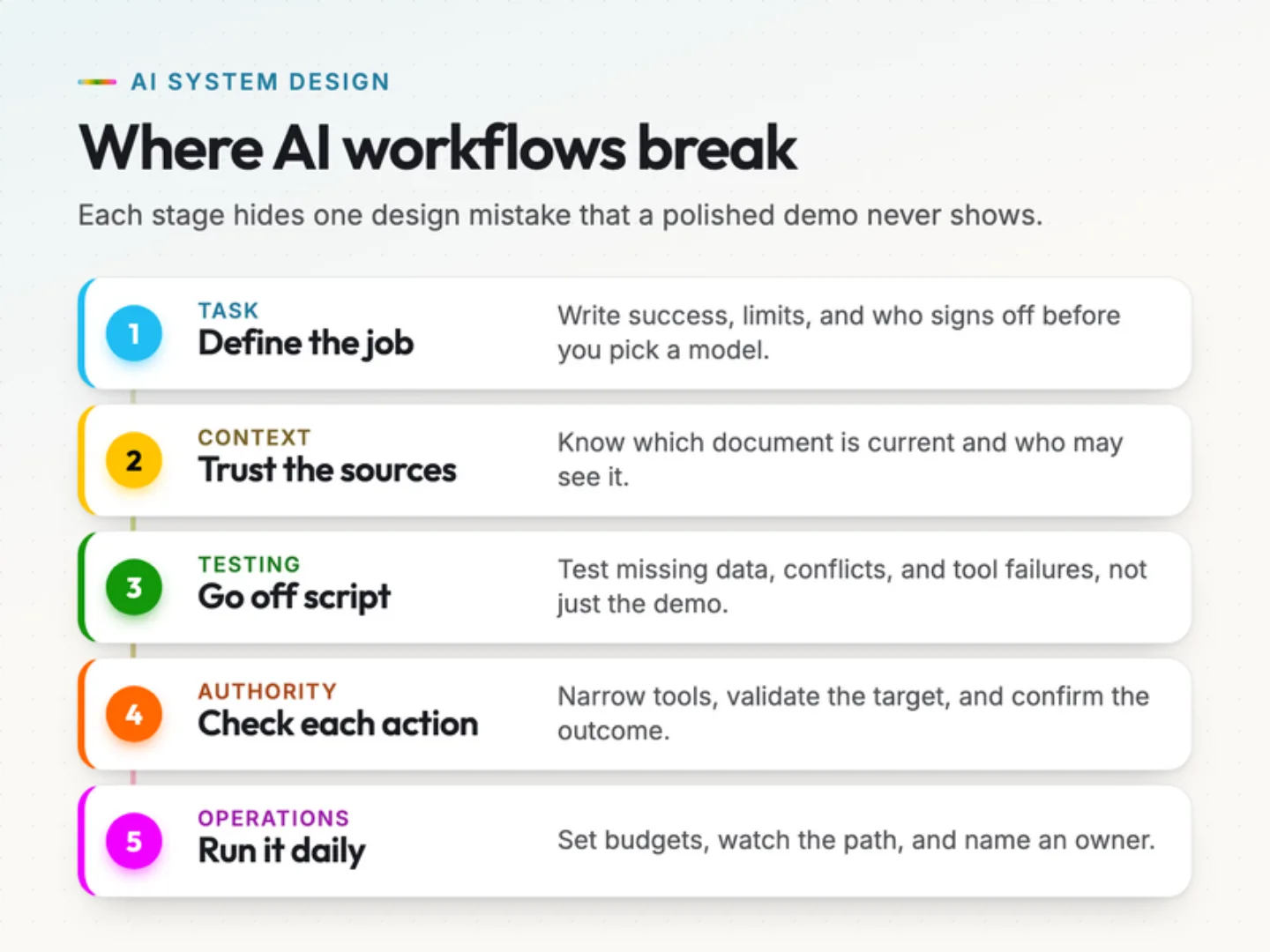
What happens when a demo meets a real request?
Picture a customer support assistant. It answers routine questions clearly and finds order information quickly. During the demonstration, everything looks ready.
Then a customer asks about an exception to the return policy, and the assistant retrieves an outdated document. Another customer shares a name with someone else in the database, and the system selects the wrong account. A tool times out after submitting an update, and the assistant can’t tell whether the change went through.
Each problem calls for a design decision. Which document has authority? How should the system identify a customer? What should happen when an action’s outcome is unknown?
You don’t need to settle every architectural question at once. You do need clear boundaries, useful tests, and a way to understand what happened when something fails. Start with the task your system must perform.
1. Choosing the technology before defining the problem.
Your first design decision concerns the work you want done. Choosing a model or framework gets easier once you can describe that work precisely.
A request to “build an AI assistant” leaves too much open. An assistant might answer questions, extract document fields, draft responses, update records, or coordinate several actions. Those tasks need different inputs, permissions, and tests.
Write a task specification you can test.
Start with one workflow and write down its boundaries.
- Who uses the system, and what triggers the request.
- Which inputs it receives and which information it may retrieve.
- What a successful output or completed action looks like.
- Which decisions it can make on its own.
- When it must ask a question or hand the task to a person.
- How you’ll measure whether it improves the existing process.
For a ticket-routing assistant, success might mean assigning each incoming message to the correct queue. For a document assistant, success might mean extracting required fields without changing their meaning.
Give those outcomes separate acceptance criteria. A routing system that writes an elegant explanation but picks the wrong queue has failed its task.
Also name who accepts the result. A developer may confirm that an output matches its schema. A support lead may need to confirm that the chosen category matches how the team handles requests.
Draft your task specification.
Fill in three fields, then copy.
You are helping me scope an AI workflow before I choose any tools.

Workflow: support ticket routing
Used by: our support team
Success means: each ticket lands in the right queue

Write a one-page task specification with these headings:
1. Trigger and inputs.
2. Information it may retrieve, and who owns each source.
3. Acceptance criteria I can test, one per line.
4. Decisions it may make alone.
5. When it must ask a question or hand over to a person.
6. What it must never do.
7. The simplest baseline to compare against first.

Ask me up to three questions before you write it if anything is unclear.
What a good answer looks like
A short document under the seven headings, with acceptance criteria you could check on a real ticket. For routing, a good criterion reads like “the ticket is assigned to one of four named queues”. A weak one reads like “routes tickets well”.
- Change the headings to match your team’s template.
- Paste in one real, anonymised request so the answer stays concrete.
Compare simpler approaches before adding autonomy.
Good AI workflow design starts with a baseline. Try conventional rules, one model call, or a fixed sequence of steps before you introduce an agent that chooses its own next action.
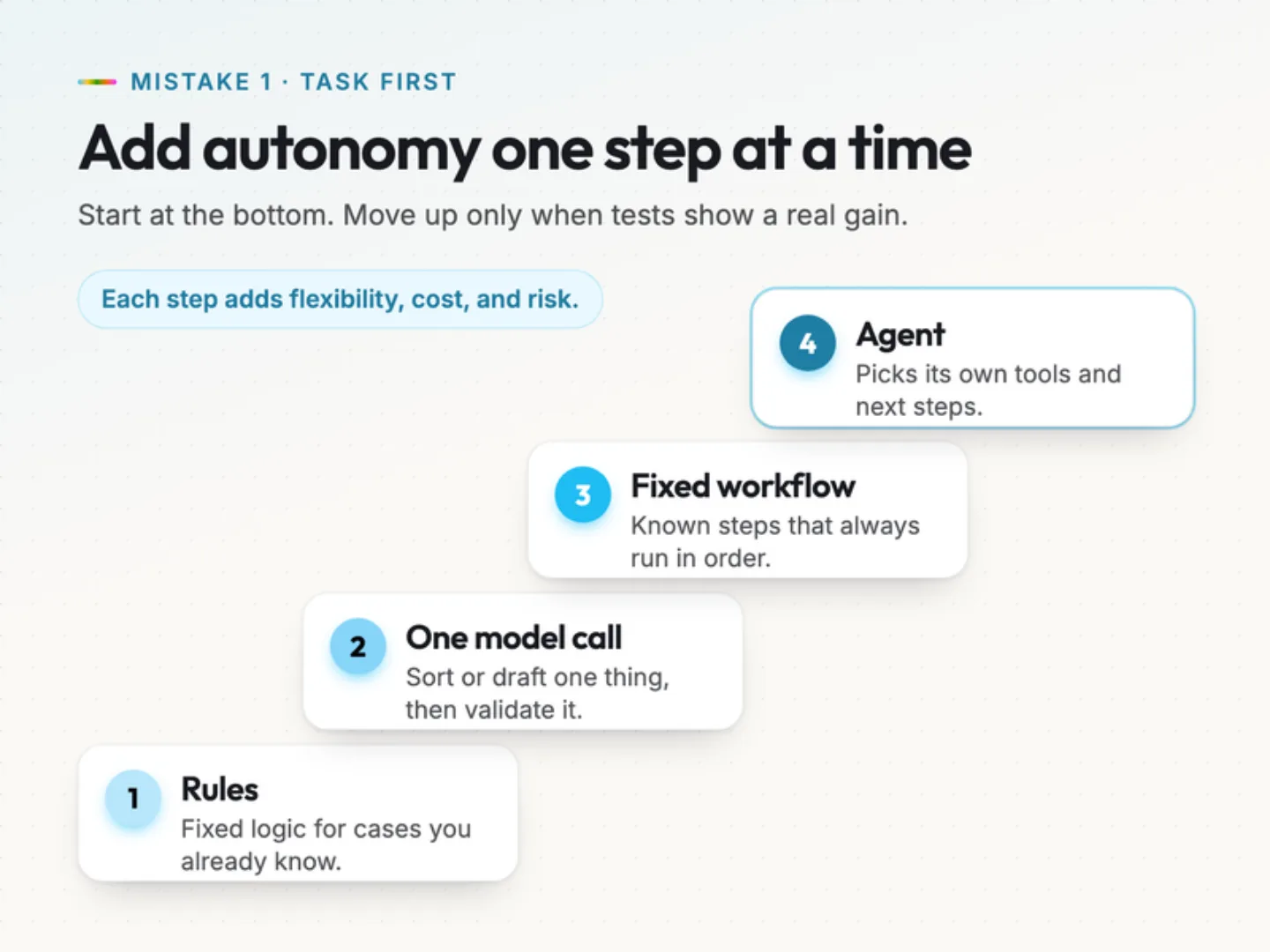
Say you need to sort support tickets into billing, technical support, account access, and general questions. A model can pick a category from that list, while your application validates the result and routes uncertain requests for review. An open-ended agent with broad tool access adds decisions without necessarily sorting better.
Anthropic’s guide to building effective agents recommends starting with the simplest workable solution and adding complexity only when it improves outcomes. It also points out the cost and speed tradeoffs that come with agentic systems.
Use a fixed workflow when the steps are known and predictable. Consider an agent when the task requires choosing among tools or changing direction based on what the system discovers along the way.
Make every architecture change earn its place.
Suppose your first classifier struggles with messages that contain two unrelated issues. Now you have a specific problem to solve.
You could ask one model call to identify each issue and route them separately. You could send mixed requests to a person. Either option deserves testing before you adopt something more complex.
Compare the candidates on the same representative inputs. Measure task quality, processing time, review effort, and operating cost. Pick the approach that meets your requirements with the least complexity you can manage.
Define what the system must avoid as carefully as what it should accomplish. A ticket classifier may recognize an account-access issue without having permission to reset the account.
The fix: a one-page task specification, a baseline, and evidence for every capability you add. If you want help mapping that first workflow, this is the starting point of our AI business process consulting work.
2. Treating data and context as an afterthought.
An AI assistant needs information that is relevant to the request and appropriate for the person asking. Your design decides how that information enters the system and which sources it trusts.
Connecting a knowledge base doesn’t settle those questions. Documents conflict, records go incomplete, and useful information can sit outside the search index.
Decide which sources have authority.
Back to the support assistant. Your knowledge base holds two return policies, one current and one replaced. Both cover the same product categories, so both can match the customer’s question.
You need rules for picking the policy that applies. Those rules might depend on its effective date, the purchase date, the customer’s region, or the product involved. Store the metadata that decision needs, and assign an owner who can retire obsolete documents.
For each important source, record the following.
- Its owner and intended use.
- Its version or effective date.
- Whether a newer source replaces it.
- The users or roles allowed to access it.
- How updates reach the searchable collection.
- What happens when its status is uncertain.
Keep that information attached through retrieval. If search results drop a document’s version and access details, the answering step can’t use those distinctions.
Diagnose three different information failures.
When the assistant gives a wrong answer, trace the information path before you touch the prompt.
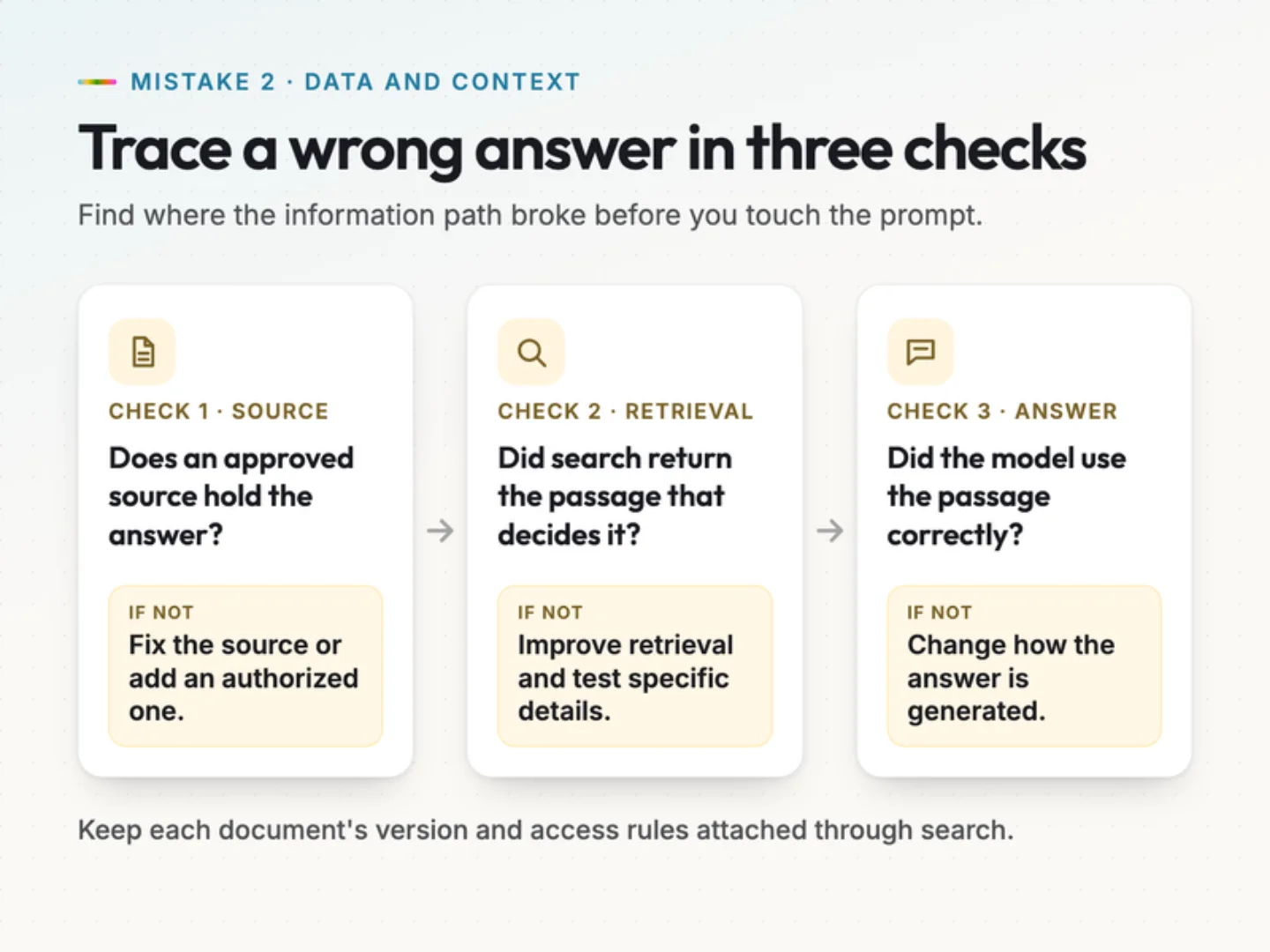
First, check whether an approved source contains the answer. If it doesn’t, no amount of retrieval tuning will produce a supported answer. Fix the source or add an authorized one.
Second, check whether the system retrieved the right passage. Search can return a document on the same topic while missing the exception that decides the answer.
Third, check whether the model used the passage correctly. It may drop a qualification, merge sources that don’t fit together, or add a claim the material doesn’t support.
Each failure needs a different fix: update the source, improve retrieval, or change how answers are generated. Test retrieval with questions that depend on specific details. A broad question about returns can pass even when the system can’t find a product-specific exception.
Apply access controls before sharing context.
A person who can ask a question should only receive information they’re authorized to see. Enforce that in your retrieval and application services. Don’t hand the model a pile of restricted records and trust an instruction to keep them private.
Use the smallest context that supports the task. More material means more chances for conflicting instructions, irrelevant details, and information the person shouldn’t see to slip into the answer.
Treat instructions found inside retrieved documents as untrusted content. They should never gain authority over the workflow’s rules or tool permissions. That separation reduces risk, but a prompt alone won’t make the model ignore every malicious instruction. Enforce data access and action controls outside the model.
Treat missing information as a normal case.
The assistant should have a useful response when the evidence is incomplete.
If a request lacks an order number, ask for it. If two policies conflict, route the question to the right owner. If no approved source supports an answer, say what’s missing and offer the next step.
Don’t rely only on a confidence score from the same model. Define conditions you can observe, such as missing required fields, conflicting source versions, or a failed retrieval check.
The fix: a source register, access-aware retrieval, and defined behavior for missing or conflicting information. Can you trace an answer back to the exact source version that supported it?
3. Testing only the happy path.
A successful demo shows that your system handles the cases you picked. Evaluation should show how it behaves across the conditions your users will bring, including unclear requests, missing information, tool failures, and inputs that try to redirect it.
Build tests around the real workflow.
Begin with representative tasks. Use sanitized examples from the process you want to improve, then add cases that challenge your assumptions. For the support assistant, an evaluation set could include the following.
Build your evaluation set.
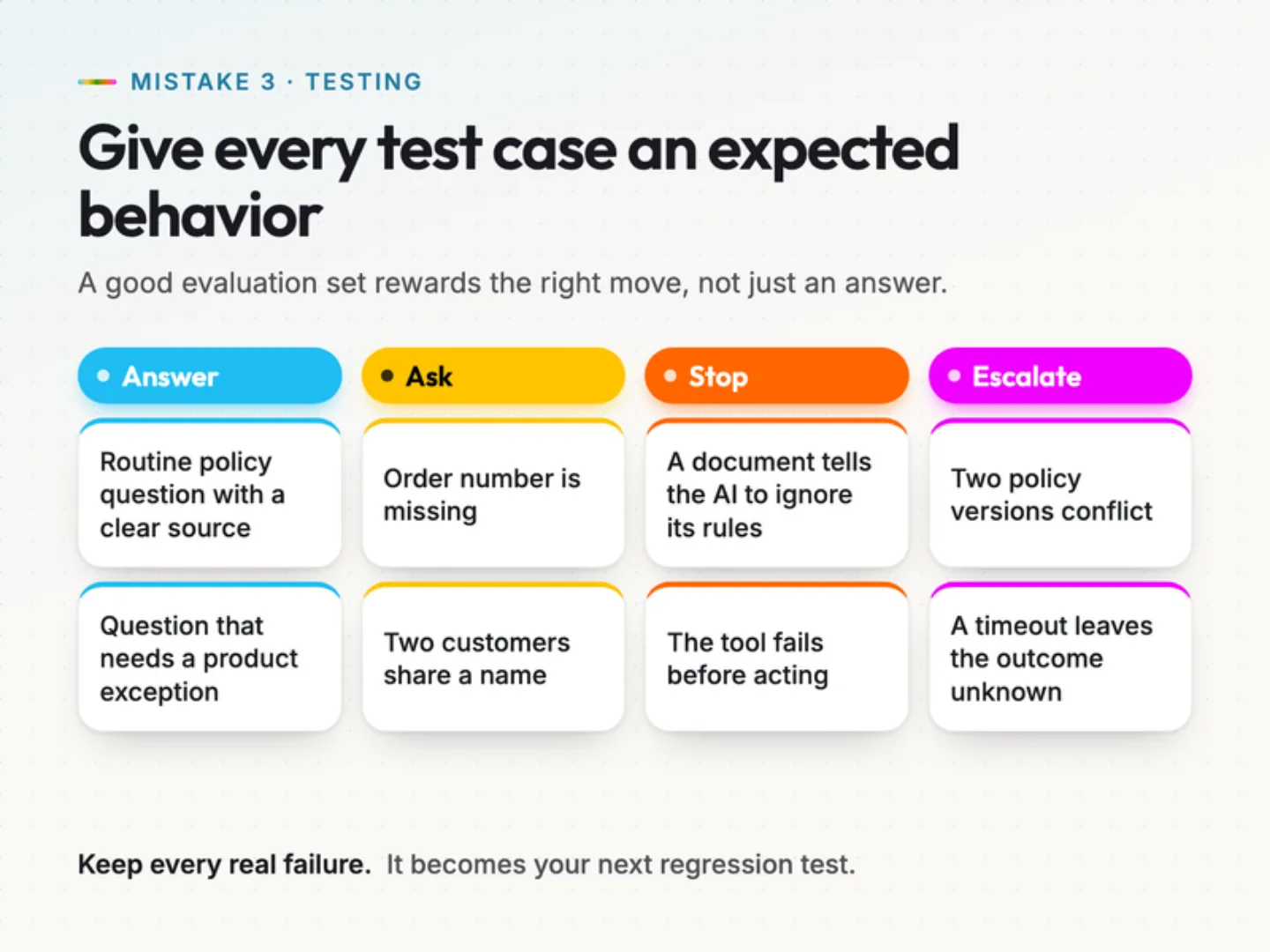
Define the expected behavior for each case. Some should produce an answer. Others should ask a question, stop an action, or escalate.
The expected result has to match the available evidence. If you reward an answer where the system should have declined, your tests start accepting unsupported output.
Measure each kind of success separately.
LLM evaluation gets more useful when you separate what you’re testing. An answer can be correct but incomplete. It can follow the format while pointing at the wrong record. A tool call can use valid parameters while attempting an action it isn’t allowed to take.
Check source support, completeness, output structure, target identity, authorization, and task completion on their own. Set the pass bar by the cost of failure. A style slip in a draft and an unauthorized account change shouldn’t carry the same weight.
Track serious failures one by one. An average quality score can hide the handful of failures that would make the workflow unacceptable.
Combine automated checks with informed review.
Use code checks wherever the expected result is explicit, such as allowed categories, required fields, identifiers, and tool outcomes. Use informed human review for judgment calls, such as whether an answer explains a policy clearly or leaves out an important condition.
If a model grades the answers, test that grader against examples people have already reviewed. Make sure it catches responses that sound right but aren’t supported.
Keep a held-out test set apart from the cases you use to tune prompts and workflow behavior. Development tests and regression cases guide your iteration. The held-out set tells you how the system handles cases it hasn’t seen.
Turn every failure into a regression test.
Each meaningful failure gives you a new test. If the assistant invents a policy exception, save a sanitized copy of that request, record the correct response, and add it to the set.
Rerun the relevant tests whenever you change the model, prompt, retrieval method, source collection, or tool behavior. Record which versions produced each result. Repeat important cases too, because one good run doesn’t prove consistent behavior.
The fix: a versioned evaluation set, explicit pass criteria, and a habit of keeping every real failure. Which failure would your tests miss because the answer still sounds plausible?
4. Giving AI too much authority without safeguards.
A system that drafts a suggestion and a system that changes business records need different controls. Set those boundaries before you connect any tool that can write.
Your application, not the model, should decide which actions are allowed, on which records, and under which conditions.
Match tool permissions to the task.
Start with the narrowest permissions that support the workflow. An assistant that answers order-status questions may need to read a few order fields. That doesn’t mean it needs to change shipping addresses, issue refunds, or export customer records.
Separate read tools from write tools. Limit which records and actions each tool can touch. Keep development and production access apart.
Enforce these limits in service permissions and application logic. A prompt can describe the rules, but the service that runs the action should enforce them on its own. Clear tool definitions help too: required fields, allowed values, preconditions, and return statuses, so bad requests fail predictably.
Validate the proposed action before it runs.
Permission isn’t the whole story. Even an allowed action can target the wrong customer or carry the wrong value.
If the assistant finds two customers with the same name, it should ask for another identifier or use an identity that’s already verified. Picking the first match is not acceptable for a record update.
Before any change runs, check the target record, required inputs, permitted operation, and relevant business rules. If only certain fields may change, reject the rest. If an action requires verified ownership, check that in the application.
Approval never replaces those checks. A person can approve a proposed action that still breaks a service-level rule.
Make human approval specific.
An approval request should show exactly what will happen: the target, the proposed change, the relevant values, and the expected effect. Give the reviewer enough context to approve, reject, or ask a question.
Tie each approval to that one proposal. If the target or action changes, ask for a fresh review where the workflow calls for one. Approving a drafted message shouldn’t authorize a later attachment, and approving one account update shouldn’t cover another account.
Set approval rules by consequence, reversibility, and uncertainty. Keep low-impact drafts quick, and review actions that could cause real harm or be hard to undo.
Verify the outcome before retrying.
A timeout means the caller didn’t hear back in time. It doesn’t prove the operation failed. If an update reached the service but the response never came back, a blind retry can repeat the action.
Where the service supports it, use operation identifiers and status checks to find out what happened. If the service supports idempotency keys, reuse the same key for retries of the same intended action and follow its documented rules. AWS explains the pattern in making retries safe with idempotent APIs. An identifier alone doesn’t prevent duplicates.
If the outcome is still unclear and no documented safe retry applies, stop and route it for review. Record what was attempted, approved, and confirmed, while protecting sensitive values.
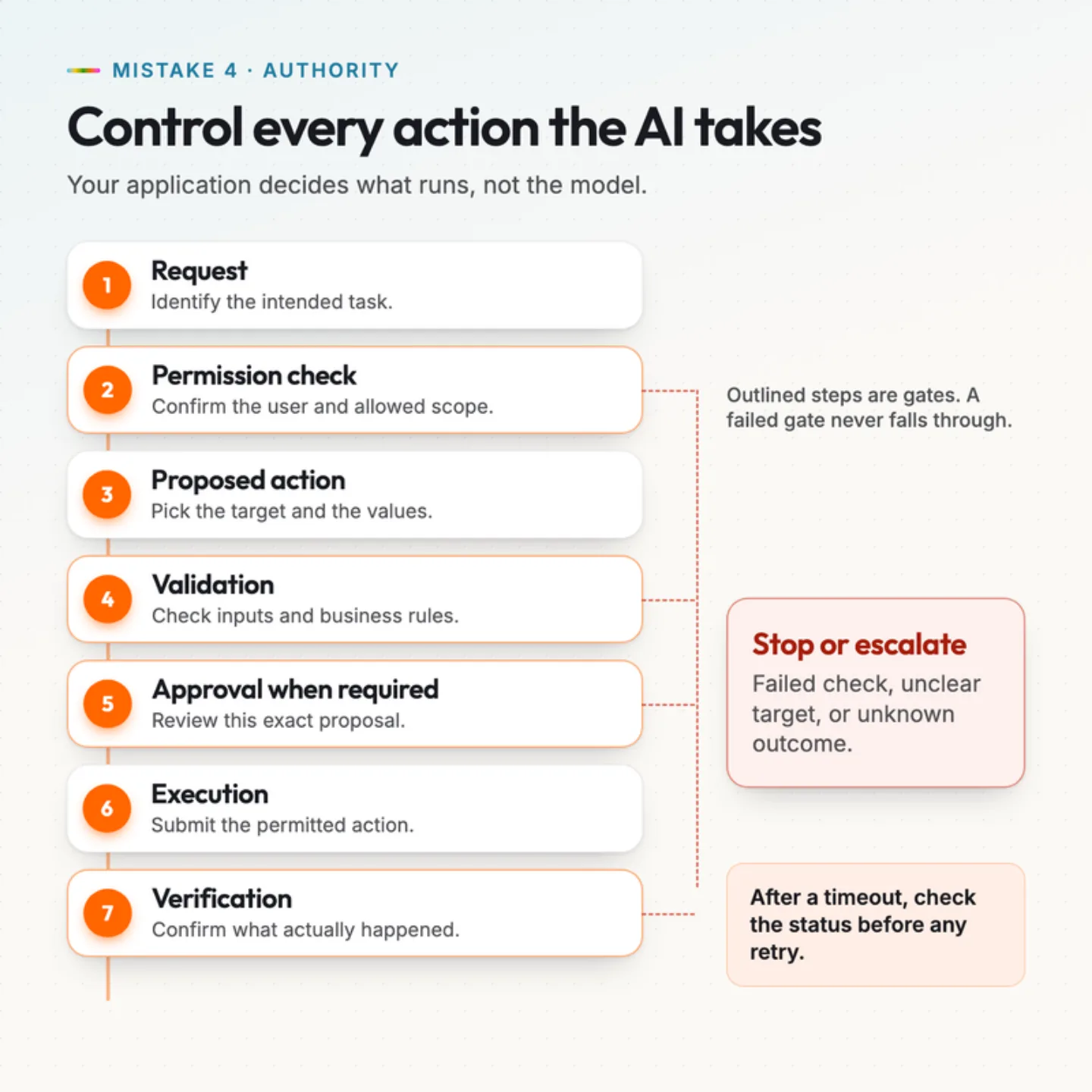
The fix: narrow tool access, validated proposals, specific approvals, and verification after every action. What can your system change today without anyone reviewing the exact action? Our AI workflow automation builds put that review step in from the first version.
Quick check.
5. Designing for the demo instead of daily operation.
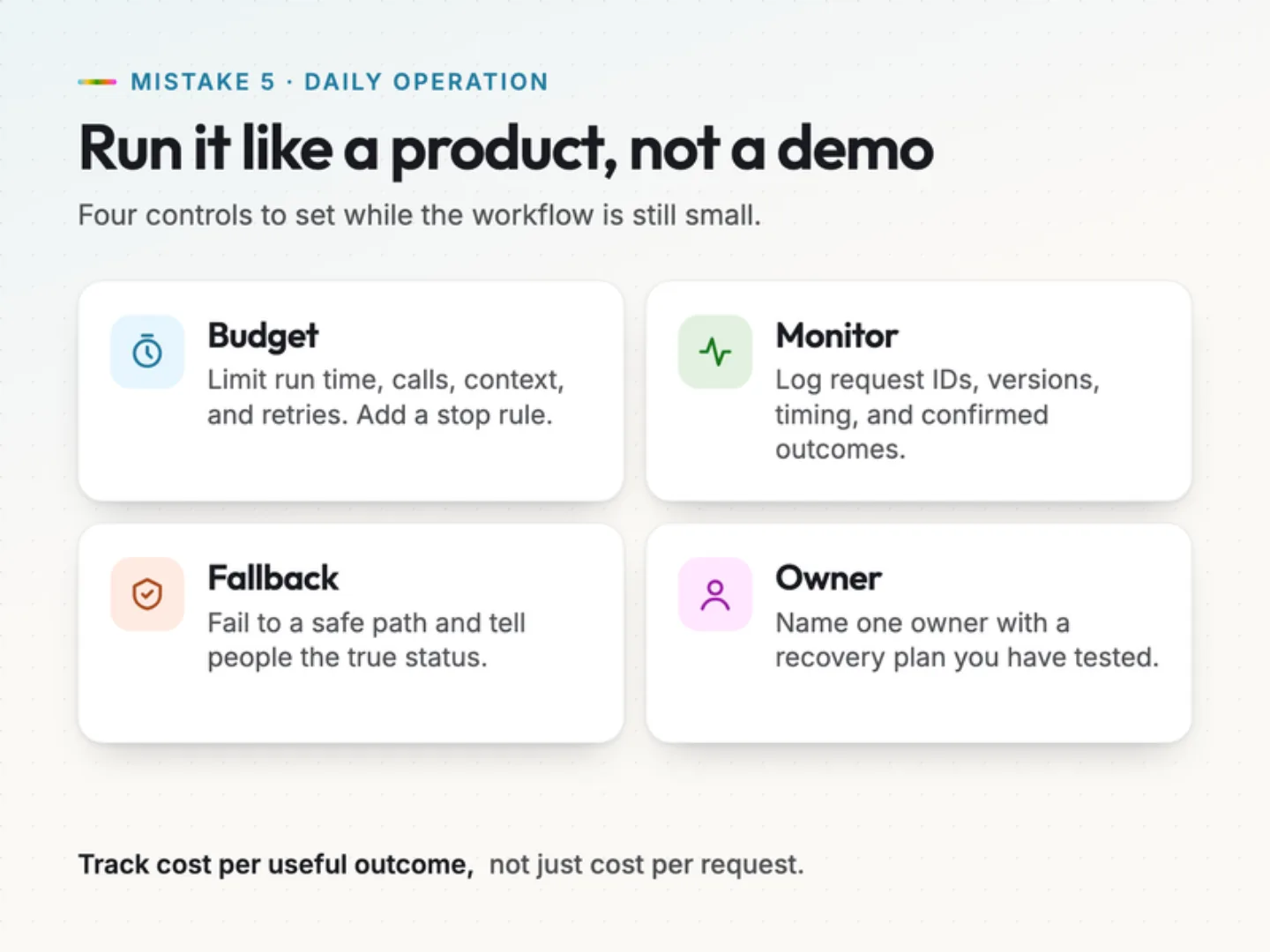
Daily use raises questions a prototype never has to answer. How long can a request run? What happens when a dependency fails? Who investigates odd behavior? Design those limits and recovery steps while the workflow is still small.
Set budgets for the whole request.
Measure the full path from the user’s request to a verified outcome, including retrieval, model calls, tool execution, validation, and any human review. Timing only the first model response can miss most of the delay.
Set limits for run time, tool calls, model calls, retrieved context, and retries. Add stopping conditions for when the system can’t make progress.
Every extra step should solve a problem you’ve seen. If an added review call improves quality, check whether the gain justifies its cost and delay for that task.
Track cost per useful completed outcome, not only cost per request. A cheap response that needs heavy correction can create more work for your team.
Make the execution path visible.
Production monitoring should help your team answer what happened and why. Record a request identifier and the versions of the model, prompt, retrieval setup, and tools involved, along with statuses and timing.
Useful measures include completion rates, validation failures, timeouts, escalations, duplicate-action attempts, and user corrections. Keep only what you need for diagnosis, and apply access controls and retention rules to logs that contain customer or business information.
You can often investigate a failure without seeing the model’s hidden reasoning. Authorized inputs, selected sources, tool parameters, validation results, and confirmed outcomes make a useful audit trail, as long as your application records them.
Give fallback behavior a clear purpose.
A fallback should keep the experience useful and controlled. If retrieval is down, the assistant can say it can’t verify the answer and offer human support. If a write tool fails, it can save the proposal for review without claiming the change succeeded.
Never fall back to an unrestricted path when a controlled one fails. Recovery has to respect the original permissions and data boundaries.
Tell people the true state of their request. A prepared action, a submitted action, a confirmed success, and an unknown outcome are four different messages.
Name an owner before launch.
Name the person or team responsible for investigating failures, maintaining source material, and approving workflow changes. Write a short recovery procedure that covers how to switch off a failing capability, roll back to a previous version, find affected requests, and decide when to resume.
The NIST Generative AI Profile offers voluntary risk-management guidance on evaluation, monitoring, and incident response. Use it to inform your reviews. It is voluntary guidance, not a stamp of approval or a promise of reliability.
Then test the procedure with a controlled failure. Make a test tool unavailable and confirm that the system stops, records the problem, and offers the intended fallback.
The fix: a measurable operating budget, monitoring you can act on, and a recovery process with a named owner. Who would notice a failure first, and what would they do?
A prelaunch checklist for your AI workflow.
Run this checklist on one workflow before you widen its access or responsibilities. For each row, record the evidence, the owner, and any open action.
Prelaunch review.
| Done | Review area | Question to answer | Evidence to collect |
|---|---|---|---|
| Task definition | Can the team describe success and the allowed boundaries? | Task specification and baseline results. | |
| Sources | Can the system identify current, applicable information? | Source owners, version rules, and retrieval tests. | |
| Data access | Does retrieval enforce each user's permissions? | Access checks with permitted and restricted cases. | |
| Evaluation | Have realistic failures been tested? | Test cases, pass criteria, and recorded results. | |
| Actions | Are targets, parameters, and permissions validated? | Tool checks and rejected-action tests. | |
| Approval | Does review cover the exact action that runs? | Approval records tied to specific proposals. | |
| Operations | Are run time, calls, and retries limited? | Configured limits and controlled failure results. | |
| Recovery | Can an owner investigate and contain a failure? | Monitoring records and a tested recovery procedure. |
Walk through an ordinary request first. Then repeat the review with missing data, an ambiguous target, and an unavailable tool.
Ask the team to show the evidence, not answer from memory. A configured limit, a recorded test result, and a confirmed action outcome tell you more than an assurance that the system usually behaves.
Rank open issues by consequence and exposure. A formatting slip may be fine in an internal draft. Unauthorized data access or an unconfirmed change to a customer record needs a different response.
Update the checklist whenever responsibilities change. A new tool, a new source, or a new allowed action means a new review. For worked examples of bounded workflows with human checkpoints, browse our workflow blueprints and AI use cases. If any term above is unfamiliar, our guide to 100 AI terms in plain English covers it.
Start with one workflow review.
Pick a workflow your team already uses and follow one complete request from input to outcome. Note the sources it retrieves, the decisions it makes, the actions it attempts, and the evidence it leaves behind.
Then change one condition. Remove a required identifier, add a conflicting document, or make a test tool unavailable. Watch whether the workflow asks for clarification, stops, or reports an accurate status.
Give each open issue an owner and a measurable acceptance condition. “Improve reliability” is hard to verify. “Block a record update when the customer identifier is ambiguous” gives your team a specific result to test.
Choose one AI workflow this week, run it through the checklist, and assign an owner to each open issue. If you’d like a second set of eyes on it, talk to a specialist about your workflow.
Was this article helpful?
Part of the free path Mastering AI Automation.


