


Email segmentation improves engagement because each group gets a message that matches why it subscribed. Split your list by how people joined, what they asked for, what they did and whether they already buy from you. Start with three segments, send each one a different message and judge it by clicks and replies, not opens.
That is the whole idea. The rest of this guide shows you how to do it with the data you already have and the email tool you already pay for.
One thing to know before we start. Your email tool quietly records a lot about every subscriber. It knows how each person joined your list, which emails they opened, which links they clicked and, if you connect a store, what they bought. Segmentation puts that record to work.
What email segmentation is and why it changes engagement.
A segment is a group of subscribers who share something useful, such as the service they asked about or the fact that they bought last spring. Email segmentation is the habit of sending each group its own version of an email instead of one email to everyone.
Most tools build segments from rules. You set a condition, such as “joined from the quote form”, and the tool collects everyone who matches. Many segments are dynamic, which means they update themselves as people meet or stop meeting the rule. A static list stays the same until you change it by hand.
Segmentation is not personalization.
People often mix these up. Personalization changes small details inside one email, such as a first name in the greeting. Segmentation changes the email itself. A new lead and a five-year customer get different subjects, different offers and a different next step.
You can do both. Segmentation usually matters more, because a greeting with the right name does not rescue a message about the wrong thing.
Why relevance moves the numbers.
Engagement means what people do with your email. In this guide it covers clicks, replies, bookings or purchases, unsubscribes and spam complaints. It does not lean on opens, for reasons you will see in the research section.
When an email matches the reason someone subscribed, more of them click. Fewer of them decide your emails are noise and leave. That is the mechanism. Nothing clever happens in the software. You stop asking one message to serve everyone at once.
What the research says about segmented email.
The most cited study is Mailchimp’s own. In its Effects of List Segmentation on Email Marketing Stats page, updated February 1, 2017, Mailchimp compared segmented and unsegmented campaigns from the same users.
The sample covered about 2,000 Mailchimp users, about 11,000 segmented campaigns and almost 9 million recipients. Here is what it reported for segmented campaigns.
| Measure | Segmented campaigns compared with the same users’ unsegmented campaigns |
|---|---|
| Clicks | 100.95% higher |
| Opens | 14.31% higher |
| Unsubscribes | 9.37% lower |
| Abuse reports | 3.90% lower |
| Bounces | 4.65% lower |
An abuse report is a spam complaint, and a bounce is an email that could not be delivered. These are relative differences, not rates you should expect. They show a direction. They do not promise your list a result.
Read this study with three limits in mind. It is vendor data. It is correlational, so the people who segment may also be better at email in other ways. And it predates Apple Mail Privacy Protection, which Apple released in 2021.
That last limit matters most. An open is counted when a tiny tracking image inside the email loads. Mailchimp’s Apple Mail Privacy Protection FAQs say emails in Apple Mail are now reported as opened “regardless of the contact’s activity”. So the 2017 open figure no longer measures the same thing today.
The click and unsubscribe figures still point the right way. They are the ones to keep in mind.
Choose segments from data you already have.
You do not need a survey or a data project to start. Almost every small business already holds four kinds of segment data. Each one answers a different question about a subscriber.
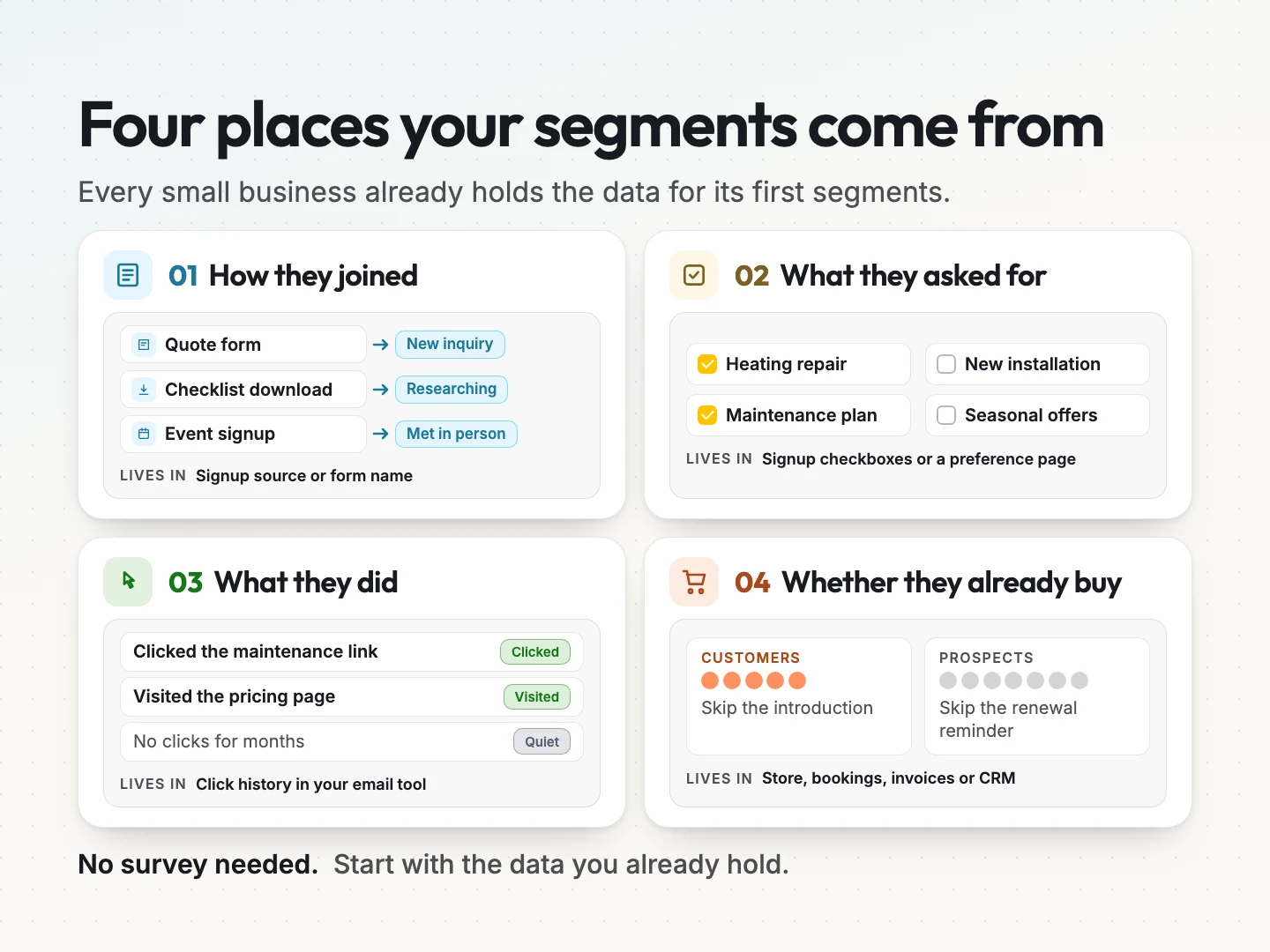
How they joined.
Your signup source tells you what someone wanted when they gave you their address. A person who filled in a quote form wants something different from someone who downloaded a checklist or signed up at an event.
Most tools record the signup source or the form name automatically. If yours does not, add a hidden field or a tag to each form so you can tell them apart later.
What they asked for.
Interests are the topics or services people tell you they want. You collect them with a few checkboxes on the signup form or in a preference page. Keep it to the choices that would change what you send.
This is the most honest data you have, because the subscriber chose it. It also ages. Someone who asked about one service two years ago may need something else now.
What they did.
Behavior is what people do with your emails and your site. Did they click a link about a service? Did they visit the pricing page? Did they stop clicking months ago?
Your email tool keeps this click history for you. Use clicks over opens wherever you can, because a click is a deliberate action.
Whether they already buy.
Customers and prospects need different emails. A past customer does not need your introduction. A prospect does not need a renewal reminder.
Purchase data lives in your store, your booking system, your invoicing tool or your CRM, short for customer relationship management software. If those connect to your email tool, purchase history can drive segments on its own. If not, a regular export and a tag can do the job.
Start with three segments if your list is small.
More segments do not mean more engagement. Every segment you add is another email to write, check and send. Each segment should earn its place by changing the message.
Three is a good start for most small lists. You can tell the difference between them, you can write for each one and you can see results.
Here is a hypothetical example. Picture a small home services business that installs and maintains heating and cooling systems. Today it sends one monthly newsletter to everyone. Here is how it could split that list.
| Segment | Who is in it | The message they get | What counts as success |
|---|---|---|---|
| New inquiries | Joined from the quote form in the last 90 days and have not booked | How the first visit works and what it costs to get a quote | A booked estimate |
| Current customers | Have an active maintenance plan | What is included this season and how to book their visit | A booked visit or a reply |
| Past customers due for service | Bought an installation or repair more than a year ago and have no plan | A reminder that a yearly service is due, with a booking link | A booked service |
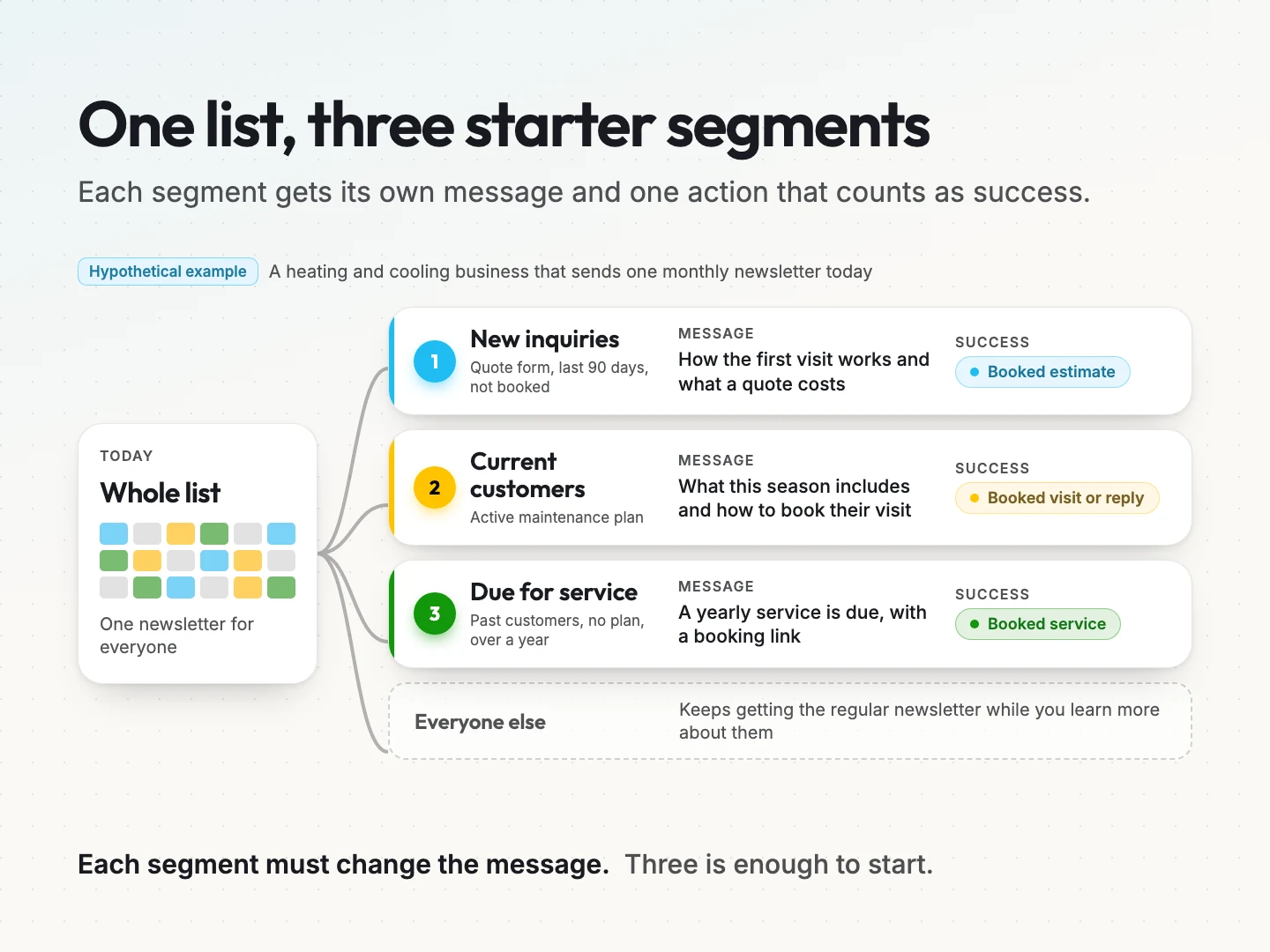
Everyone who fits none of the three keeps getting the regular newsletter. That group is not a failure. It is your general audience, and you will learn more about it over time.
Notice that each segment has one action that counts as success. That decision makes measurement easy later. You are not asking whether the email “did well”. You are asking whether more people booked.
How to build a segment in Mailchimp, Klaviyo and Acumbamail.
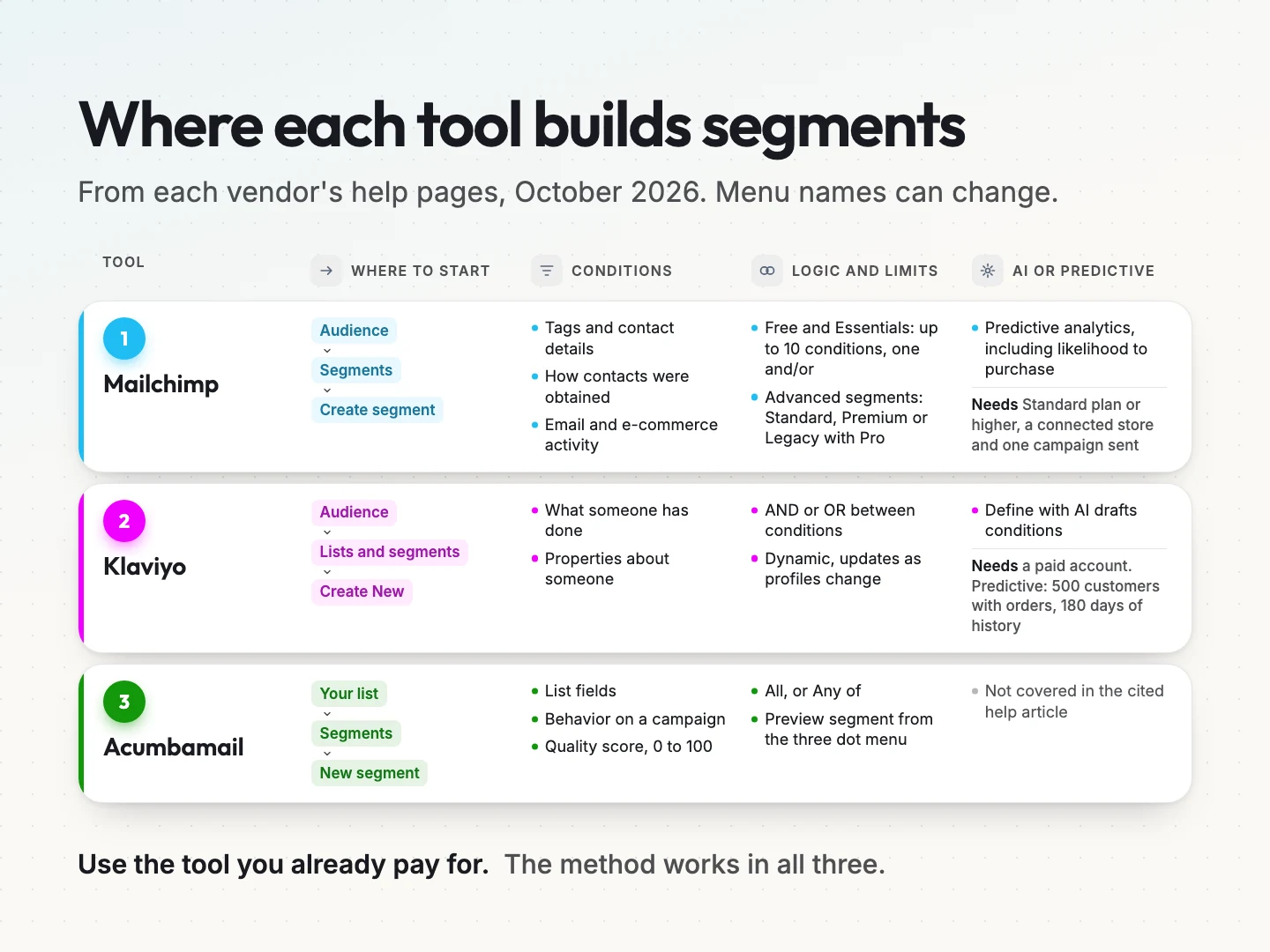
Every major email tool can build segments. The names and menus differ. These steps come from each vendor’s help pages as of October 2026. Menu labels change, so check the linked page if a button has moved.
Mailchimp.
Mailchimp’s Create and Send to a Segment guide walks through the builder.
- Click Audience, then Segments.
- If you have more than one audience, choose the right one from the dropdown.
- Click Create segment.
- Pick your first condition, such as a field under “How your contacts were acquired”.
- Set the comparison and enter the value.
- Add more conditions if you need them.
- Click Use segment, name it and save.
Plan matters here. According to Mailchimp’s Getting Started with Segments page, Free and Essentials plans allow up to 10 conditions per segment with one and/or operator. Advanced segments, with unlimited conditions and nested logic, need Standard, Premium or Legacy with Mailchimp Pro.
The condition groups, listed in All the Segmenting Options, include tags, contact details, how contacts were obtained, email activity and e-commerce activity. That covers all four bases from the previous section.
Klaviyo.
Klaviyo’s Getting started with segments guide describes a similar flow.
- Go to Audience, then Lists and segments.
- Click Create New and select Create segment.
- Name the segment.
- Add conditions in the segment builder.
- Click Create segment to save it.
Klaviyo segments are dynamic. They grow and shrink as profiles meet or stop meeting the conditions. Conditions can be joined with OR, where a profile needs to meet any one, or AND, where it must meet all of them.
Conditions cover what someone has done, such as placing an order, and properties about someone, such as a field on their profile. Large segments can take a while to fill, so build them before the day you plan to send.
Acumbamail.
Acumbamail’s Create and configure a subscriber list article covers segments inside a list.
- Open the list you want to segment.
- Click the Segments tab, then New segment.
- Add one or more conditions.
- Under “Send to those who meet”, choose All to require every condition or Any of to require at least one.
- Check the result with Preview segment from the three dot menu next to the segment.
Acumbamail offers three condition types, and you can mix them. List fields filter on the data you store for each subscriber. Behavior targets people by how they responded to a specific campaign. Quality uses a score from 0 to 100 based on subscriber engagement.
Pick whichever tool you already use. The method in this guide works in all three.
Write one message per segment, not one per person.
A segment is only useful if its email is different. The easiest way to write for a segment is to decide three things before you write a word.
- One reason. Why does this group care right now? For past customers due for service, it is that a yearly check is overdue.
- One offer. What are you putting in front of them? A booking link for a service visit, not your full service menu.
- One next step. What should they do after reading? Book, reply or call. Pick one.
Then write the email around those three answers. Keep the shared parts, such as your footer, your brand and your contact details, the same across segments. Only the reason, the offer and the next step change.
This is also where you avoid a common trap. You do not need a separate email for every person. Writing three good emails a month is realistic. Writing thirty is not, and the quality drops fast.
Subject lines and inbox placement have their own rules. Our guide on how to improve email open rates covers both, so this guide stays on what goes inside each segment’s email.
Measure segment engagement with clicks, not opens.
Before you send your first segmented email, write down the numbers from your last send to the whole list. That is your baseline. Then compare each segment against it.
Use these measures, roughly in this order of weight.
- Clicks. A click is a choice. Divide clicks by delivered emails to get a click rate.
- Replies. For a service business, a reply is often worth more than a click.
- Conversions. The success action from your segment table, such as a booking or a purchase.
- Unsubscribes. Fewer people leaving is a sign the message fits.
- Complaints. A complaint, sometimes called an abuse report, is when someone marks your email as spam. Even a few are a warning.
Opens come last, and only as a rough signal. Mailchimp’s Apple Mail Privacy Protection FAQs say that opens from Apple Mail users are reported whether or not the person read the email. The same page states that clicks and purchases are stronger signs of engagement than opens.
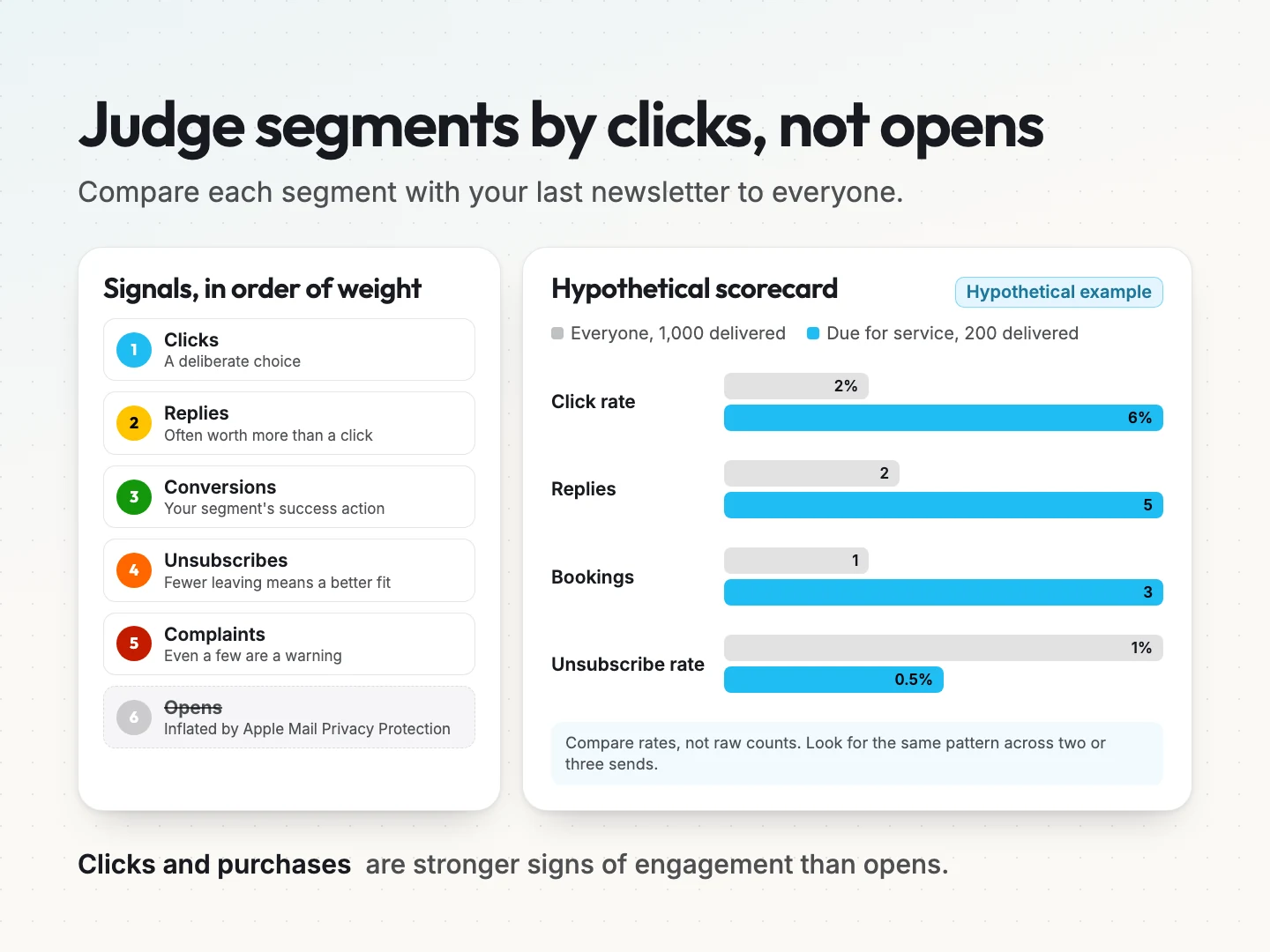
A hypothetical scorecard.
Here is how the home services business might compare one segment with its old newsletter. These numbers are made up to show the method.
| Measure | Last newsletter to everyone (1,000 delivered) | Past customers due for service (200 delivered) |
|---|---|---|
| Click rate | 2% (20 clicks) | 6% (12 clicks) |
| Replies | 2 | 5 |
| Bookings | 1 | 3 |
| Unsubscribe rate | 1% (10 people) | 0.5% (1 person) |
| Opens | Not used | Not used |
Compare rates, not raw counts, because the segment is smaller than the full list. Also watch for small numbers. One extra booking in a group of 200 can swing a result. Look for the same pattern across two or three sends before you call a segment a success.
Open-based segments need a second look.
The same Mailchimp FAQ warns that segments built on opens can be misleading. An automation triggered by an open may reach more people than it should. Where you can, rebuild those rules on clicks or purchases instead.
Where AI helps with segmentation and what it needs first.
AI can help in two different ways. One works on day one. The other needs history you may not have yet. Measurement comes first for a reason. You need to know what a good segment looks like before you let a tool draft one.
Describing a segment in plain words.
Klaviyo’s Define with AI feature lets you type a description, such as people who viewed a product and did not buy, and it drafts the conditions for you. You start from Audience, then Lists and segments, then Create segment, and type into the condition selector.
It needs a paid Klaviyo account. Klaviyo’s own page also says you are still responsible for the final segment definition. Treat the draft as a first pass. Read every condition before you send to it.
Predictive segments need purchase history.
A predictive segment groups people by what a model expects them to do next, such as buy again or stop buying. Churn risk is the chance a customer stops buying. Customer lifetime value, often shortened to CLV, is the total a customer is expected to spend with you over time.
These features only work with enough order data behind them. Here is what each vendor states.
| Tool | What it predicts | What it needs first |
|---|---|---|
| Klaviyo | Predicted and total CLV, churn risk, expected date of next order | At least 500 customers who placed an order, 180 days of order history, orders in the last 30 days, some customers with 3 or more orders, and an e-commerce integration or order data sent from your own system through its API |
| Mailchimp | Likelihood to purchase over 60, 90 or 365 days, churn risk, predicted time to next purchase, predicted CLV | A Standard plan or higher, a connected online store and at least one email campaign sent to the audience |
Sources: Klaviyo’s Understanding predictive analytics and Mailchimp’s About Predictive Analytics and Demographics.
If you are a service business without an online store, predictive segments may not switch on at all. That is fine. The four bases and three starter segments do not need them.
Where automation fits.
The useful job for automation is keeping segments current without anyone remembering to update them. A booking in your CRM can tag a contact as a current customer. A completed job can start a reminder twelve months later.
Scayver Graphix builds this kind of CRM automation and AI lead management automation for small businesses. A person still reviews every segment before a send. If you are choosing a CRM to hold that customer record, our comparison of the best CRM for customer retention is a good place to start.
Keep your email segments accurate as your list grows.
Segments drift. People change jobs, finish projects and stop needing what they signed up for. A short review every quarter keeps your segments honest.
- Check each segment’s size. A segment that has shrunk to a handful of people may not be worth its own email anymore.
- Check whether it still changes the message. If two segments now get nearly the same email, merge them.
- Retire what no longer earns its place. Fewer, clearer segments beat a long list nobody remembers.
- Look at subscribers who never click. Send them one plain check-in asking if they still want your emails, then respect the answer.
Collect only the data a segment uses. If no email changes based on someone’s birthday, do not ask for it. Every extra field is one more thing to store, protect and explain. A short signup form also tends to feel more trustworthy to the person filling it in.
Tell people what they are signing up for and how often you will write. Record the permission each person gave. That keeps your list clean and keeps you on the right side of the email rules where you do business.
Final thoughts on email segmentation.
Segmentation works because it respects why people joined your list. You already have the data. Start with three segments built from how people joined, what they asked for, what they did and whether they buy.
Write one clear email for each, measure clicks, replies and bookings against your old newsletter, and keep only the segments that change the result. Add AI and predictive features once your history supports them, and keep a person checking every segment before it sends.
If you want help setting up your segments and the automations that keep them current, talk to a specialist about your email list. You can also see how our email marketing service handles the writing and sending each month.
Was this article helpful?
