
A good cancellation flow asks the customer why they are leaving, offers one response that fixes that exact reason, and keeps a clear cancel button on every screen. Match a pause to a busy season, a cheaper plan to a price worry and real help to a broken experience. Offer only remedies your team can deliver.
Most cancellation flows do the opposite. They show the same discount to everyone, whether the customer is leaving over price, a bug or a move overseas. The person with a bug still has the bug. The person who moved still cannot use your service. You lose margin and the customer leaves anyway, a little more annoyed than before.
This guide gives you a better method. You get six worked churn reasons with the response that fits each, a reason-to-response ledger you can copy and a simple delivery check for every offer. You also get a dated note on the cancellation rules and an outline for the email you send after someone leaves.
What a cancellation flow is and what it should do.
A cancellation flow is the short series of screens and messages between the moment a customer clicks “cancel” and the moment they see a confirmation. It might live in your billing tool, your customer account page or a simple form that goes to your inbox. Even a phone call where staff ask “can I ask why?” is a cancellation flow.
It has three jobs, in this order.
- Learn the real reason. You cannot fix churn you do not understand. The reason a customer gives at the exit is some of the most honest feedback you will ever get.
- Offer one fair alternative, when one exists. A retention offer is any option that solves the problem without a full cancellation. That could be a pause, a smaller plan, a fix or a conversation.
- Let the customer go cleanly when they still want to leave. A clean exit protects your reputation and leaves the door open for a return.
Notice what is missing from that list. The job is not to stop every cancellation. Some customers should leave. They have outgrown you, their situation has changed or you are not the right fit. A flow that fights them only produces chargebacks, complaints and bad reviews.
The vendor guides that rank for this topic agree on the basic parts. ProsperStack’s guide, updated August 2, 2024, lists reinforcing value, an exit survey, alternatives and a visible cancel button. Chargebee’s examples, updated July 30, 2025, stress a cancel button that is easy to find. Both sell cancellation software, so read them as useful starting points written by vendors.
Why one discount for every reason backfires.
The most common cancellation flow has one move. The customer clicks cancel and sees a single offer, such as half off for three months. It feels like a safe default. It is usually the wrong one.
A discount only fixes one kind of reason, which is price. For every other reason it fails in a predictable way.
- It does not fix the problem. A customer leaving because a feature broke still has a broken feature at half price.
- It teaches customers to threaten. Word gets around that clicking cancel earns a better price. Loyal customers who never click it pay more than those who do.
- It costs you margin on people who would have stayed. Some customers were only browsing the cancel page. Now they pay less for the same service.
- It can delay the cancellation, not prevent it. If the reason stays unsolved, the customer returns when the discount ends.
Churnkey’s article on discounting at cancellation, updated September 5, 2025, makes a fair point in favour of discounts. It argues they work best when they are targeted, time limited and kept inside the flow rather than advertised. Its supporting figures come from the vendor’s own data without a published method, so treat them as a vendor view rather than a benchmark.
The better rule is simple. Match the response to the reason, and use a discount only when the reason is price.
The four parts of a fair cancellation flow.
You do not need special software to build a fair flow. You need four parts in a fixed order, and a cancel option that stays visible the whole time.
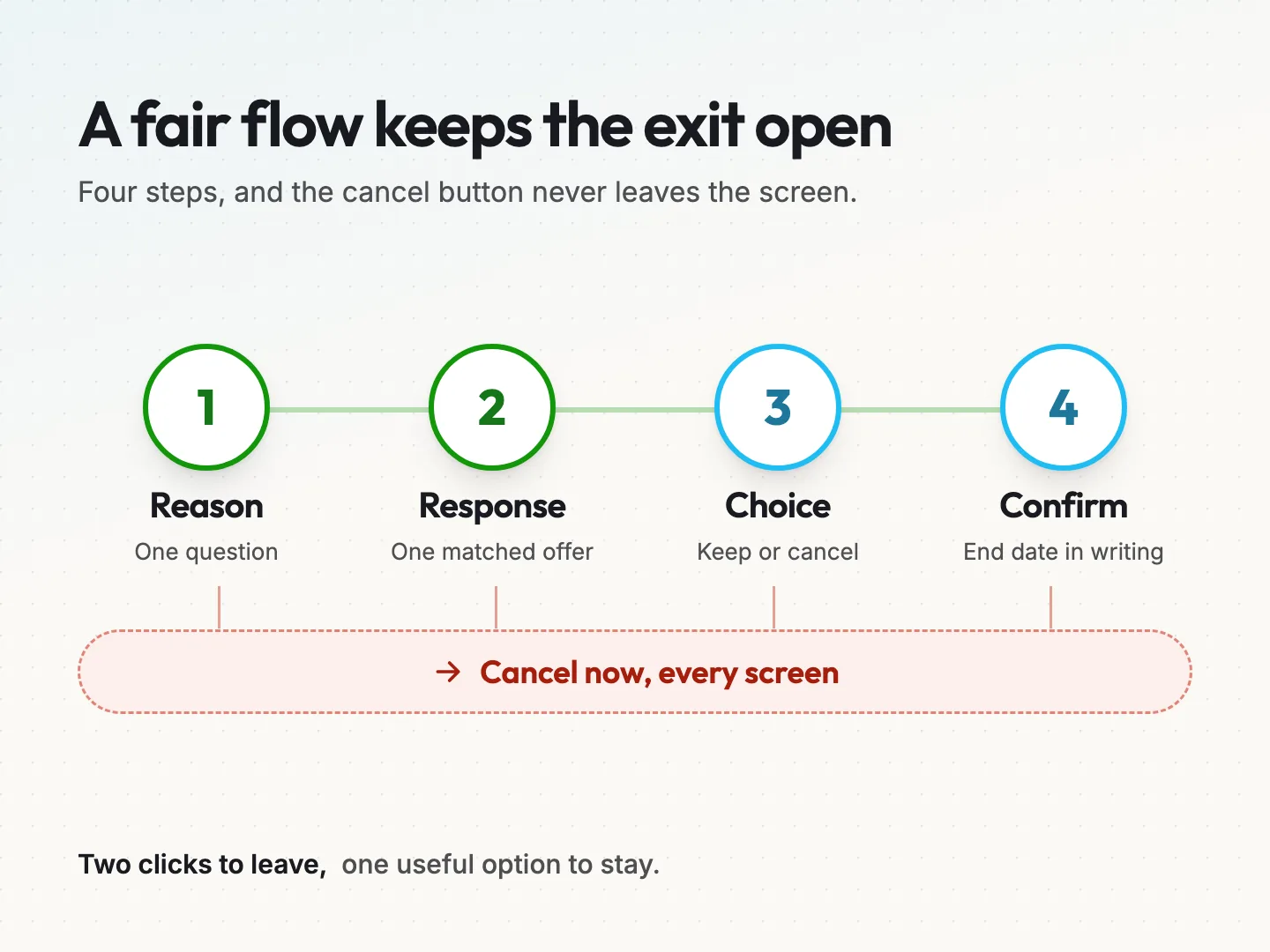
Part 1. Ask one reason question. Show a short list of reasons as single-choice options, plus “something else” with a text box. Keep the list to about six options so customers can scan it in seconds. The six reasons later in this guide are a good starting list.
Part 2. Show one matched response. Based on the answer, show one response, not a menu of five. A single, specific offer reads like help. A wall of offers reads like a sales pitch.
Part 3. Keep “cancel now” on every screen. The cancel button should sit beside the offer at the same size, with plain wording such as “No thanks, cancel my plan.” Never hide it behind a link in grey text.
Part 4. Confirm clearly. The final screen should say the plan is cancelled, when access ends and what happens to the customer’s data. Then send the same information by email.
That is the whole structure. Two clicks for someone who wants to leave, and one useful option for someone who might stay.
One small detail helps a lot. Put the customer’s own information on the reason screen, such as their plan name and renewal date. It shows you know who they are and it prevents mistakes, like cancelling the wrong account.
Six churn reasons and the response that fits each.
Churn reasons are the explanations customers give for leaving. Most answers fall into a handful of groups. Here are six common ones, each with a worked hypothetical example, the matched response and what not to offer.
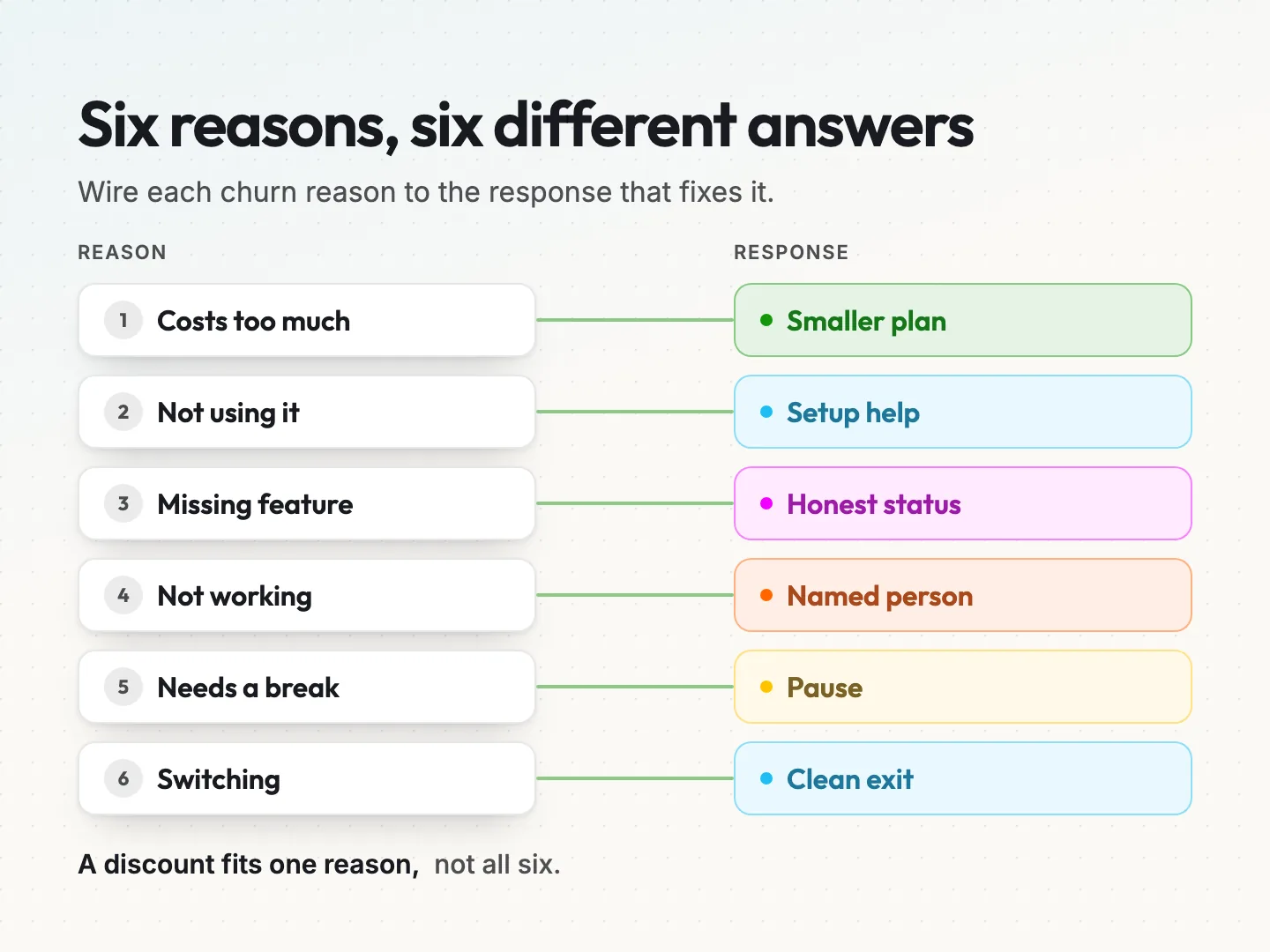
Reason 1: it costs too much.
*Hypothetical example:* a small bakery pays for your online ordering software on the top plan. Sales slowed after the holidays, and the owner wants to cut costs.
Matched response: right size the plan. Offer the smaller plan that covers what they use, or annual billing if that lowers the monthly cost. A limited, time-bound discount is fair here, because the reason is price.
Do not offer: a deep discount with no end date. It turns a short-term cash problem into a long-term pricing problem for you.
Reason 2: I am not using it enough.
*Hypothetical example:* a landscaping company signed up for your scheduling tool. The owner set up two crews and then never finished the setup for the rest.
Matched response: offer help, not money. Book a short setup call, send a three-step guide for the one task they signed up for, or both. A pause can also fit if the customer is genuinely too busy right now.
Do not offer: a discount. They are not using it at full price, and they will not use it at half price either.
Reason 3: it is missing a feature I need.
*Hypothetical example:* a yoga studio wants class packs that expire, and your booking system only sells monthly memberships.
Matched response: an honest answer. If the feature is built and scheduled, say when, and only give a date your team has committed to. If it is not planned, say so and record the request. Let them go cleanly.
Do not offer: a vague “it’s on our roadmap” or a promise someone made up on the spot. If the feature never ships, you have turned a fair goodbye into a broken promise.
Reason 4: something is not working.
*Hypothetical example:* an accounting firm’s client portal keeps logging users out, and two support emails went unanswered.
Matched response: a named person and a deadline. Route the cancellation to someone who can fix it, and tell the customer who will contact them and by when. If they lost service, a credit for that time is a fair apology.
Do not offer: a discount on a product that still does not work. Fix the cause first.
Reason 5: I only need a break.
*Hypothetical example:* a seasonal vacation rental owner pays for monthly marketing support but has no bookings to promote from November to February.
Matched response: a pause. Let them stop billing for a set number of months, keep their settings and data, and restart on a date they choose. Remind them a week before the pause ends.
Do not offer: a discount to keep paying for a service they cannot use during the off season. A pause keeps the relationship without charging for nothing.
Reason 6: I am switching to someone else.
*Hypothetical example:* a dental office is moving to a practice management system that includes the reminders your tool provides.
Matched response: a clean exit. Ask one optional question about what the other option does better. Offer a data export, confirm the end date and leave the door open.
Do not offer: a last-minute price war. If they chose a different product for its features, a lower price rarely changes the decision.
When the reason is something else.
Some customers pick “something else” or skip the question. Do not push. Let them cancel straight away and give them an optional text box. You will learn more from reading those notes each month than from forcing an answer.
A seventh reason deserves a separate path. If a card payment failed, the customer may not be leaving at all. Check the payment status and retry path before treating the failure as a cancellation request.
The reason-to-response ledger you can copy.
A reason-to-response ledger is a one-page table that lists each cancellation reason, the response you show, who delivers it and the limits that apply. It turns the six cases above into a decision your whole team can follow. Copy it into a spreadsheet or document and fill in your own rows.
| Reason | Response shown | Who delivers it | By when | Limits | What we never offer |
|---|---|---|---|---|---|
| Costs too much | Smaller plan or annual billing, short discount if needed | Billing or account owner | Applies at the next renewal | Discount once per customer, ends on a set date | Open-ended discounts |
| Not using it enough | Setup call or short guide, pause if busy | Support lead | Call booked within two business days | One call per cancellation | Discounts |
| Missing a feature | Honest status of the request | Product owner | Only dates the team has committed to | No promised features without a date | Vague roadmap talk |
| Something is not working | Named person and a deadline, credit for lost time | Support lead | Contact within one business day | Credit matches the time lost | Discounts before a fix |
| Needs a break | Pause with settings saved | Billing | Pause starts at the next renewal | Set pause length, reminder before restart | Paid months they cannot use |
| Switching | Data export and clean exit | Account owner | Export ready before access ends | One optional question | Price wars |
Blank row template. Use this for any reason you add later.
| Reason | Response shown | Who delivers it | By when | Limits | What we never offer |
|---|
A few tips make the ledger useful.
- Use your customers’ words. Write the reason the way customers say it, not in internal jargon. “Costs too much” beats “pricing sensitivity”.
- Name a role, not a hero. Write “support lead”, not one person’s name, so the ledger survives holidays and staff changes.
- Review it monthly. Read the cancellation notes, count reasons and adjust the responses that are not helping anyone.
The times in the example rows, such as one or two business days, are placeholders. Replace them with times your team can hit every week, not on its best week.
Only offer a remedy your team can deliver.
Every response in your flow is a promise. When a customer accepts a pause, a setup call or a fix, your business now owes them that thing. A broken promise at this moment hurts more than a clean goodbye.
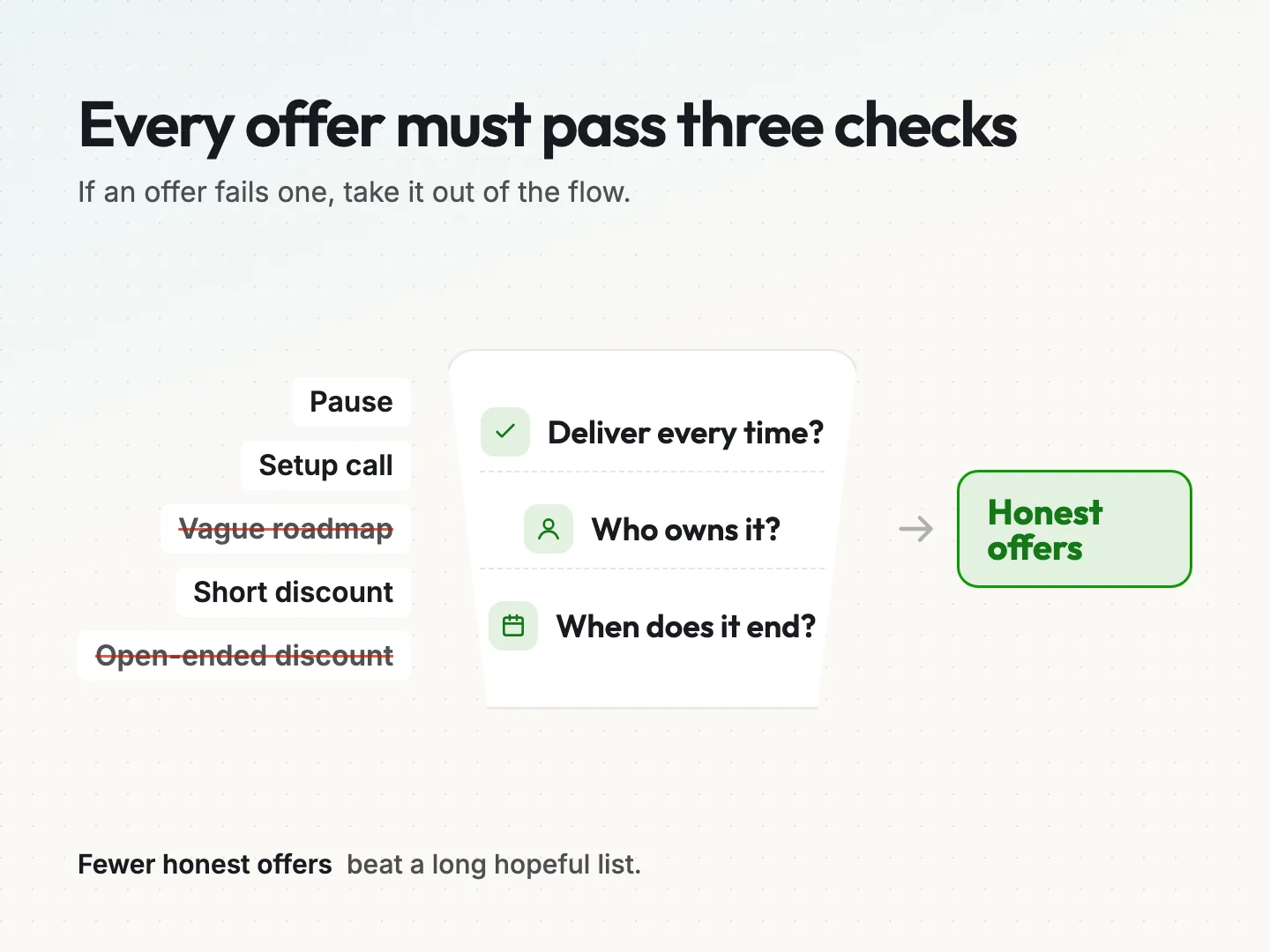
Run every offer through three questions before it goes into your flow.
- Can we deliver it every time? Not once, when the owner happens to see the request. Every time, including busy weeks.
- Who owns it? One role is responsible. If nobody owns the setup call, the call does not happen.
- When does it end? Every pause, discount and credit needs an end date. Write it in the confirmation so the customer is never surprised.
If an offer fails any of the three questions, take it out of the flow until it passes. A smaller set of honest offers beats a longer list of hopeful ones.
Keep a record of what each customer accepted, with the date and end date. A CRM is the natural place for this, because the next person who speaks to that customer can see the promise. Our comparison of the best CRM for customer retention covers which tools make that kind of follow-up easy.
Watch the billing side too. A pause that does not stop billing, or a discount that never ends, creates a new problem. Test each offer once with a test account before you switch it on, and check the next invoice matches what the screen promised.
Keep the exit open and check the cancellation rules.
Rules on online cancellation have changed more than once in the past two years, so check the current status before you build.
The Federal Trade Commission adopted “click to cancel” amendments to its Negative Option Rule in 2024. They never took effect. According to an Alston & Bird advisory dated July 9, 2025, the Eighth Circuit vacated the rule on July 8, 2025, days before its effective date.
That did not remove every requirement. The same advisory says the Restore Online Shoppers’ Confidence Act, known as ROSCA, still applies to online subscriptions. It requires clear terms, consent before charging and a simple way to cancel. Some states, including California, have their own cancellation rules.
The topic is still moving. A Greenberg Traurig alert dated March 16, 2026 reports that the FTC asked for public comment on updating the Negative Option Rule on March 11, 2026. That notice was a request for input, not a new binding rule. Check for later changes before you launch, and confirm the details with a lawyer for your states.
This article is general information, not legal advice. The practical design rule is the same either way, and it is good business too.
- Make cancelling as easy as signing up. If customers can join online in two clicks, they should be able to leave online in about the same.
- Keep offers optional. An offer should never be a required step before the cancel button appears.
- Use plain buttons. “Cancel my plan” and “Keep my plan” are clear. “No, I don’t want to save money” is a trick.
- Confirm in writing. Send a confirmation the customer can keep.
If you run memberships, the rules of what members keep and lose matter as much as the flow. Start by defining membership access rules, including access dates and what happens when membership status changes. State any refund terms separately in your policy.
What to send in the cancel subscription email.
The cancel subscription email is the message a customer receives once the cancellation is complete. It is part of the flow, and for many customers it is the last thing they read from you. Make it short, clear and kind.
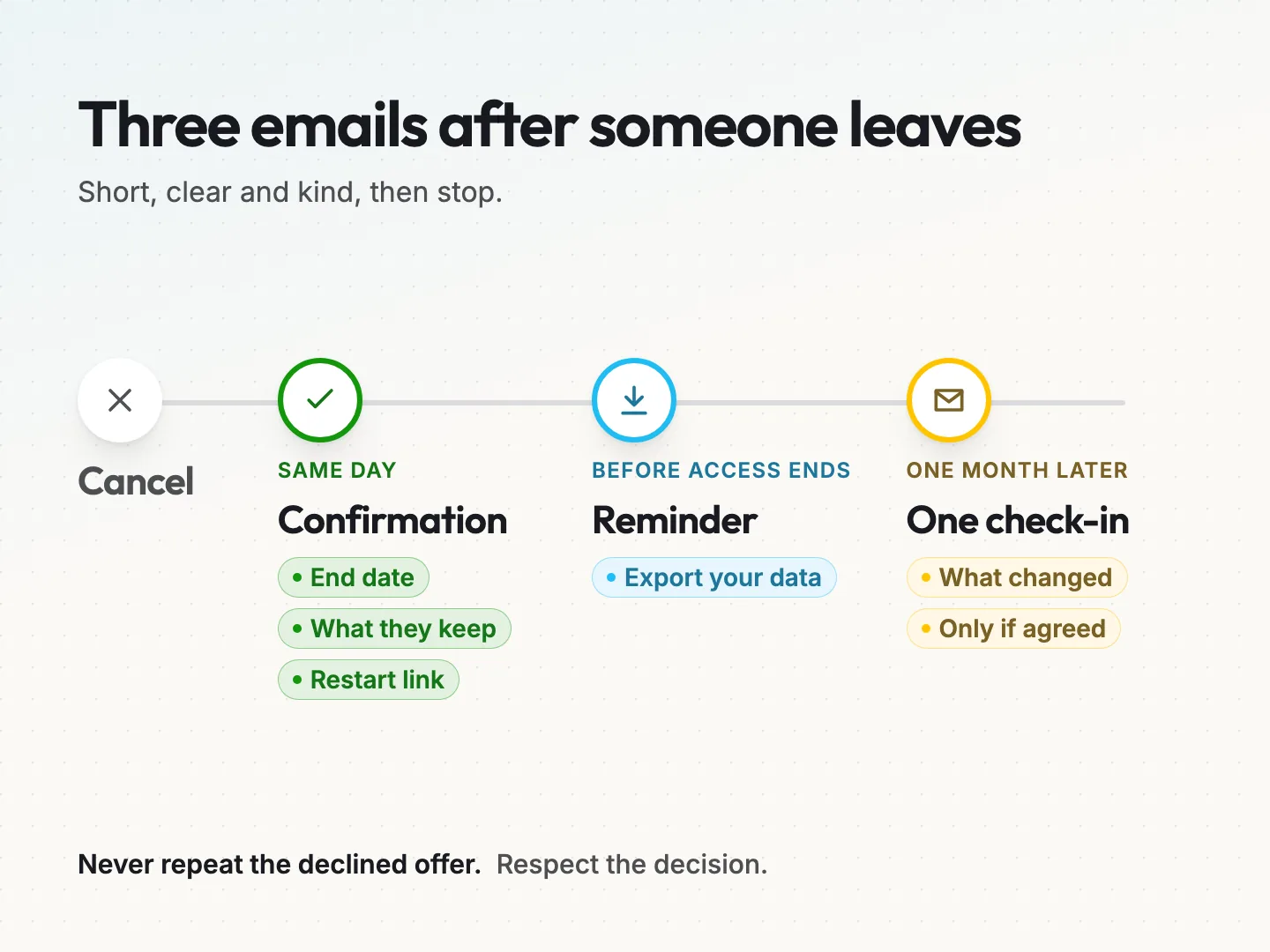
Same day: the confirmation. Send this within minutes of the cancellation. Include these five things.
- A plain line that the plan is cancelled, with the plan name.
- The date access ends and the date of the final charge, if any.
- What the customer keeps, such as downloads, receipts or a data export.
- How to restart, with one link, if they change their mind.
- A contact for questions, answered by a person.
Before access ends: a reminder. If access continues to the end of a billing period, send a short note a few days before it ends. Remind them to export anything they need. This prevents the angry “you deleted my files” email later.
One month later: one check-in. Send one friendly message about a month after access ends. Mention anything that changed since they left, such as the feature they asked for or a fix to the problem they reported. Send only one, and only if they agreed to hear from you.
Match each email to the reason, too. A customer who left over a missing feature should hear when it ships. A customer who left over price should hear about a smaller plan. If you want help writing these messages, our email copywriting service can draft the full set.
Two things to leave out. Do not repeat the offer the customer already declined, and do not send a series of “we miss you” messages. Respecting the decision is what makes a return possible.
How to tell whether your cancellation flow works.
The usual measure is the save rate, the share of customers who start a cancellation and stay. It is useful, but on its own it can mislead you.
Track these four numbers each month instead.
- Reasons by count. Which reasons come up most often? This tells you where to fix your product or service, which matters more than any offer.
- Saves by reason. Which matched responses help? A response that saves nobody needs rewriting or removing.
- Saves that last. How many saved customers are still active three months later? A save that cancels again next month was only a delay.
- Promises kept. How many accepted offers were delivered on time? This is the number most businesses never check, and it tells you if the flow is honest.
Keep the numbers small and simple. A spreadsheet with one row per cancellation, the reason, the response shown, whether it was accepted and whether it was delivered is enough for most small teams.
Read the free text notes as well. Patterns often show up in customers’ own words long before they show up in a chart. A hypothetical example: three customers in one month mention the same confusing setup screen. That is a fix worth more than any discount.
Change one thing at a time. If you rewrite three responses in the same month, you will not know which change helped.
Final thoughts on matching the response to the reason.
A cancellation flow is a conversation at a delicate moment. When you ask why, listen to the answer and respond to that answer, customers notice. Some will stay because you solved the real problem. Others will leave, but they will leave thinking well of you, and that is often how a return starts.
Start small. Write your six reasons, fill in the ledger, run each offer through the three delivery questions and keep the cancel button on every screen. Then read the notes each month and fix what they tell you.
If you would like help building a fair cancellation flow, writing the emails around it or connecting it to your CRM and billing tools, talk to a specialist about your setup.
Was this article helpful?