


Evergreen content is a page that answers a question whose answer stays true for years, so it keeps bringing in search visitors long after you publish it. To create it, follow six steps. Pick a lasting buyer question, check that demand is steady, choose a format that ages well, build the page to bring in leads, then measure and refresh it.
Most people find evergreen pages through organic search, which means the unpaid results on Google and other search engines. So the topic has to match the words your buyers type. A page about a question nobody searches for can be accurate forever and still never get read.
This guide is written for small business owners who publish content or pay someone to write it. You’ll learn how to test a topic before writing, how to structure a page so it brings in enquiries and how to keep it accurate without starting over every year. There’s also a section on affiliate income for businesses that recommend tools to their clients.
What evergreen content is, and what it is not.
The name comes from evergreen trees, which keep their leaves all year. An evergreen page works the same way. Its core answer doesn’t expire, so it stays useful to the reader in month one and in year three.
Timely content is the opposite. It covers news, trends, events or anything tied to a date. A “2025 design trends” post can do well for a few weeks, then interest drops off once the year moves on. That isn’t bad content. It has a short life, and you should plan for that.
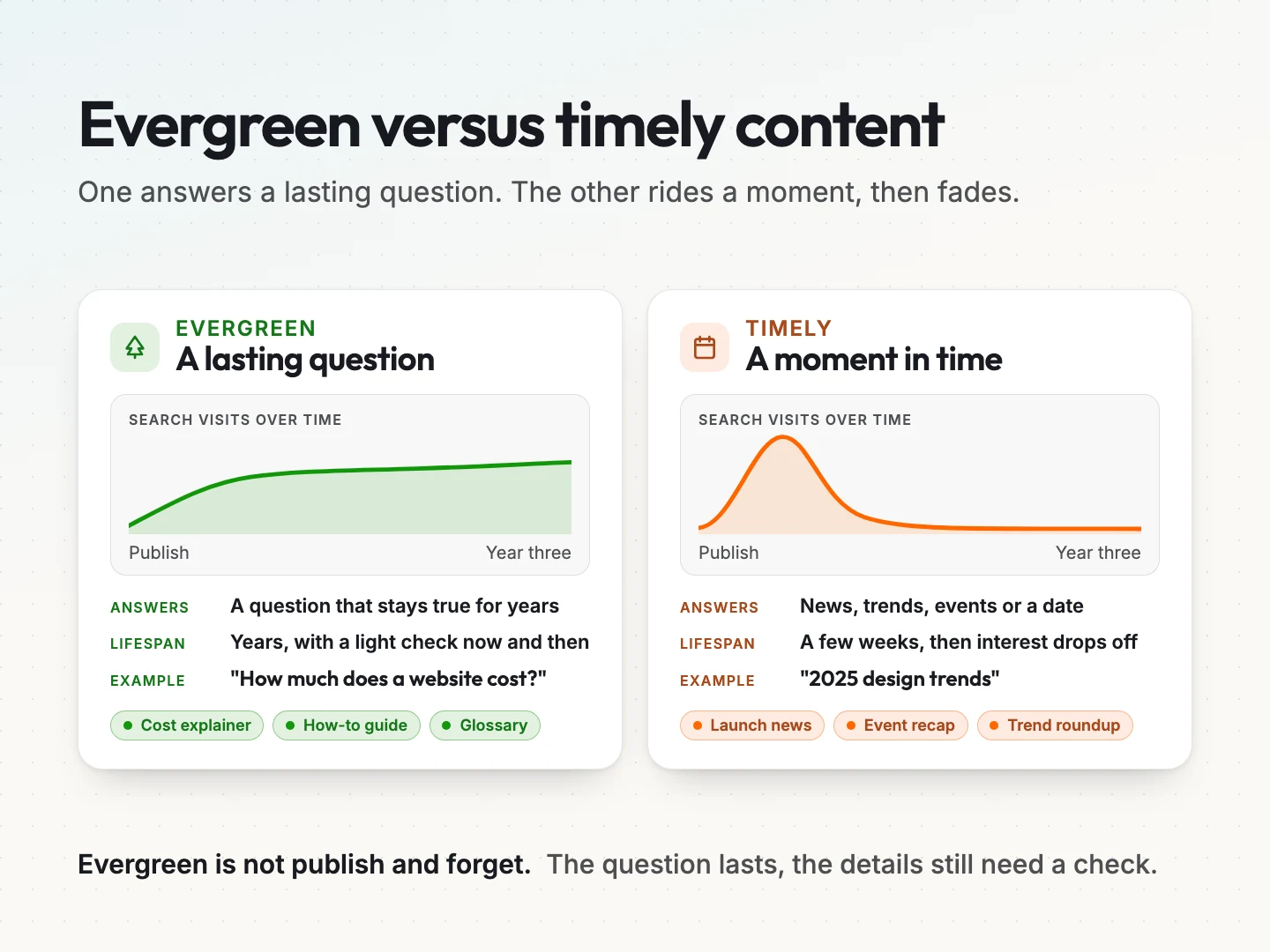
Some examples from a small business point of view make the difference clear.
- Evergreen. “How much does a website cost?”, “How to choose a CRM for a small team”, “What is local SEO?” and a glossary of terms your customers ask about.
- Timely. A product launch announcement, an event recap, a post about this year’s trends and a reaction to a platform update.
One misconception is worth clearing up early. Evergreen doesn’t mean “publish and forget”. Prices change, tools get renamed and screenshots go stale. An evergreen page has a lasting question, but its details still need a check now and then. The refresh section later in this guide shows how to do that without much effort.
Google’s guidance points the same way. Its page on creating helpful, reliable, people-first content describes content made mainly for people rather than to manipulate rankings. Evergreen pages fit that well, because they exist to answer a real question properly.
Why evergreen content pays off for a small business.
A timely post asks you to keep feeding it. An evergreen page asks for one solid build and a light check now and then. For a small team with limited time, that difference matters more than any single traffic number.
One good evergreen page can do several jobs for you.
- It answers the same buyer question every day. Someone searching “how long does a website redesign take” at midnight gets your answer, not a competitor’s.
- It supports your sales conversations. When a prospect asks a common question, you can send the page instead of writing the answer from scratch.
- It gives email and social something to resend. A strong guide can go into a welcome email, a newsletter or a social post more than once.
- It builds on itself. Each new evergreen page can link to the others, which helps readers and search engines find the whole set.
The payoff is slow at first. A new page rarely brings much traffic in its first weeks. The value shows up over months and years, as the page keeps working without a new campaign behind it. That’s why the topic you pick matters so much. If you’d like help planning which pages to build first, a content strategy maps your buyer questions to the services you sell.
How to find evergreen topics your buyers already search for.
A good evergreen topic is a question your buyers ask, that people search for steadily and that leads naturally to something you sell. You don’t need expensive tools to find one. Start with what you already know.
Start with the questions customers ask you.
Your best topics are probably sitting in your inbox. Look at sales calls, support tickets, enquiry forms and the questions people ask before they buy. Write down the exact words they use, not your internal jargon.
A few prompts help.
- What do new customers always ask in the first call?
- What do people misunderstand about your service or price?
- What question comes up right before someone decides to buy?
- What do customers wish they had known before they started?
Each answer is a candidate topic. A plumbing company might list “how long does a water heater last”. A design studio might list “what to prepare before a website redesign”. These questions were true five years ago and will likely be true five years from now.
Check that demand stays steady.
Next, check that people search for the topic and that interest doesn’t spike and vanish. Search demand is how often people look for something, and a keyword is the word or phrase they type to find it.
Google Trends is a free way to see the shape of interest over time. Set the range to the past five years. Its numbers are relative, scaled from 0 to 100, so they show the shape of interest rather than a count of searches. A fairly flat or gently rising line suggests a lasting topic. A sharp spike followed by a drop usually means a trend.
If your site already gets traffic, Google Search Console shows the real queries that bring people to your pages. Look for questions you rank for by accident on a page that doesn’t fully answer them. Those are often your easiest evergreen wins.
Evergreen also doesn’t mean chasing the biggest keyword. A broad term with huge volume brings readers who will never buy from you. Steady demand from your own buyers beats raw volume every time.
Run the three-question evergreen test.
Before you write, score each candidate topic against three questions. A topic that passes all three is worth a full page.
- Will the answer still be true in three years? If the core answer depends on this year’s prices, tools or trends, it isn’t evergreen.
- Do real buyers ask this? It should come from your customer list, not from a keyword tool alone.
- Does it connect to something you sell? The reader should have a natural next step with you after reading.
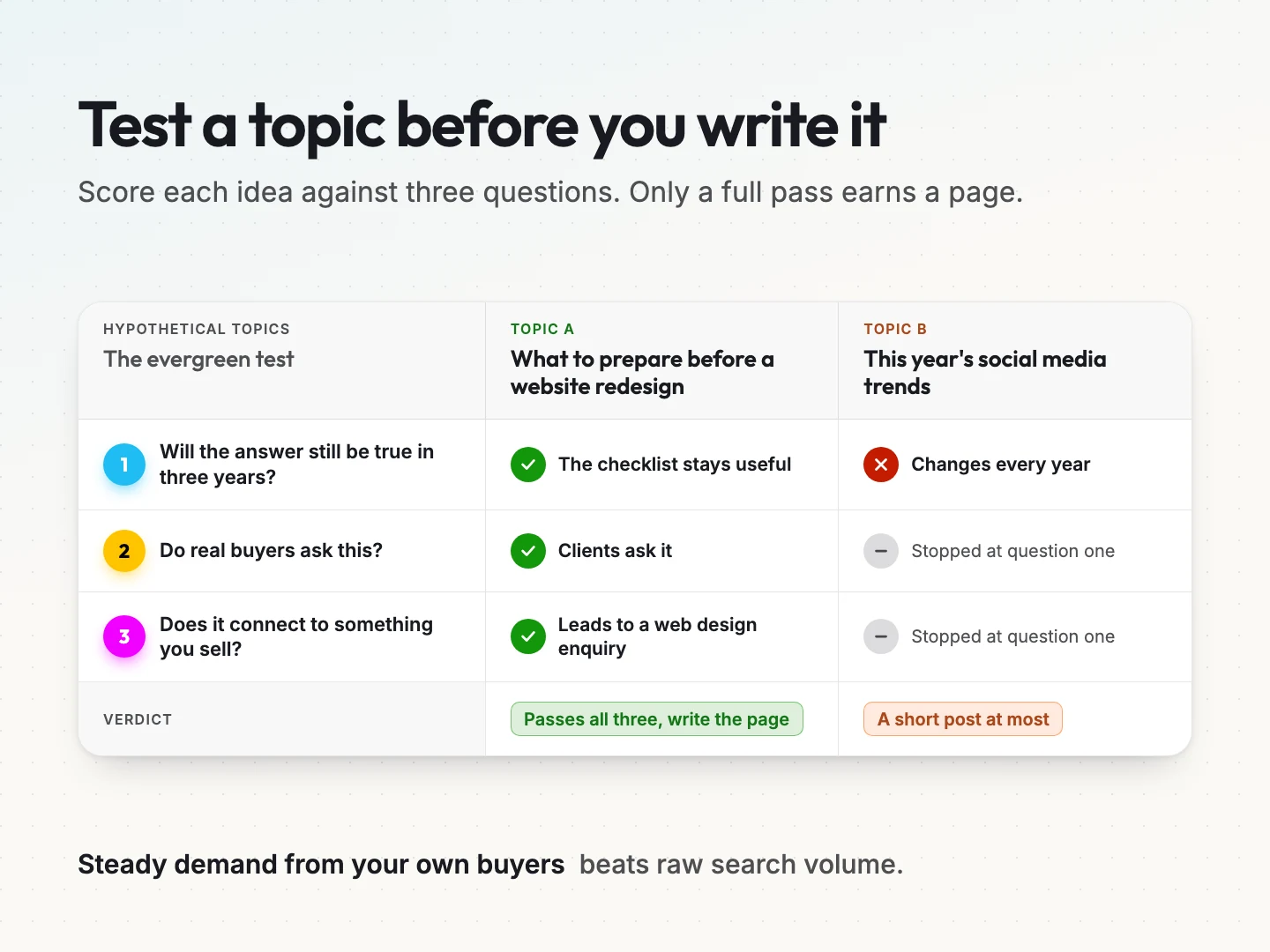
Take two hypothetical topics. “What to prepare before a website redesign” passes all three. The checklist stays useful, clients ask it and it leads to a web design enquiry. “This year’s social media trends” fails the first question, because the answer changes every year. It might still be worth a short post, but it shouldn’t be your evergreen priority.
Evergreen content formats that stay useful for years.
Some formats age better than others. The format you choose affects how long the page stays accurate and how much upkeep it needs.
| Format | The buyer question it answers | Refresh need |
|---|---|---|
| How-to guide | How do I do this myself? | Low, unless the steps depend on a tool |
| Cost or pricing explainer | What will this cost me, and why? | Medium, because prices move |
| Decision guide | Which option is right for my situation? | Medium, when options change |
| Glossary or FAQ page | What does this term mean? | Low |
| Checklist or template | What do I need before I start? | Low |
How-to guides and checklists tend to need the least upkeep, because the steps rarely change. Cost explainers bring some of the strongest buying intent but need more care. Show the factors that drive the price and link to a live pricing page, rather than printing figures that will date the page.
Decision guides work well when buyers compare options, such as “agency or freelancer” or “build or buy”. Keep the criteria general, so the page holds up when specific products change. If you name tools, date the comparison in the text and add it to your refresh list.
Whatever the format, write for a person who knows less than you. Search intent is the reason behind a search, so match the format to it. Someone typing “how to” wants steps. Someone typing “cost” wants a range and the reasons behind it. A content marketing plan can help you assign formats across a whole set of pages.
Build each evergreen page to turn readers into leads.
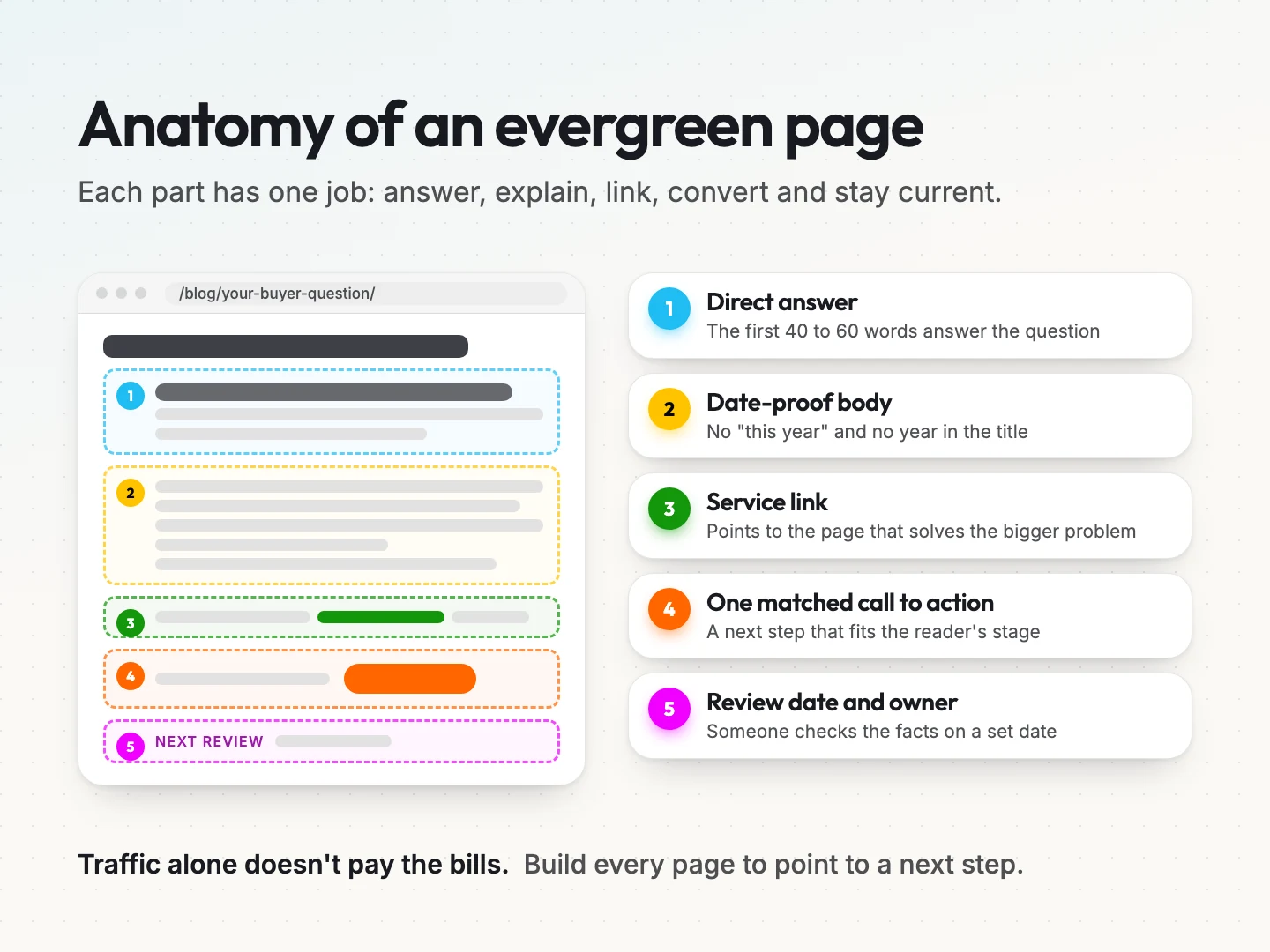
Traffic on its own doesn’t pay the bills. An evergreen page earns its keep when some readers take the next step with you. Four habits make that more likely.
Answer the question in the first paragraph.
Put the direct answer at the top, in plain words, in the first 40 to 60 words. Readers decide quickly whether a page will help them. A clear answer up front keeps them reading and gives search engines and AI tools a clean passage to quote.
After the answer, add the detail. Explain the reasons, the steps and the exceptions. The opening answers the question, and the rest of the page earns the reader’s trust.
Write without dates that expire.
Small phrases quietly age a page. “This year”, “recently”, “the latest version” and a year in the title all tell readers the page is old once that time has passed.
- Leave the year out of the title and the URL.
- Replace “this year” with a specific condition, such as “when a tool changes its pricing”.
- Describe what a tool does rather than its current menu names.
- Keep screenshots to a minimum, because they date faster than text.
Google’s helpful content guidance also warns against changing the date on a page to make it look fresh when the content hasn’t changed in substance. A real update changes the facts, not only the timestamp.
Link to the service page the reader needs next.
An internal link is a link from one page on your site to another. Every evergreen page should link to the service page that solves the reader’s bigger problem. A guide on preparing for a redesign links to web design. A guide on choosing keywords links to search engine optimization.
Use anchor text, the clickable words, that says where the link goes. “Our email marketing service” is clear. “Click here” tells the reader nothing. Link to two or three related guides as well, so readers who aren’t ready to buy can keep learning on your site.
Match one call to action to the reader’s stage.
A call to action (CTA) is the next step you ask the reader to take, such as booking a call or downloading a checklist. Choose one main CTA per page, and match it to how ready the reader is.
- Early stage. Someone reading “what is local SEO” may not be ready to talk. Offer a checklist or a newsletter instead.
- Comparing options. Someone reading a decision guide may want a short consultation.
- Ready to buy. Someone reading a cost explainer is often close to a decision. A direct “talk to us about your project” fits.
One clear CTA usually works better than four competing ones. Readers who want more will find your navigation.
Where affiliate revenue fits in an evergreen content plan.
An affiliate link is a tracked link to another company’s product. When a reader buys through it, you earn a commission. For some businesses, evergreen guides are a natural home for these links. For most, affiliate income should stay a small extra, not the goal of the page.
When affiliate links make sense for a business blog.
Affiliate links fit when you already recommend a product to clients and use it yourself. A web studio might recommend a hosting company it sets up for clients. A bookkeeper might recommend the accounting software it works in every day.
They don’t fit when the product has nothing to do with your service, or when you’d never recommend it without the commission. It’s tempting to see affiliate links as free money for any blog. They aren’t. Readers can tell when a page exists to sell someone else’s product. If that hurts trust in your own service, the commission costs you more than it earns.
Disclose every affiliate link clearly.
In the United States, the Federal Trade Commission expects you to tell readers when you earn money from a recommendation. Its guide, FTC’s Endorsement Guides: What People Are Asking, covers affiliate links directly.
In plain terms, the FTC page makes four points.
- The disclosure should be clear and conspicuous, so readers can’t miss it.
- The closer it sits to the recommendation, the better. Readers should see the disclosure and the link together.
- The words “affiliate link” alone may not be clear, because some readers won’t know you get paid.
- A short plain sentence works, such as “I get commissions for purchases made through links in this post.”
A note at the bottom of the page or on a separate disclosure page is easy to miss. Put it near the link instead. This is educational guidance, not legal advice. If affiliate income is a real part of your business, check your setup with a qualified professional.
Keep recommendations honest and easy to update.
Affiliate programs change their terms, products get discontinued and better options appear. List every affiliate link in a simple sheet with the page it sits on, the program and the date you last checked it. Review that sheet whenever you refresh the page.
Only recommend what you would recommend without the commission, and say who it’s not right for. That honesty is what keeps the page useful for years. If you want to build affiliate income as its own channel, our guide to niche affiliate marketing covers that route in detail.
How to measure whether evergreen content is working.
You can’t improve what you don’t measure. A short review every quarter tells you which pages bring leads, which are fading and which need work. You don’t need a complex dashboard to start.
Google Search Console’s Performance report shows four numbers for your pages: clicks, impressions, click-through rate and average position. Impressions count how often your page appeared in search results. Clicks count how often someone opened it. Click-through rate is the share of impressions that turned into clicks. You can filter by date range and see results grouped by query and by page.
Two simple formulas cover most of what a small business needs.
Lead conversion rate. A conversion is the action you want a reader to take, such as filling in your form. A session is one visit to your site. Divide the leads that came from the page by the page’s sessions over the same period. Hypothetical example: 10 leads from 1,000 sessions gives a lead conversion rate of 1%.
Traffic retained year over year. Divide this year’s sessions for a set of months by last year’s sessions for the same months. Hypothetical example: 900 sessions this spring against 1,000 last spring means the page kept 90% of its traffic. Comparing the same months removes seasonal swings.
Use your own numbers, not industry averages. Every site, audience and offer is different.
At each quarterly review, ask three questions.
- Which evergreen pages brought leads, and which brought only visits?
- Which pages lost traffic compared with the same months last year?
- Which queries show impressions but few clicks, suggesting the title or opening needs work?
The answers feed straight into your refresh list. If tracking leads by page is hard in your current setup, analytics dashboards can pull the numbers into one view.
Keep evergreen content accurate with a refresh schedule.
Every page slowly loses visits if nobody looks after it. Facts age, competitors publish newer answers and links break. That slow decline is often called content decay. A simple refresh routine stops it from creeping up on you.
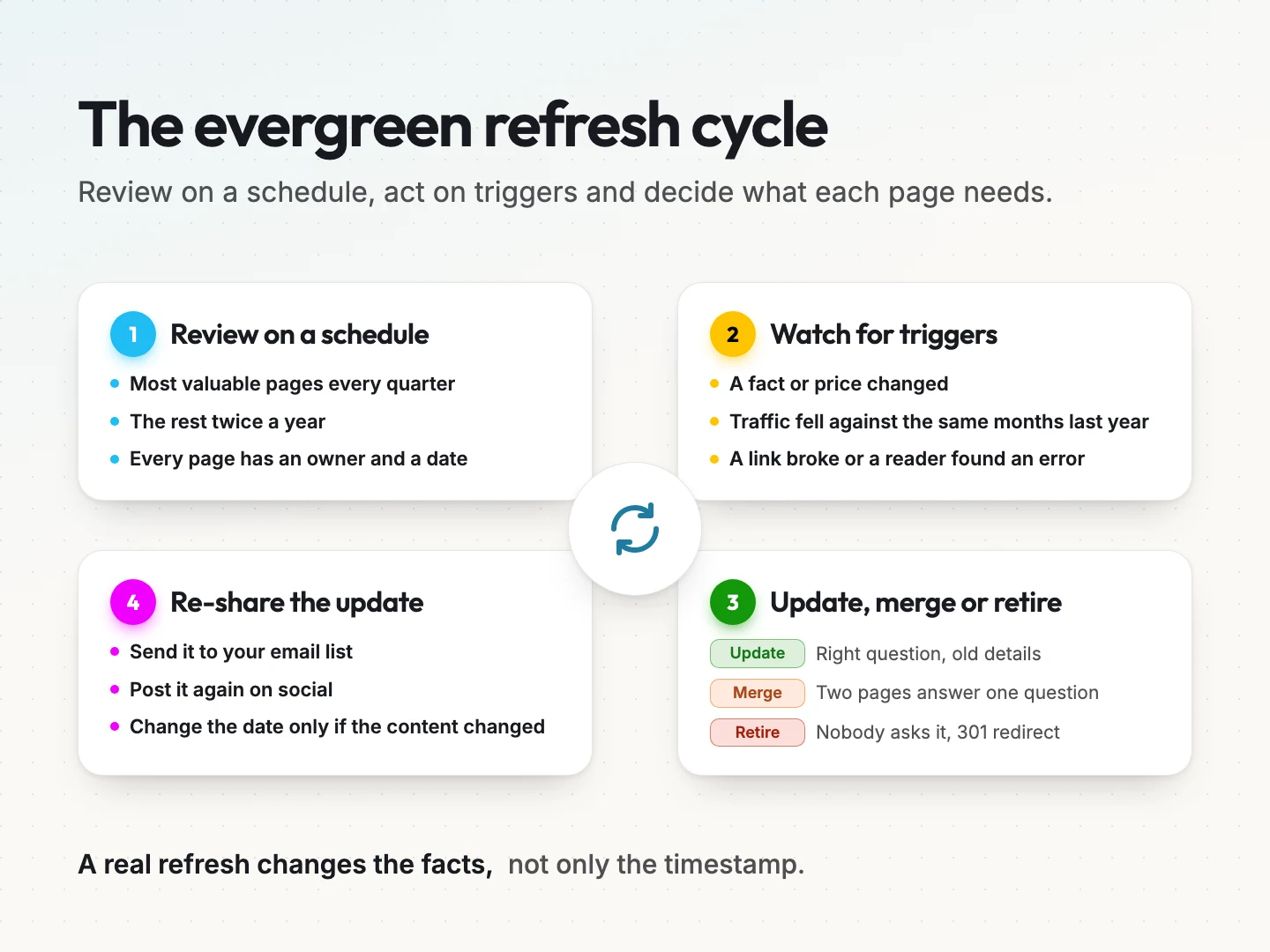
- Set a review cadence. Give every evergreen page a review date and an owner. Many teams check their most valuable pages every quarter and the rest twice a year. Treat this as a practice to adapt, not a fixed rule.
- Watch for triggers. Some changes need action before the next review. A fact or price changed, traffic dropped compared with the same months last year, a link broke or a reader pointed out an error.
- Decide to update, merge or retire. Update when the question is still right but the details are old. Merge when two pages answer the same question and compete with each other. Retire when nobody asks the question anymore.
- Redirect anything you retire. Point a retired or merged page to the closest live page with a permanent redirect, often called a 301. That keeps visitors and links from hitting a dead end.
- Re-share the updated page. Send it to your email list or post it again. An improved guide deserves a second introduction.
A common shortcut is to change the date and nothing else. That isn’t a refresh. A real one checks every fact, replaces old examples, fixes links and improves the parts readers skip. Change the date only when the content has changed.
Where automation helps maintain evergreen content.
Once you have more than a handful of evergreen pages, keeping track by memory stops working. Automation can take on the repetitive watching and drafting, so your team spends its time on judgement.
These tasks suit automation well.
- Review reminders. A scheduled task sends each page owner a reminder when the review date arrives.
- Traffic alerts. A rule compares each page’s sessions with the same months last year and flags pages that drop past a level you choose.
- Broken link checks. A crawler checks every link on your evergreen pages and lists the ones that fail.
- Refresh drafts. AI drafts suggested updates, such as a clearer opening or a missing step, for a person to review.
- Repurposed snippets. AI turns an updated guide into a short email or social post for you to edit.
AI can’t keep content fresh on its own, though. It can’t check whether your prices changed, whether a recommendation still holds or whether an example matches your real process. A person checks the facts and approves every change before it goes live.
Scayver Graphix builds AI content workflow automation for this kind of upkeep, with a person approving each update. Updated guides can also feed your email marketing, so subscribers see your best answers again.
Final thoughts on building an evergreen content library.
Evergreen content is a slow, steady asset. Pick questions your buyers ask, test each one before writing and build every page to answer fast and point to a next step. Then measure what each page brings and refresh it before it fades.
Start small. A few strong evergreen pages tied to your main services usually do more than a stack of thin ones. Add a page each month, review the set every quarter and let the library grow with your business.
If you’d like help choosing your first evergreen topics and building pages tied to your services, talk to a specialist about your content plan.
Was this article helpful?