



Choose an automation platform by who owns it after launch, not by its feature list. Options include a WordPress plugin, a hosted tool such as Zapier or Make, or a managed build. For each, name who sees a failed run, who fixes it, who pays for upkeep and how you leave. Pick the route where every answer has a name.
Most comparison guides rank tools on integrations, price per task and ease of use. Those things matter. They don’t tell you what happens on the morning a website enquiry never reaches your CRM. Someone has to notice, find the failed run, fix the cause and decide whether to send it again.
This guide compares the three common routes on the questions that shape your week after launch. You’ll name an owner for each stage, check how failures are handled, count the costs that sit under the price and plan your exit. It ends with twelve route checks you can run on any option before you commit.
The real decision behind an automation platform.
An automation is a set of steps that runs on its own when something happens, such as a form being submitted. People also call it a workflow, or an integration when it connects two apps. The platform, or route, is where those steps run and who looks after them.
Small businesses usually pick from three routes.
- A WordPress plugin. The automation runs inside your own website, using a plugin installed next to your forms and pages.
- A hosted tool. The automation runs on a service such as Zapier, Make or a cloud version of n8n, and your apps connect to it through logins.
- A managed build. A developer or agency builds the automation for you, on a tool or in custom code, and often hosts it too.
Each route can do the job for a simple task. The real difference is who carries the work after the build is finished. That is the part most buying guides skip, and it is the part you live with every month.
One thing is true of all three routes. Every automation fails at some point. A login expires, someone renames a form field, or a connected app changes how it sends data. That is normal, and it is not a sign you picked a bad tool.
So the useful question is not which tool has the most features. It is who notices a failure, who fixes it and who pays for that time. A tool with a huge list of integrations is not safer if nobody is watching it.
Two terms come up often from here. A failed run is one time the automation started and did not finish. A replay means sending that run through again after you fix the cause.
Write down the one task and what must never happen.
Before you compare anything, write the task in one sentence. Name the trigger, the result and the person who receives it. Then list what the automation must never do. This short note becomes the test you hold every route to.
Here is a hypothetical example we’ll follow through the guide. A small service business wants every website enquiry to create a contact in its CRM and send an alert to the staff member on duty. The business is invented for this guide, and so are its choices.
Its never list is short. The automation must never add a person to the newsletter without consent. It must never create a duplicate contact. It must never send an enquiry to a former employee’s inbox.
That never list matters more than it looks. A lot of automation damage comes from actions nobody planned, not from planned steps failing. If a route cannot respect the never list, it is out before features are discussed.
Keep this step brief. You do not need a specification document. You need a sentence, a short list and a decision about which accounts the automation can touch.
Record which logins and permissions each connection may use. If you are planning something larger with AI, the common AI system design mistakes start with this same step of defining the problem before choosing the technology.
WordPress plugin, hosted tool or managed build compared.
The three routes differ less in what they can do and more in where ownership lands. Each one hands the daily care of the automation to a different person.
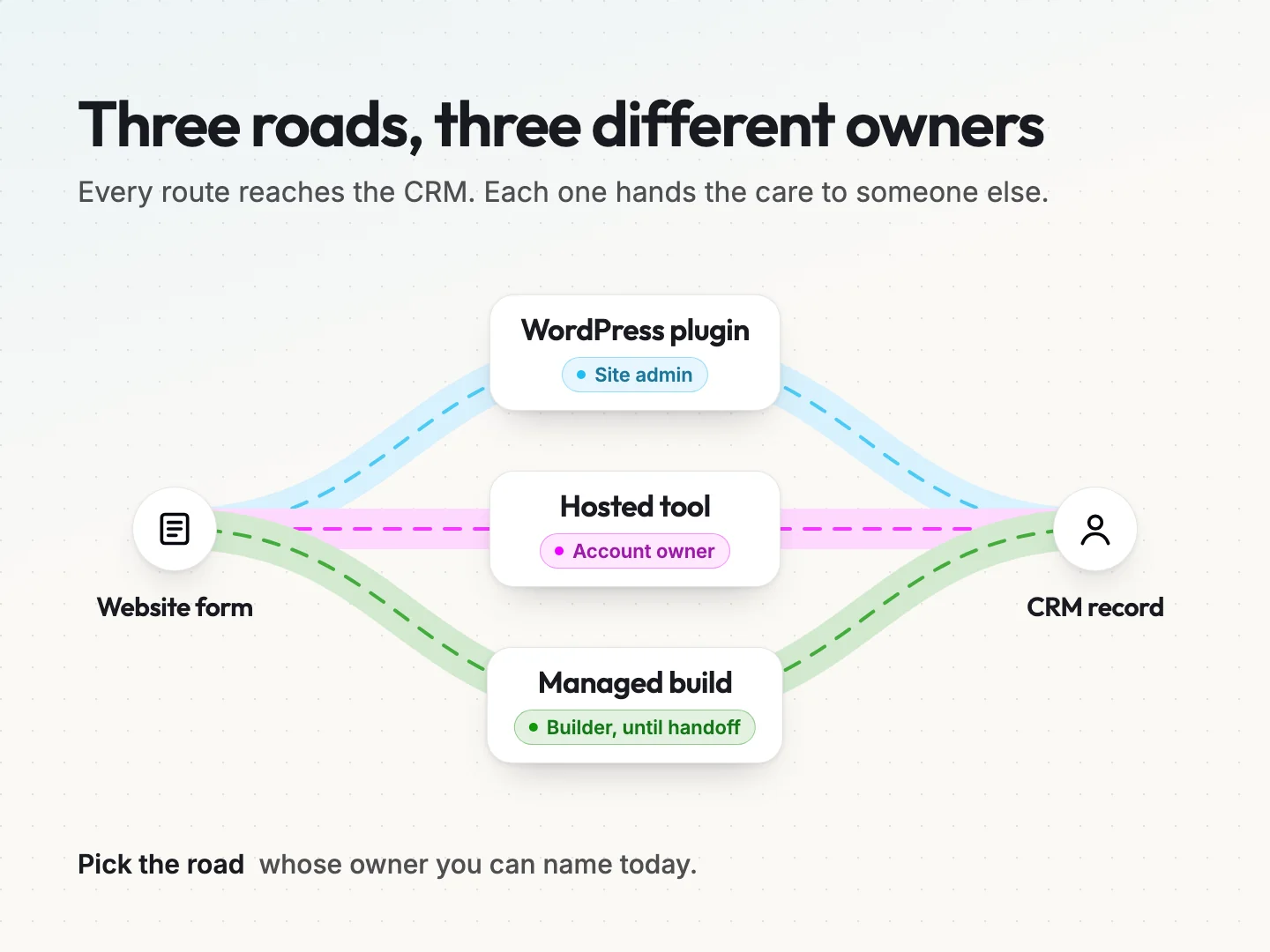
The table compares them on four questions that matter after launch.
| Question | WordPress plugin | Hosted tool | Managed build |
|---|---|---|---|
| Where it runs | Inside your website | On the vendor’s servers | Wherever the builder sets it up |
| Who updates it | Whoever maintains the site | The vendor updates the platform, you update each workflow | The builder, if your agreement says so |
| How a failure shows up | Plugin logs, if the plugin keeps them | Run history and alerts, depending on the plan | Whatever alerts the builder set up |
| How you leave | Rebuild elsewhere or keep the plugin | Export if offered, or rebuild from written steps | Depends on who owns the code and accounts |
WordPress plugin: the site admin carries it.
A plugin keeps the automation close to your forms, which can mean fewer moving parts. It also ties the automation to the health of your website. When WordPress, the form plugin or the automation plugin updates, someone has to check the automation still works.
If your site already has a maintenance routine, a plugin fits inside it. If nobody updates the site, a plugin quietly ages with it. Our notes on WordPress integrations cover how site-based connections fit with the rest of your tools.
Hosted tool: the account owner carries it.
A hosted tool such as Zapier or n8n runs the steps on its own servers and keeps a history of each run. The vendor maintains the platform itself. You still own every workflow you build on it.
When a connected app changes or a login expires, the fix is yours. Hosted tools also bill by usage, so the account owner watches the bill as well as the runs. That makes one person the natural owner of both cost and care.
Managed build: the builder carries it, until the handoff.
A managed build hands the work to someone with more experience. That is often the right call for anything that touches payments, customer records or several systems at once.
The catch is that building and owning are separate jobs. Many agreements cover the build and a short support window. After that, ownership falls back to you unless a care agreement says otherwise. Ask what happens in month four as well as in week one.
Matching the route to the kind of task.
A simple, low-risk task with two apps often suits a hosted tool, because the run history is built in. A task that lives entirely inside your website, such as tagging form entries, can suit a plugin. A task that moves money, crosses several systems or needs custom rules usually earns a managed build.
None of these is the safe default. The right route is the one whose owner you can name today.
Name an owner for every stage after launch.
An automation lives through six stages. It gets built, it runs, it fails, it gets recovered, it changes and one day it gets moved or switched off. Many quotes, plans and tutorials cover only the first stage. The other five are where small teams get surprised.
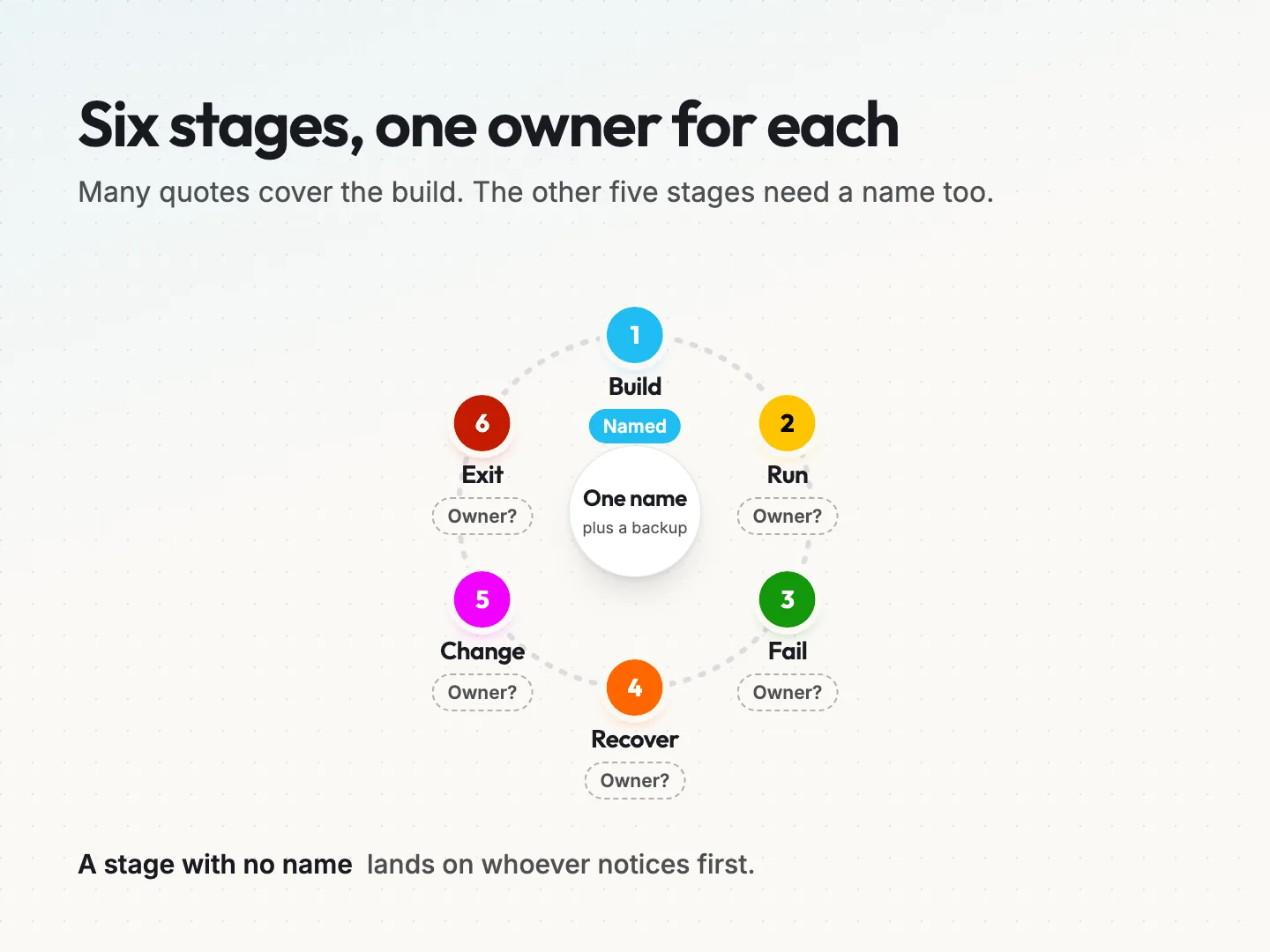
Give each stage a named person, plus a backup who can cover for a week.
- Build. The person who sets it up and writes down how it works.
- Run. The person who checks it is still working, even when nothing looks wrong.
- Fail. The person who receives the alert when a run fails.
- Recover. The person who fixes the cause and decides whether to replay the run.
- Change. The person who updates it when a form, app or process changes.
- Exit. The person who holds what you need to move it or switch it off.
In the hypothetical service business, the office manager builds the automation on a hosted tool. The office manager also owns run, fail and recover. The owner approves any change, and the office manager keeps the exit notes with the owner as backup.
One person carries most stages, which is common in a small team. What matters is that each stage has a name, not that each has a different one.
Use roles while you plan and names when you sign off. “Marketing” is not an owner. “The office manager, with the owner as backup” is an owner. If a stage has no name, the work still exists. It lands on whoever notices first, which is often a customer.
Signs a stage has no owner yet.
You can spot a gap before it costs you. Alerts go to a shared inbox that nobody is responsible for reading. The person who built the automation has left, and nobody else knows the login. A form changed last month and nobody checked the automation afterwards. Each of these is a missing name, not a broken tool.
Check how each platform handles a failed run.
Here is a misconception worth clearing up. Many owners assume a failed run retries itself. On most tools, recovery depends on your plan and on a setting someone has to switch on. Find that setting before you commit, not after the first missing enquiry.
Three vendor help pages show how much this varies. Plans and settings change often, so treat these as examples to check on your own account, not as current terms.
- Zapier. Its help page on replaying failed Zap runs, updated May 29, 2026, says manual replay of errored runs works on the Free plan. Autoreplay, which retries errored runs automatically, is listed for the Professional, Team and Enterprise plans. An account owner or super admin turns it on for the whole account.
- Make. Its help page on incomplete executions says failed runs are stored only when “Store incomplete executions” is switched on in a scenario’s settings. It states that incomplete executions “are disabled by default.” The number stored is capped by your account’s usage allowance.
- n8n. Its documentation on error handling describes an error workflow that you set for each workflow in its settings. That error workflow starts with an Error Trigger and can send an email or chat alert when a run fails. Someone has to build it and point each workflow at it.
The pattern is the same across all three. The tool gives you a way to see and recover failures. A person has to turn it on, read the alerts and act on them.
A replay can create a duplicate.
A replay sends the run through again. If part of the first run worked, a full replay can repeat that part. In the example, the CRM contact might be created before the staff alert fails. Replaying the whole run could then create the same contact a second time.
Zapier’s same help page notes that replaying an entire run counts as a new run, and successful steps count toward task usage again. So a careless replay can cost you twice, once in duplicate records and once in usage.
The person replaying needs one habit. Check the destination first. Look in the CRM for the contact, then replay only what is missing. For detection, manual fallbacks and recovery steps for one critical automation, use our resource on planning automation failure handling.
Three questions to ask of any route.
Ask them of every option. Where do failed runs show up? Who gets told, and how fast? Can you replay one step, or only the whole run? A WordPress plugin may keep only a basic log. A managed build shows whatever its builder set up. Get the answers in writing before you choose.
Count the real cost beyond the monthly price.
The visible price is the plan fee or the build quote. It is real, and it is rarely the whole cost. Much of what you pay for an automation sits under the waterline, in usage and in hours.
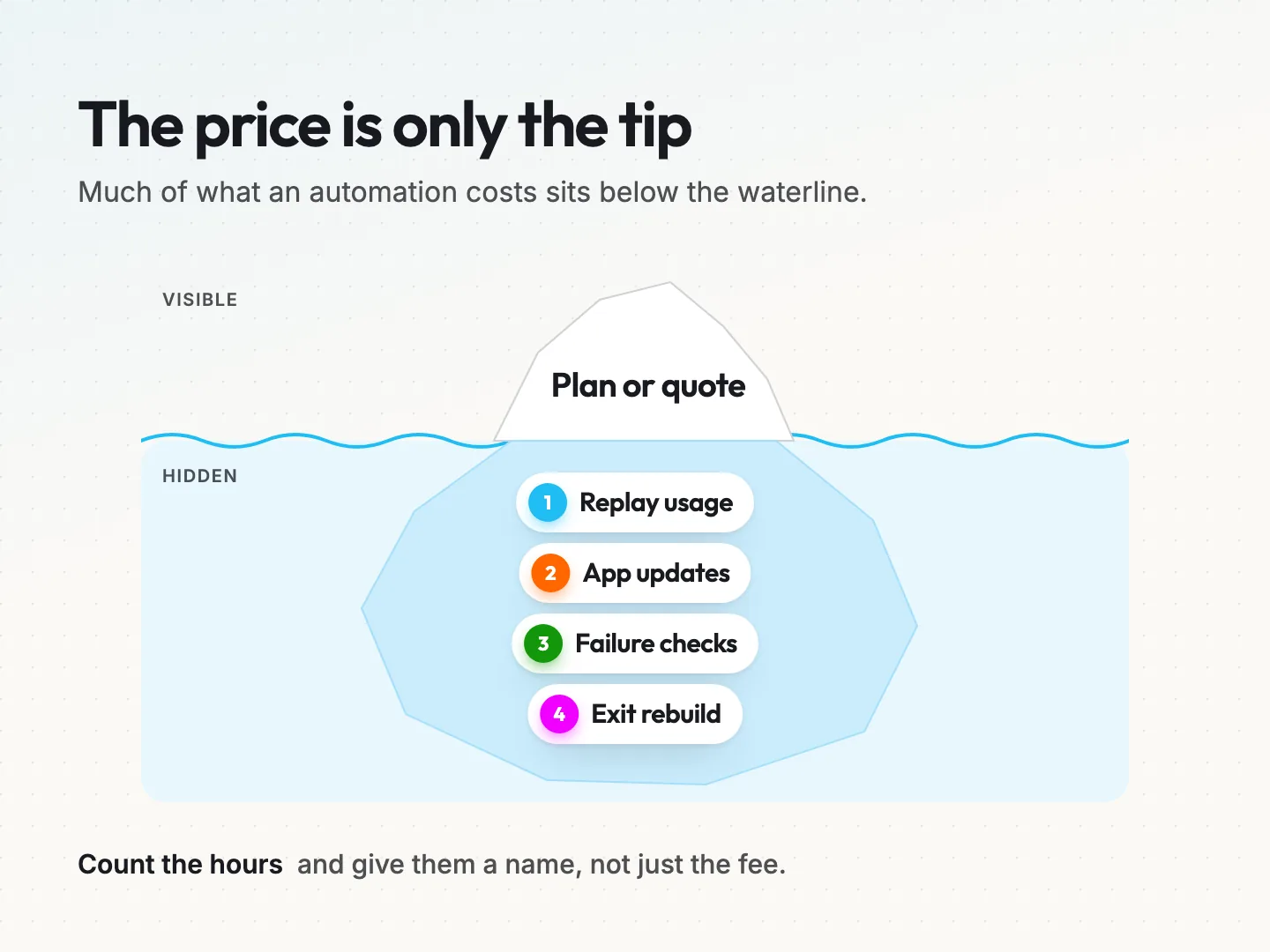
Four costs tend to hide there.
- Replay usage. Hosted tools bill by usage, often counted as tasks or operations, the units each step uses. Replays and retries can use more of them, as the Zapier note above shows.
- App updates. Plugins, forms and connected apps change. Someone spends time checking and fixing the automation after each change.
- Failure checks. Even a quiet automation needs someone to look at its run history. That time comes out of a real person’s week.
- Exit rebuild. If you cannot export the workflow, leaving means building it again on the new route.
You do not need exact figures to compare routes. Estimate the hours per month for checks and updates, and attach a name to them. A route with a lower fee and no owner for updates can cost more once you count those hours.
Write the estimate next to each route in one line. A hypothetical line might read “plan fee, one hour a month of checks and a rebuild if we leave.” That single line makes the hidden costs as visible as the price.
For a WordPress plugin, the update hours belong in the site’s maintenance routine. If you already pay for website care plans, ask whether automation checks are inside that scope or outside it.
Plan your exit before you commit to a platform.
“We can switch tools later” is true, but only if you kept the right things from day one. Vendor lock-in means being stuck with a tool because leaving costs too much. It rarely comes from the contract. It usually comes from missing notes.
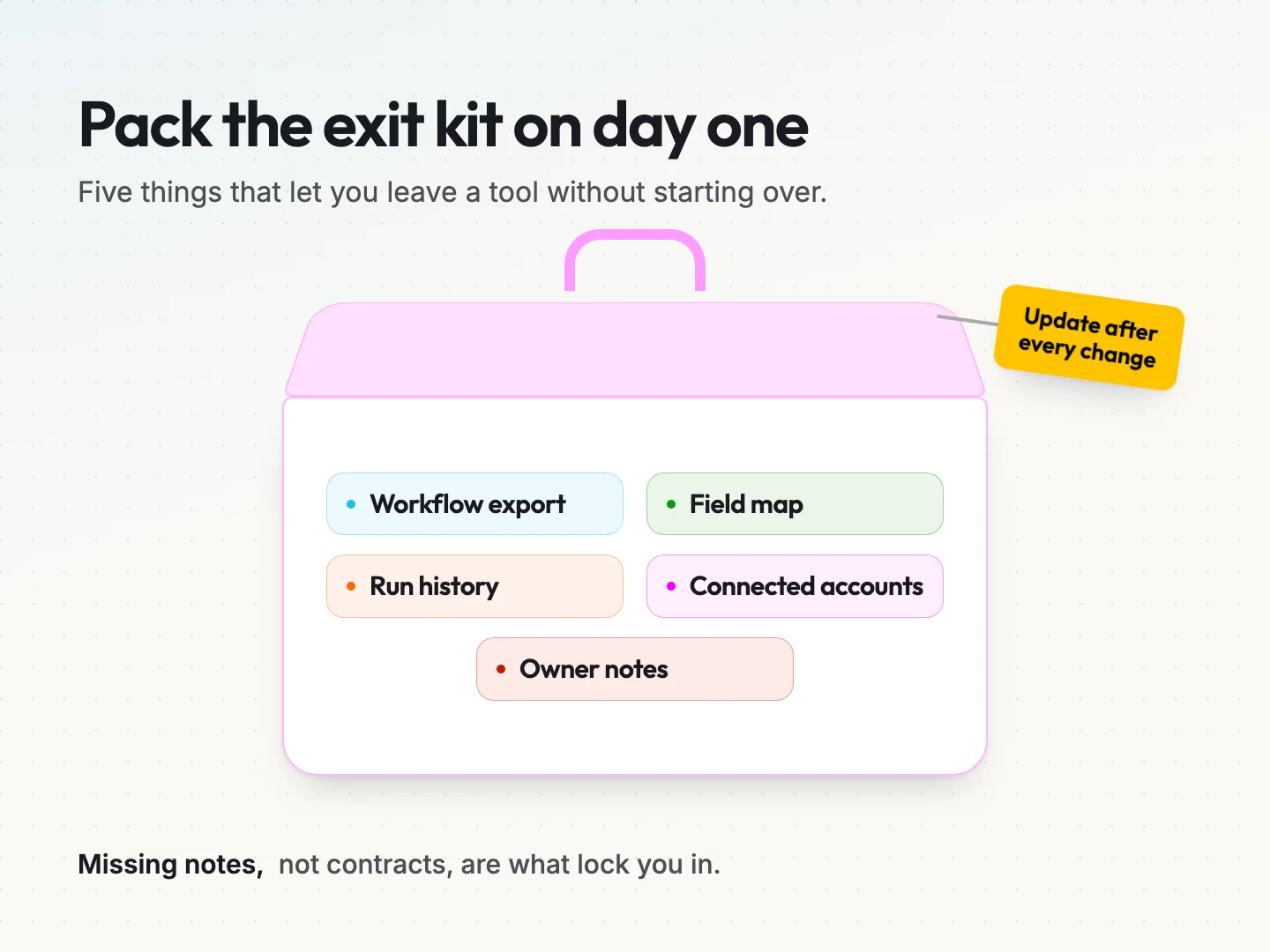
Keep an exit kit for each automation. It holds five items.
- The workflow export or written steps. Some tools export a file. The n8n guide to exporting and importing workflows says it saves workflows in JSON format, a plain text file you can import again. Where a tool has no export, write each step down in plain words.
- The field map. Which form field goes to which CRM field, plus any rule that changes the data in between.
- Recent run history. A sample of successful and failed runs, so you can test the new route against real cases.
- The connected accounts list. Every login and app connection, so you can switch each one off when you leave.
- Owner notes. Who owns each stage, the never list and anything learned from past failures.
One caution on exports. The same n8n page notes that exported files include credential names and IDs, and that the names could be sensitive. Review any export before you share it with a new supplier.
Decide who holds the kit. With a managed build, ask in writing who owns the code, the hosting account and the logins at handoff. If the builder owns them all, your exit depends on their goodwill.
Update the kit whenever the automation changes. An exit kit from a year ago describes an automation you no longer run.
Run the twelve route checks before you choose.
These twelve checks turn the sections above into a decision. Run them for each route you are considering. Copy the table into a document or print it, then mark each check yes or no for each route.
| No. | Route check | Route A | Route B | Route C |
|---|---|---|---|---|
| 1 | The task is written in one sentence with its result | |||
| 2 | The never list is written and the route can respect it | |||
| 3 | A named person builds it and writes down how it works | |||
| 4 | Failure alerts reach a named person, not an unread inbox | |||
| 5 | Failed runs are stored and you know where to find them | |||
| 6 | A named person can replay a run and checks for duplicates first | |||
| 7 | You know whether automatic retry is on, and who turned it on | |||
| 8 | A named person updates it when a form, plugin or app changes | |||
| 9 | A backup can do the owner’s job for a week | |||
| 10 | The full monthly cost is written down, including hours | |||
| 11 | You can export the workflow or have written steps for it | |||
| 12 | You have a list of connected accounts to switch off when you leave |
A route is ready to choose when all twelve checks are a yes. Every no is a question to ask before you sign, subscribe or switch anything on. A “not sure” counts as a no until someone answers it.
Ask the right person for each route. For a hosted tool, that is whoever will own the account. For a plugin, it is whoever maintains the site. For a managed build, put the twelve checks into your request for a quote and ask for written answers.
The hypothetical example, scored.
The service business runs the checks on three options. The hosted tool scores ten of twelve. It misses check 7, because nobody has decided whether automatic retry is on, and check 9, because nobody covers the office manager’s holidays yet.
The WordPress plugin scores eight of twelve. Its log is thin, nobody owns plugin updates, nobody knows how it retries and there is no export. That means checks 5, 7, 8 and 11 are a no.
The managed build scores five of twelve. The quote covers the build and nothing after it, so checks 4, 6, 7, 8, 9, 10 and 12 have no owner yet.
The lesson is not that the hosted tool wins. It is that the hosted tool is ready once two gaps close, a decision on retries and a named backup. The managed build would be ready too if the builder offered a care agreement that covered the missing stages. The checks tell you what to ask, not which brand to buy.
Final thoughts.
Choosing an automation platform is a decision about people as much as software. Features decide whether a tool can do the task. Owners decide whether it keeps doing it after the first expired login.
Start with one automation that matters, such as enquiries reaching your CRM. Write the task and the never list. Run the twelve checks on two or three routes, and fill every gap before anything is built. Then add the next automation with the same checks.
If you want a second pair of eyes, Scayver Graphix offers AI workflow automation built with named owners and an exit kit written down from the start. Talk to a specialist about the automation you want to run and who should own it.
Was this article helpful?
Part of the free path Mastering AI Automation.


