Integration requirements are the short written rules you agree on before two apps are connected. Write four things on one page: the trigger that starts the connection, the action it must take, the receipt that proves it happened and the result that counts as done. Add a matching key and a named owner, and most duplicate records and silent failures never happen.
Most small businesses skip this step. Someone opens an automation tool, picks two apps, maps a few fields and turns it on. It works in the test. Then, weeks later, a customer gets two invoices, a lead never reaches the sales inbox or a booking shows in the calendar but not in the CRM. Nobody knows when it started, because nobody wrote down what working meant.
This guide gives you a one-page integration contract you can fill in before anyone builds. It works whether you connect apps yourself with a no-code tool or hand the job to a developer. You also get a duplicate checklist, a failure plan and five tests to run before go-live.
What integration requirements mean for a small business.
An integration is any link that moves data from one app to another without someone retyping it. A form that sends leads to your CRM is an integration. So is an online store that creates invoices in your accounting tool, or a booking page that adds events to a shared calendar.
Integration requirements are the decisions behind that link, written down. In large companies, they fill long specification documents. You don’t need that. You need answers to a handful of plain questions, agreed before anyone touches a setting.
- What starts it? The event in the first app.
- What should happen? The exact change in the second app.
- How will you know? The proof that the change happened.
- When is it finished? The result a person can check.
- Who fixes it? The person who hears about a failure and acts.
Think of it like a delivery note between two departments. The sender lists what is in the box, the receiver signs for it and someone checks that the order is complete. Your apps need the same handshake, written in words a manager can read.
For a simple connection, this is usually a short meeting, not a project. Skipping it rarely saves time, because the same questions still come up later. They arrive as customer complaints instead of planning notes.
Why connected apps fail quietly.
Connected apps rarely crash in a way you notice. They fail quietly. The automation tool shows a green tick, yet the data on the other side is wrong, missing or doubled. Most of these problems come from a few predictable causes.
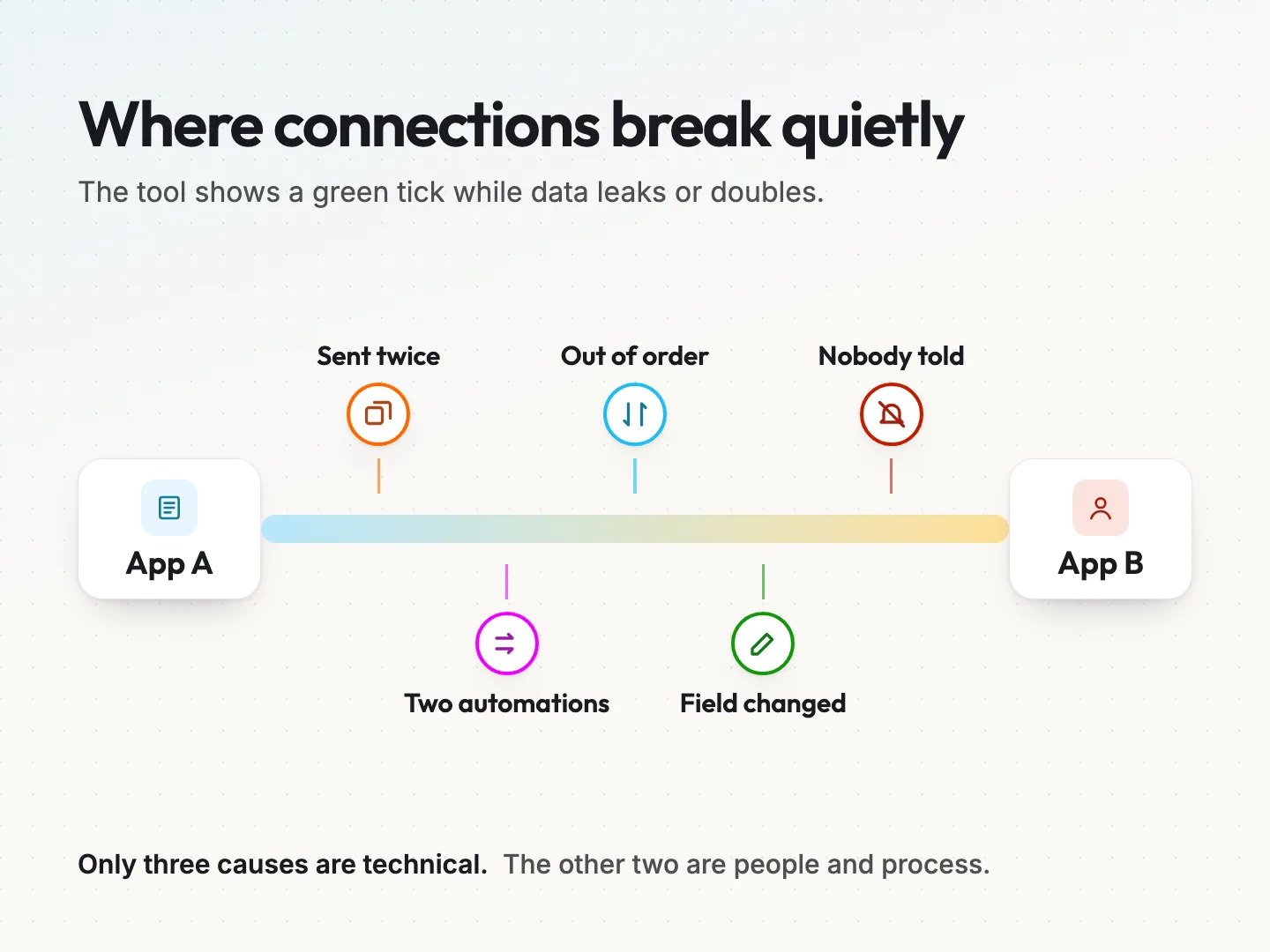
The same event arrives twice. Many apps send updates using webhooks, which are automatic messages one app sends another when something happens. If the receiving side answers slowly, the sender often tries again.
Stripe’s webhook documentation, which we read on 13 October 2026, says it retries live-mode events for up to three days. It also warns that an endpoint “might occasionally receive the same event more than once.” Other services behave differently, so check the documentation for your own tools.
Each connection only knows itself. Zapier’s help page on duplicate data, updated 29 May 2026, explains that its duplicate check runs inside a single Zap. If two Zaps use the same form as a trigger, both run. The same page says instant triggers skip that check. What happens at the action step depends on the receiving app, and some apps create a second record.
Events arrive out of order. An update can land before the record it updates. Stripe states that it does not guarantee delivery order. If your connection assumes a new record always arrives before its payment, one late message can leave that record half finished.
A field changes shape. Someone renames a form field, adds a dropdown option or switches a date format. The connection keeps running, but it now writes blanks or the wrong value.
Nobody is told. The tool records an error in a log that nobody reads. The failure is real, but nobody hears about it.
Only the first three causes are technical. The last two are about people and process. That is why better software alone rarely fixes a messy integration. Clear requirements do.
The four parts of an integration contract.
An integration contract is a one-page agreement that describes a single connection. It has four core parts: trigger, action, receipt and done. Two supporting fields sit beside them, a matching key and a failure owner.
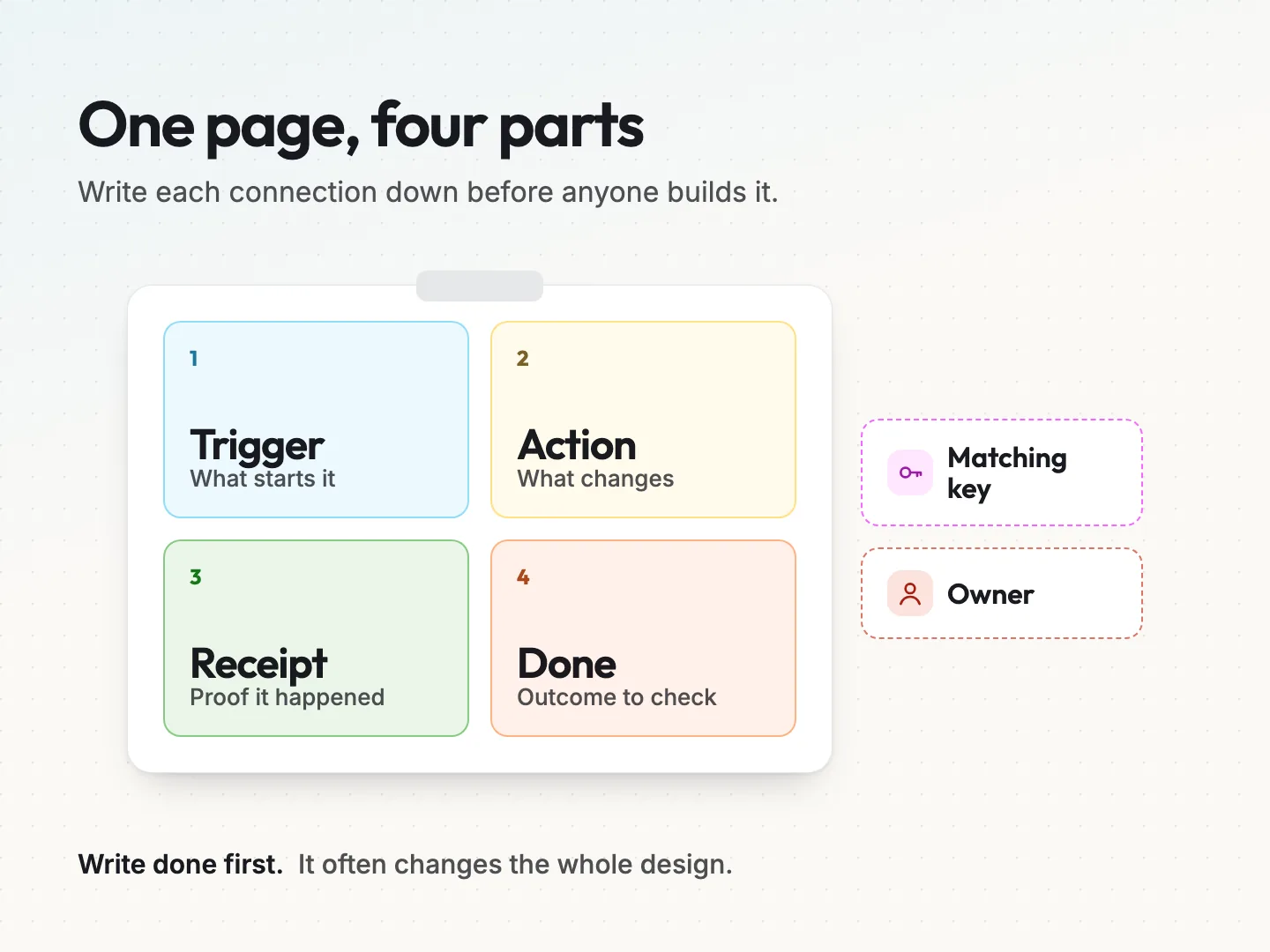
Trigger: the event that starts the connection.
Name the app and the exact event. “New lead” is too vague. “A submission on the Quote Request form, with an email address present” is clear. Say what should not trigger it as well, such as test entries, spam or entries from your own staff.
Write down whether the trigger is instant or checked on a schedule. An instant trigger fires the moment the event happens. A scheduled one, often called polling, checks for new data every few minutes. That choice affects how fast data moves and how duplicates are handled.
Action: the change the receiving app must make.
Describe the change in the second app in one sentence. Then list the fields. For each field, note where it comes from, what format it needs and what happens if it is empty.
Decide early whether the action creates a new record, updates an existing one or does both. “Find the contact by email, update it if it exists, create it if not” prevents more duplicates than any cleanup later.
Receipt: the proof that the action happened.
A receipt is evidence that the receiving app accepted the change. It might be a record ID written back to the first app, a line in a log or a note on the contact’s timeline. Without a receipt, you only know that a message was sent. You don’t know that it arrived or what it created.
Ask where the receipt will live and who can see it. A receipt only helps if a person can find it quickly when a customer calls.
Done: the result a person can check.
Done is the business outcome, not the technical step. For a lead form, done might mean the contact exists in the CRM, is assigned to a salesperson and has a follow-up task due the next working day. A connection can succeed technically and still miss done.
Writing done first often changes the whole design. Teams discover they need an extra step, such as assigning an owner, that nobody had planned.
The two supporting fields: matching key and owner.
The matching key is the value that identifies the same customer or order in both apps. Email address, phone number and order number are common choices. The owner is the named person who hears about failures and decides what happens next.
The integration contract template you can copy.
Copy this template into a document for each connection you plan. Keep it to one page. If a field takes more than a few sentences, the connection is probably two connections and deserves two contracts.
| Field | What to write | Example answer |
|---|---|---|
| Connection name | A short plain name | Quote form to CRM |
| Business reason | Why the link exists | Every quote request gets a reply the next working day |
| Trigger | App, event and conditions | Quote Request form, email present, not a test entry |
| Excluded events | What must not trigger it | Spam, staff tests, repeat submissions within 10 minutes |
| Action | The change in the receiving app | Find contact by email, update or create, add a follow-up task |
| Field map | Source field, destination field, format | Phone to Mobile, digits only |
| Matching key | The value that identifies the same record | Email address, lowercase |
| Receipt | Proof the change happened | CRM contact ID saved on the form entry |
| Done | The outcome a person can check | Contact assigned, task due next working day |
| Retry rule | What happens after a failure | Retry automatically, then alert the owner |
| Failure owner | Name and backup | Office manager, backup sales lead |
| Alert channel | Where failures are announced | Shared inbox checked daily |
| Review date | When the contract is checked again | Every quarter, or after either app changes |
Two rows deserve extra care. The excluded events row stops test entries and spam from polluting your records. The review date row matters because apps change. A connection that was correct in spring can drift after a plugin update or a new form field.
Keep every contract in one shared folder. When something goes wrong, the first question is always what this connection was supposed to do. The contract answers it in seconds.
How to prevent duplicate records before you build.
Duplicate records are the most common complaint after a new connection goes live. They waste time, confuse reports and can send a customer two copies of the same message. You prevent most of them with three decisions made on paper.
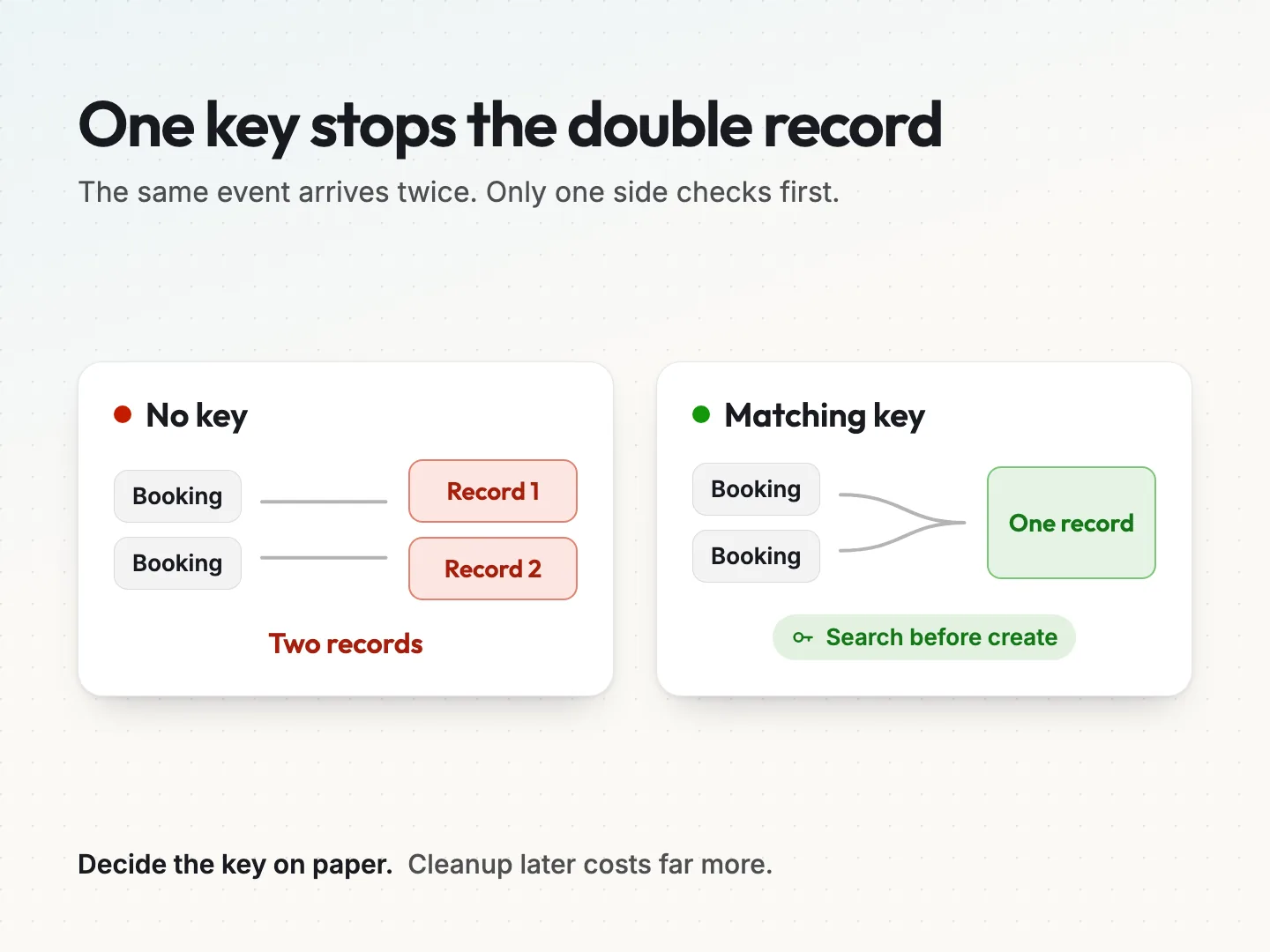
1. Pick one matching key and clean it the same way. Choose a value both apps can share, then decide how it is tidied. Email addresses should be trimmed and stored in lowercase, so Ana@Example.com and ana@example.com count as the same person. Phone numbers should keep digits only.
2. Search before you create. Ask for an action that looks up the matching key first. Many no-code tools offer a find or create step. In a custom build, a developer can add a unique rule in the database, so a second record with the same key is refused.
3. Record every event you have processed. Developers call this idempotency. It means that handling the same message twice has the same effect as handling it once. Stripe recommends logging the event IDs you have processed and skipping any you have already seen.
Hookdeck’s guide to webhook idempotency, an undated vendor article, explains the same idea in general terms. It notes that most providers promise at least once delivery, not exactly once.
The key phrase is on paper. These decisions are cheap before the build and expensive after it. Once hundreds of duplicate contacts exist, someone has to merge them by hand or pay for a cleanup.
A quick duplicate checklist.
Run through these questions before you approve a build.
- Is there one matching key, and is it present on every record?
- Is the key cleaned the same way in both apps?
- Does the action search before it creates?
- Is anything else, such as a second automation, triggered by the same event?
- Will a resent or retried event be skipped instead of processed again?
- Who merges duplicates if one slips through, and how often do they check?
The fourth question catches a common trap. Two automations built months apart can both fire on the same form. Each one works alone. Together they create twice the records.
Plan for failure with retries, alerts and an owner.
Every connection fails sometimes. A receiving app goes down for maintenance, a password expires or a usage limit is reached. The goal is not zero failures. The goal is that every failure is either fixed automatically or seen by a person quickly.
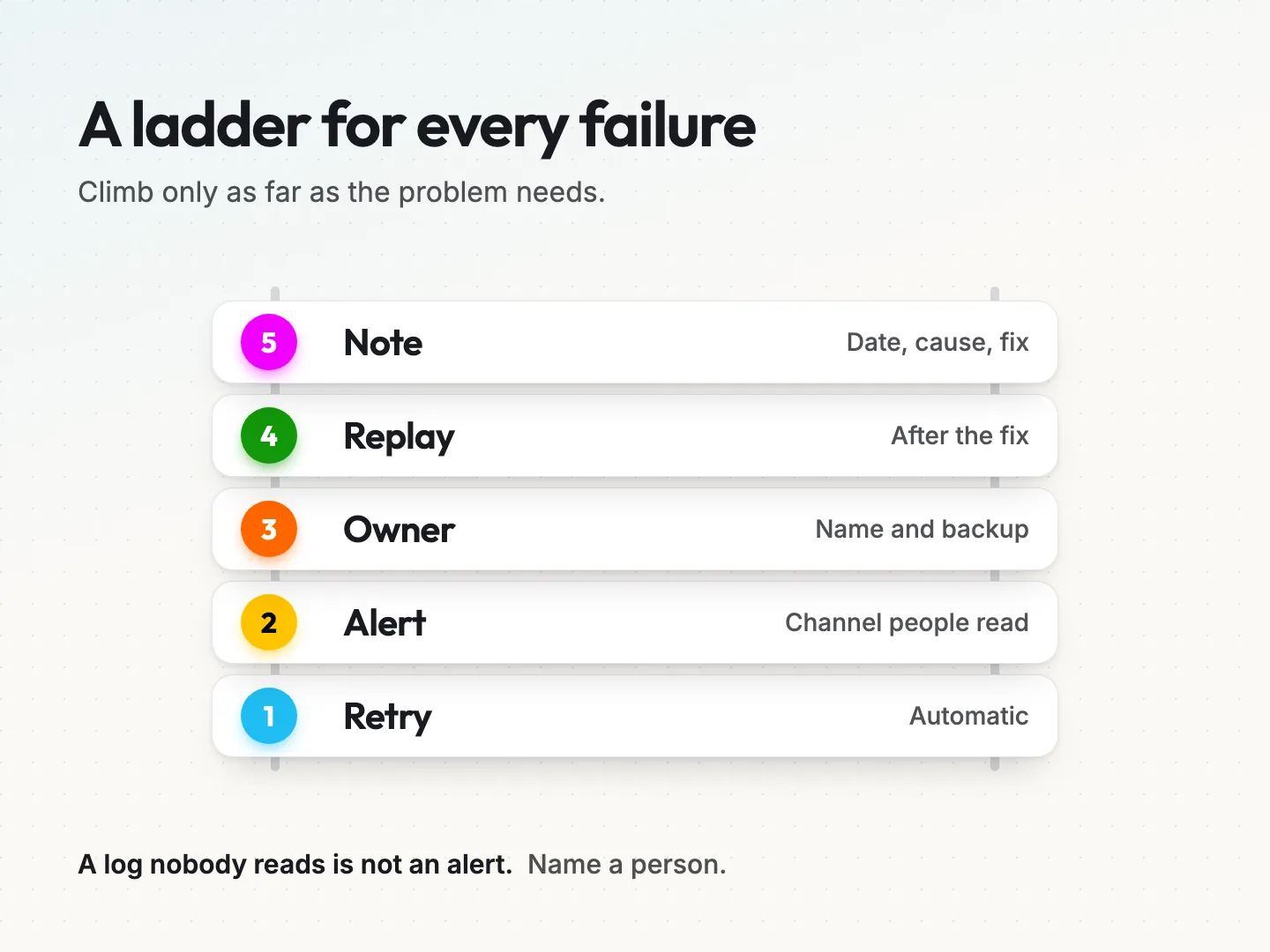
Write the failure plan as a short ladder with five rungs.
- Retry automatically. Most platforms retry failed steps for a while. Find out how long and how often, and write it in the contract. Stripe’s documentation, for example, describes live-mode webhook retries for up to three days. Your tools may retry for minutes or not at all.
- Alert a channel a person reads. When retries run out, the failure should land somewhere visible, such as a shared inbox or team chat. A log file nobody opens is not an alert.
- Give it to a named owner. One person, plus a backup, decides whether to fix, replay or ignore the failure. When everyone shares the job, nobody tends to pick it up.
- Replay safely. After the fix, the owner resends the failed events. This only works safely if the duplicate rules above are in place, because a replay is a planned duplicate.
- Note what happened. A one-line note with the date, cause and fix builds a history. Patterns show up quickly, such as the same password expiring every few months.
Also decide what the business does while the connection is down. If the CRM link fails on a Friday, does someone check the form entries by hand? A short manual fallback protects customers while the fix waits.
Test the contract with five cases before go-live.
A single happy test proves little. Before the connection goes live, run five planned cases and record each result against the contract. Use test data that is clearly labelled, so it is easy to find and delete afterwards.
| Test case | What you do | What should happen |
|---|---|---|
| 1. Normal entry | Submit one complete, valid entry | One record created, receipt saved, done reached |
| 2. Same entry twice | Submit the same entry again | The existing record updates, no second record |
| 3. Missing field | Leave out an optional field | The record is created and the blank is handled as agreed |
| 4. Receiving app unavailable | Pause the receiving app, then submit | The step retries, then alerts the owner |
| 5. Edit after create | Change the entry in the first app | The change reaches the second app, or the contract says it should not |
Check each result against the done field, not only the automation’s success message. A green tick that leaves a contact unassigned is a failed test.
Test 4 is the one teams most often skip, because breaking something on purpose feels awkward. It is also the only way to know your alerts reach a real person. If you cannot pause the receiving app safely, ask your developer or platform for a test mode.
Keep the results with the contract. They become your baseline for the next change.
Field mapping mistakes to catch on paper.
The field map is where small errors hide. Each one looks harmless in a test with clean data. Real customers type in ways your test entries never do, so check these before the build.
- Names in one box or two. A form with one Name field cannot fill First name and Last name reliably. Decide the rule, or change the form.
- Dates and time zones. A booking at 9 am in Florida can land as a different hour in an app set to another time zone. Write the time zone into the contract.
- Dropdown values. If the form says “Residential” and the CRM expects “Home”, the field stays blank. List every allowed value on both sides.
- Required fields. If the receiving app requires a field your form treats as optional, the action fails. Mark which fields are required in each app.
- Long text. Notes and messages can exceed the length the receiving field allows. Ask what happens to the extra text.
None of these needs a developer to spot. They need someone who knows the business to read the field map line by line and ask what happens with a messy entry.
A hypothetical example: a booking page, a CRM and an invoice tool.
This example is hypothetical and simplified. Picture a small cleaning company that takes bookings online. Each booking should create or update a customer in the CRM and draft an invoice in the accounting tool.
Without a contract, the owner connects the booking page to both apps in one afternoon. It works. Weeks later, repeat customers appear twice in the CRM, because one booking used a work email and the next used a personal one. Then two invoices go out for one cleaning after the booking page resends a slow message.
With a contract, the same owner fills in the template first.
- Trigger: a confirmed booking, not a pending or cancelled one.
- Action: find the customer by phone number, update or create, then draft one invoice per booking ID.
- Matching key: phone number, digits only, because customers change emails more often than numbers. The booking ID guards the invoice.
- Receipt: the CRM customer ID and the invoice number written back to the booking.
- Done: the customer exists once, the invoice is drafted and the booking shows both numbers.
- Owner: the office manager gets failure alerts, with the business owner as backup.
The contract also exposes a real business question. Should a cancelled booking void the draft invoice automatically, or should a person decide? Writing it down forces that choice before a customer is billed by mistake.
The build itself takes about the same time either way. The difference is that the second version comes with rules for the cases that cause trouble.
When to bring in a developer.
You can write the contract yourself, and you should. You know what done means for your business. Whether you also build the connection depends on what the contract reveals.
A no-code tool usually fits when the connection has one trigger, a simple field map and apps with ready-made connectors. Our page on Zapier integrations covers that kind of setup. If you are still choosing a tool, compare options by who will fix the connection when it breaks.
A developer is worth the cost when the contract includes any of these.
- Matching rules that a no-code step cannot express.
- Money, such as invoices, refunds or payment status.
- High volume, where retries and usage limits matter.
- Apps without a ready-made connector, which need direct API integration work.
- Data that must stay in step both ways, where each app can change the same record.
Before anyone connects anything, approve what each connection is allowed to see and change.
Handing a developer a filled-in contract saves time on both sides. They can quote accurately, and you can check the finished work against the same page.
Final thoughts.
Integration requirements are not paperwork for its own sake. They are the few decisions that separate a connection you trust from one you quietly double check every morning. Trigger, action, receipt and done tell everyone what the link is for. A matching key and a named owner keep it honest when something goes wrong.
Start with the connection that worries you most. Fill in the template, run the five tests and keep the page where your team can find it. Then move on to the next one.
Want a second pair of eyes on a contract, or help with a connection that needs custom work? Talk to a specialist about your apps and what done should look like.
Was this article helpful?
Part of the free path Mastering AI Automation.