



The choice between a WordPress plugin and custom development gets easier once you write down what the process must record, decide and tell the visitor. Turn that into a short pass or fail test. Then hold a plugin, a reviewed manual step and a custom build against the same test. The cheapest option that passes every line is usually the right one.
That order matters because most feature debates start with tools. Someone says there is a plugin for that. Someone else says a custom build would fit better. Both sides argue about features, and nobody has written down what the business needs the process to do.
This guide shows you how to write that test, gives you a template to copy and walks one hypothetical booking request through all three options. You will also see what each option costs to keep running, because the build price is only the first bill.
The plugin question comes too early.
A plugin is a package of code you install to add a feature to WordPress. Custom development means a developer writes code for your site alone. Both can work well. Both can fail in the same quiet way.
Here is the failure. A visitor asks for a table, a consultation or a quote. The screen says “Your booking is confirmed.” Behind the scenes, staff still have to check the calendar and approve the request. The website finished its job, but its wording promised a decision that nobody made.
Switching plugins rarely fixes that. A custom build will not fix it either unless someone writes down what “confirmed” should mean. The gap sits between what the visitor is told and what your team does next.
So the first question is not which tool to buy. It is what the process has to do, step by step, before a visitor can trust it. Once that is on paper, the tool question often answers itself.
The gap a feature list leaves.
Plugin pages and developer quotes are written as feature lists. Calendar sync. Email alerts. Payment fields. A feature list tells you what a tool can do in general. It does not tell you whether the tool does your process correctly.
A process has an order, owners and promises. It has a moment when a request becomes a commitment. It has a plan for when something breaks. Those details decide whether visitors come back, and they rarely appear on a feature list.
A process acceptance test, defined.
A process acceptance test is a short list of statements that must all be true before you accept a feature as finished. Each line can be checked with a yes or a no. If one line fails, the feature is not done, whoever built it.
You may know the idea from a website requirements document. The difference is focus. A requirements document can run to many pages. An acceptance test covers one process and fits on one page. You can hand it to a plugin vendor, a developer or a staff member and ask them to prove each line.
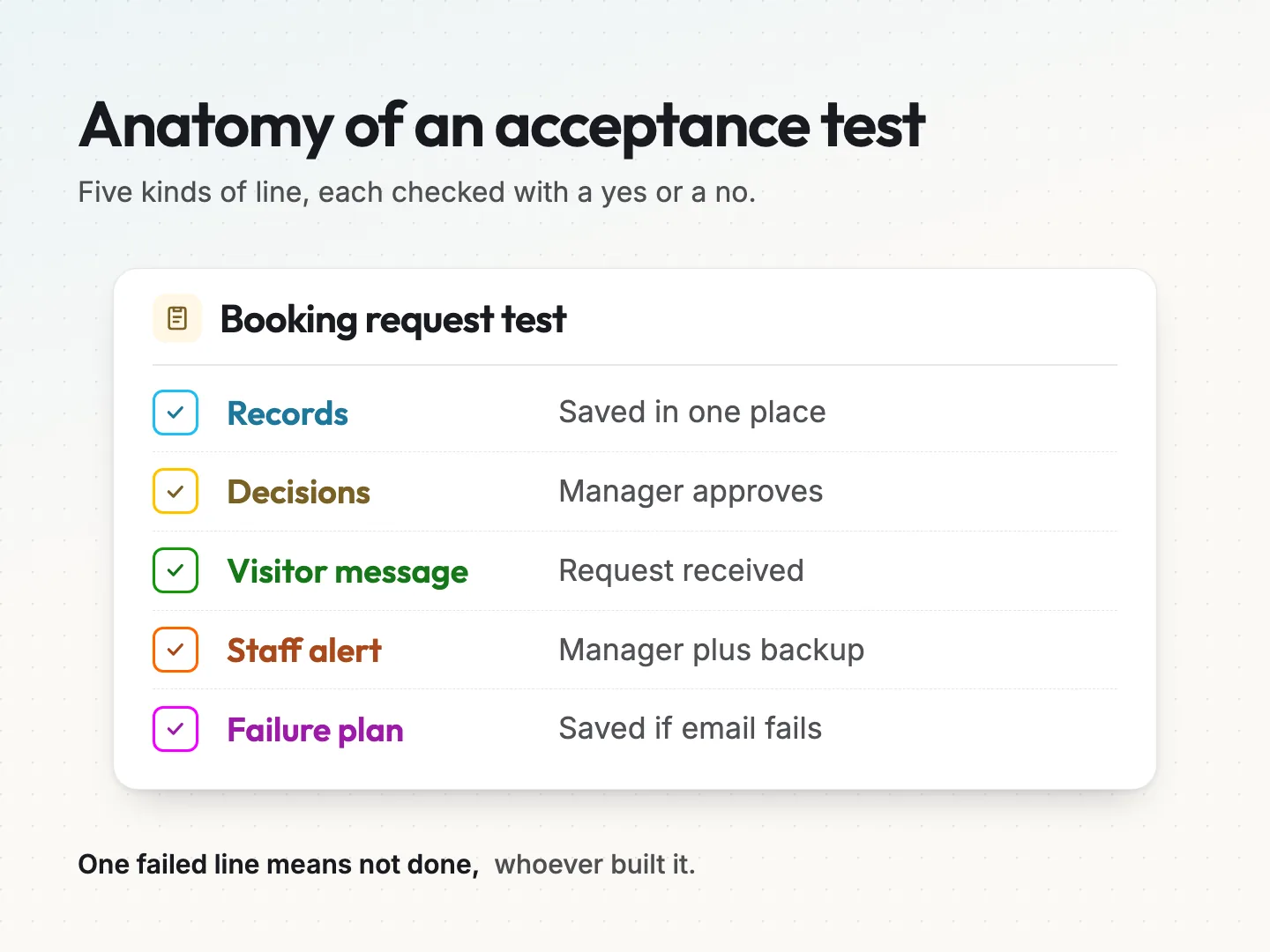
Every good test covers five things.
- What is recorded. The details the process must save, where they are stored and who can see them.
- What is decided. Each decision in the process, who makes it and what happens next.
- What the visitor is told. The exact words on screen and in any email, at each stage.
- What staff are told. Who gets notified, how and how quickly someone must act.
- What happens when it fails. The plan for a lost email, a double booking, a payment error or a missing person.
The visitor line deserves extra care. The W3C forms tutorial on user notifications says messages should be concise and clear, and a success message should confirm that the task was completed. That is a fair rule for your wording too. If the task is not completed yet, the message should not say it is.
Write the test for one process in six steps.
Pick one process. Not the whole website, only one thing a visitor starts and your team finishes. A booking request, a quote request, a membership signup or a product return all work. Then follow these steps.
- Name the trigger and the finish line. Write what starts the process and what counts as done. For example, the trigger is a submitted request and the finish line is a reply with a decision.
- Write the promise to the visitor. Say in one sentence what the visitor can expect and by when. Keep it honest about review steps.
- List what must be recorded. Name each field, where it is saved and how long you keep it. Leave out anything you do not use.
- List each decision and its owner. Who approves, rejects or changes the request? What rule do they follow?
- Write every message. Draft the screen text, the visitor email and the staff alert at each stage. Use your real words, not placeholders.
- Write the failure cases. List what can go wrong and what should happen when it does. Then add how you will check each line.
Six steps sound like a lot. In practice, a first draft often takes less time than a meeting about plugins, and it saves you from having that meeting twice.
A hypothetical booking request, written out.
Here is a hypothetical example for a small restaurant that takes private dining requests through its website. It is invented to show the method, not taken from a real business.
- Trigger and finish line. A guest submits a private dining request. The process is done when the guest receives an approval, a decline or a new suggested date.
- Promise to the visitor. “We have your request. A team member will reply within one business day.”
- Records. Name, email, phone, party size, preferred date, a second date and dietary notes, saved to one place the manager can open.
- Decisions. The manager approves or suggests another date, based on the event calendar and staffing.
- Messages. The screen and the first email both say “request received”, never “confirmed”. The approval email says “confirmed” and repeats the date.
- Staff notice. The manager and one backup get an alert. If nobody replies within one business day, the backup follows up.
- Failure cases. If the alert email fails, the request is still saved and visible. If two requests ask for the same date, the second guest gets a suggested date, not a silent clash.
Notice what is missing. There is no plugin name and no code. These are booking form requirements written from the guest’s side and the manager’s side, which is exactly what you want before anyone quotes a price.
A process acceptance test template you can copy.
Use this template for any process. Copy the table into a document, replace the example column with your own words and add rows if your process needs them. Each line should be something a person can check and mark pass or fail.
| Test line | Write your requirement | How you will check it |
|---|---|---|
| Trigger | What starts the process | Submit a real test request |
| Finish line | What counts as done | Follow one request to the end |
| Visitor promise | What the visitor is told and when | Read the screen and the email |
| Records | Fields, where saved, who sees them | Open the saved entry |
| Decisions | Each decision, its owner and rule | Ask the owner to make one |
| Staff notice | Who is alerted, how, how fast | Check the alert arrived |
| Visitor updates | Message at each later stage | Trigger each stage once |
| Failure cases | What breaks and what happens then | Break it on purpose |
| Privacy | What you keep, how long, who deletes | Find and delete a test entry |
| Ownership | Who fixes it when it stops working | Name a person and a backup |
Before you send the test to anyone, run through this short checklist.
- Every line can be answered with yes or no.
- The visitor promise matches what staff can deliver.
- No message says “confirmed” before a person or a rule has confirmed.
- Each decision has a named owner, not “the team”.
- At least one failure case covers a lost or late email.
- Someone outside the project could run the checks without asking you.
If a line is hard to write, that is useful information. It usually means the process itself is unclear, and no plugin or developer can fix a process nobody has agreed on.
Three ways to pass the test.
With the test written, you have three realistic ways to meet it. Most comparisons online only discuss two. The third is often the cheapest place to start.
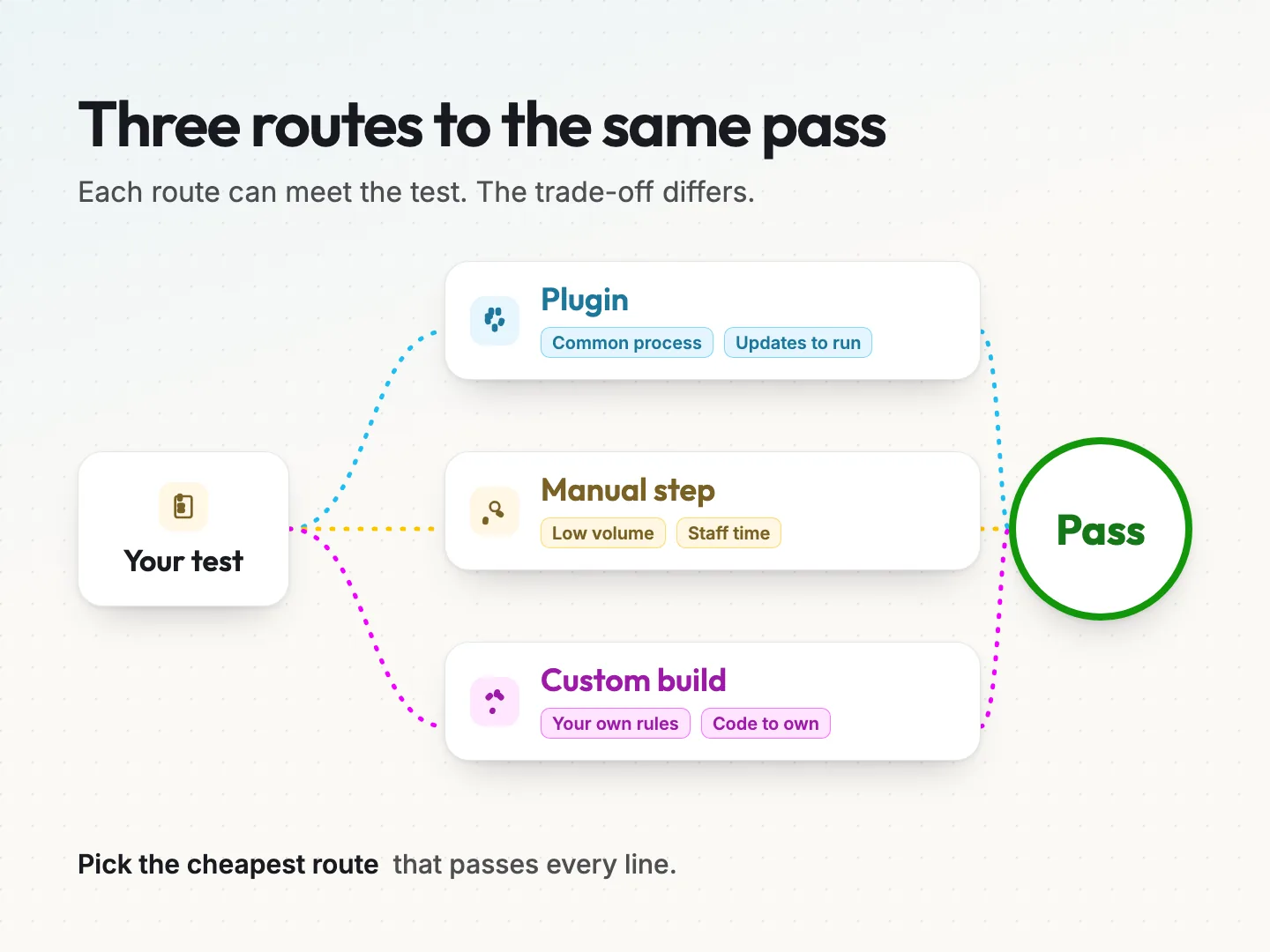
A plugin passes when the process is common.
A plugin fits when many businesses run the same process in roughly the same way. Contact forms, simple appointment booking, newsletter signups and basic online payments fall into this group. Many sites run these tools, so common bugs tend to get found and fixed.
Plugins still need checking. WordPress.org’s guide to managing plugins notes that directory plugins vary in quality, and a plugin not updated since the latest WordPress release may be incompatible. Run your test on the plugin’s free version or demo before you pay for anything. If you are choosing a form tool, compare candidates against the same process test.
A manual step passes when volume is low.
A manual step means a person handles one part of the process on purpose, with a written rule. The website collects the request and tells the visitor what happens next. A named staff member reviews it and replies.
This sounds old-fashioned, yet it often passes the test better than software. A person can read context, spot a strange request and handle exceptions without new code. If you get a few requests a week, a reviewed manual step may be all you need for months. It also teaches you which parts are worth automating later.
A custom build passes when the rules are yours alone.
Custom development fits when your process has rules no general tool handles, or when it must connect to a system that has no ready connector. Pricing that depends on several of your own variables is one example. Access rules tied to your own customer records are another.
A custom build can match your test line for line. The trade-off is that you now own that code. Someone has to update it, fix it and explain it to the next developer. Treat that ongoing duty as part of the price, not an afterthought.
Score every option against the same test.
Now put the three options side by side. Use the same test lines for each one, and mark each line pass, partial or fail. A partial means the option could pass with a workaround, so write the workaround down.
Here is how the hypothetical private dining request might score. The results are illustrative, because they depend on the specific plugin and the specific build.
| Test line | Booking plugin | Form plus manual step | Custom build |
|---|---|---|---|
| Records saved in one place | Pass | Pass | Pass |
| Visitor told “request received” | Partial, needs text edits | Pass | Pass |
| Manager decides each request | Fail, books instantly | Pass | Pass |
| Backup follows up after one day | Partial | Pass, with a written rule | Pass |
| Date clash handled | Pass | Partial, manager checks | Pass |
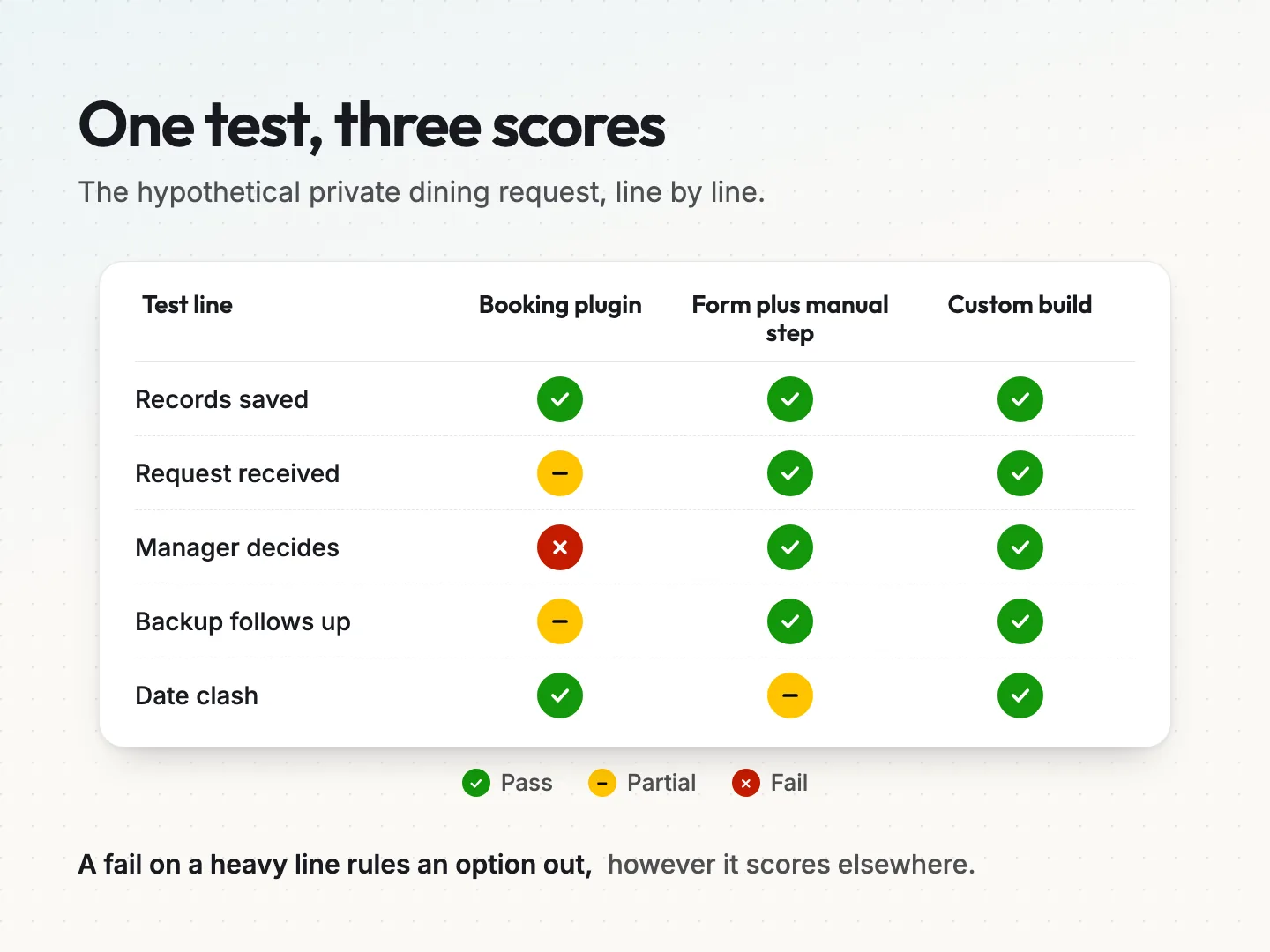
In this example, the instant booking plugin fails the most important line. It confirms tables before the manager has decided. The custom build passes everything, but the form plus manual step also passes or comes close on every line, at a fraction of the effort.
That is the pattern to look for. The best option is not the one with the most passes. It is the simplest option with no fails on the lines that matter most to your visitors.
Weight the lines before you score.
Not every line carries equal weight. Mark the two or three lines that would hurt trust or revenue if they failed. For a booking process, that is usually the visitor promise and the decision step. For a quote form, it may be the records and the staff notice.
An option that fails a heavy line is out, however well it does elsewhere. An option that gets a partial on a light line may still be fine, as long as the workaround is written down and someone owns it.
Climb the smallest step that passes.
When no option passes cleanly, do not jump straight to a full custom build. Climb one step at a time and stop at the first step that passes your test.
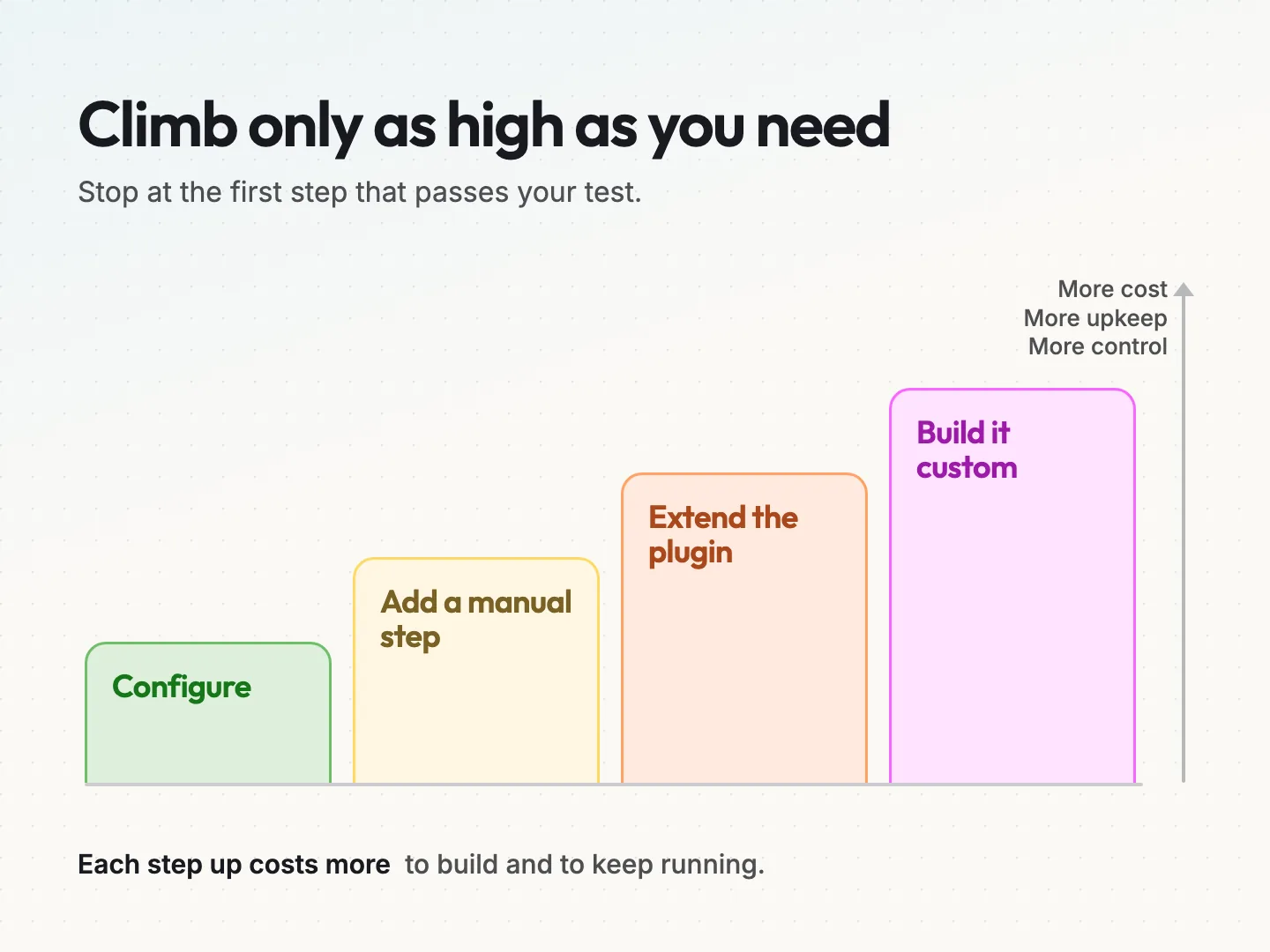
- Configure what you have. Many failures come from default settings. Change the confirmation text, the alert recipients or the required fields, then test again.
- Add a manual step. Let the tool collect the request, and let a person make the decision with a written rule.
- Extend the plugin. A developer adds a small piece of code that changes one behaviour of an existing plugin. Keep the change small and documented.
- Build it custom. Write a feature for your site alone, ideally as its own small plugin so it survives a theme change.
Each step up costs more to build and more to keep running. Each step also gives you more control. The aim is the lowest step that passes every heavy line, not the highest step your budget allows.
Write down why you stopped where you did.
Add one line to your test document saying which step passed and why. If the process grows or a plugin changes, the next person can start from that note instead of redoing the whole comparison.
Price the upkeep before you choose.
The build price is only the first cost. Every option has a running cost, and it is easy to miss when you compare quotes. Ask about these before you choose.
Plugin upkeep. Plugins need updates. WordPress.org advises keeping a current backup before you update plugins, because problems can happen during an update. Someone has to run those updates, check the site afterwards and rerun your acceptance test. Paid plugins also renew, so check what happens to the feature if a licence lapses.
Manual step upkeep. A manual step costs staff time. Estimate it simply. Multiply the requests you get in a typical week by the minutes each one takes. If that number keeps growing, you have a clear signal that it is time to climb the ladder.
Custom build upkeep. Custom code needs an owner. It must keep working with each new WordPress version, your theme and your other plugins. Ask who will maintain it, how changes are documented and what it costs to have someone fix it at short notice.
Shared costs. Every option needs someone who understands the process, can read the test and can say whether it still passes. That role costs little, but leaving it empty is how processes quietly break.
Compare the options over two years, not one launch.
Put each option’s build cost and its expected running cost side by side over the same period. Use real quotes and your own staff estimates, not guesses from articles. A cheaper build with heavy upkeep can cost more over two years than a pricier build that rarely needs attention.
Signs a custom build is the right call.
Custom development is not a failure of planning. Sometimes it is the honest answer. These signs suggest you have reached that point.
- A heavy test line fails on every plugin you have tried, even after configuration.
- The manual step works, but the staff time it takes keeps growing with volume.
- The process must exchange data with a system that has no existing connector.
- The rules come from your own pricing, packages or customer records and change often.
- The process is part of how you win customers, so a generic version weakens your offer.
- You have a person or partner who will own and maintain the code.
When the process connects to other software, write that part of the test with extra care. Mapping the handoff between tools walks through the questions to answer first, such as which system holds the master record.
If several of these signs apply, a custom build becomes easier to justify. Hand the developer your acceptance test as the brief. It gives them a clear definition of done and gives you a fair way to judge the result. Teams that offer WordPress website development should be able to quote against it line by line.
Signs a plugin or manual step is enough.
The opposite signs matter as much. If a well-maintained plugin passes every heavy line after configuration, stop there. If requests are few and a person handles them well, keep the manual step and review it every quarter. Building custom only to avoid a licence fee or an admin screen you dislike rarely pays back.
Run the test again before launch and after updates.
A test is only useful if you run it. Before launch, work through every line with a real test request. Use a test name your team will recognise, and delete the test entries afterwards.
- Submit a request from a phone and from a desktop.
- Read every visitor message and compare it with your template.
- Check that each staff alert arrives and names the right person.
- Make each decision once and confirm the visitor gets the right update.
- Break one failure case on purpose, such as using a wrong alert address.
- Record the date, the tester and the result for each line.
If your process starts with a form, include spam filters and mobile layouts in your acceptance tests.
Rerun the test whenever something changes.
Run the test again after plugin updates, theme changes, staff changes and any edit to the messages. Keep the results in the same document as the test. Over time, that log becomes the history of your process, and it shows you when a step on the ladder stops passing.
Final thoughts on choosing a plugin or a custom build.
The plugin versus custom debate feels technical, but the hard part is not code. It is agreeing on what the process must do and what your visitors are promised. Once that is written as a test, the options stop being opinions. Each one either passes or it does not.
Start with one process that causes trouble today, such as a booking request or a quote form. Write the test, score a plugin, a manual step and a custom build against it, and pick the lowest step on the ladder that passes. If you need a partner for the build itself, look for one who works from your test, whether the answer is a configured plugin or custom web development.
If you would like a second pair of eyes on your test before you choose, talk to a specialist at Scayver Graphix and bring the process you want to get right first.
Was this article helpful?
Part of the free path Mastering AI Automation.
