



A lead magnet delivery email is the message that sends someone the free download they asked for. Send it right away, with a plain subject, one clear link, one first step and a backup link. Then offer up to five short follow-up lessons, but only to people who agreed to them, and stop each one the moment it no longer fits.
That last part is where most sequences go wrong. The file goes out, and then a stack of timed emails keeps firing at people who already booked a call, already bought, or never opened the first message. This guide gives you the delivery email and five follow-ups written in full, each with a rule for who gets it and when it stops.
The one job of a lead magnet delivery email.
The delivery email has one job before any other. It gets the file into the reader’s hands and makes it easy to start using. Everything else, including your introduction and your offer, comes second.
That sounds obvious, but look at a few delivery emails in your own inbox. Many open with a long welcome, a brand story and three buttons before the download link appears. The reader came for a checklist. Make them hunt for it and they close the email, and the file never gets used.
A good delivery email also sets expectations. It tells the reader who the email is from, what happens next and how to stop hearing from you. When you skip that, your next email looks like a surprise, and surprises get marked as spam.
If you have not built the download yet, start with our guide on how to choose between an article and a downloadable resource. The email can only promise what the file delivers.
Write the delivery email in seven parts.
Every delivery email that works has the same seven parts. You can write them in about twenty minutes once your file is ready. Here they are in the order the reader meets them.
- A subject line that names the file. “Your kitchen budget worksheet is here” beats anything clever. The reader is looking for it, so make it easy to find.
- Preview text that adds one detail. Use the short line inboxes show after the subject to say how long the task takes or what the reader ends up with.
- The link, near the top. Put the download link or button in the first two or three lines. Use a link to a page or file you control, so you can fix it without resending.
- One first step. Tell the reader exactly what to do in the next ten minutes. “Fill in the first column with rough numbers” is enough.
- A plain sender. Use a real person’s name and a reply address someone reads. A reply is the best signal you can get, so invite one.
- A backup link. Add a plain text version of the link in case the button does not show. This also helps readers on strict work email.
- What happens next, and how to stop. Say whether more emails are coming, how many and how to opt out.
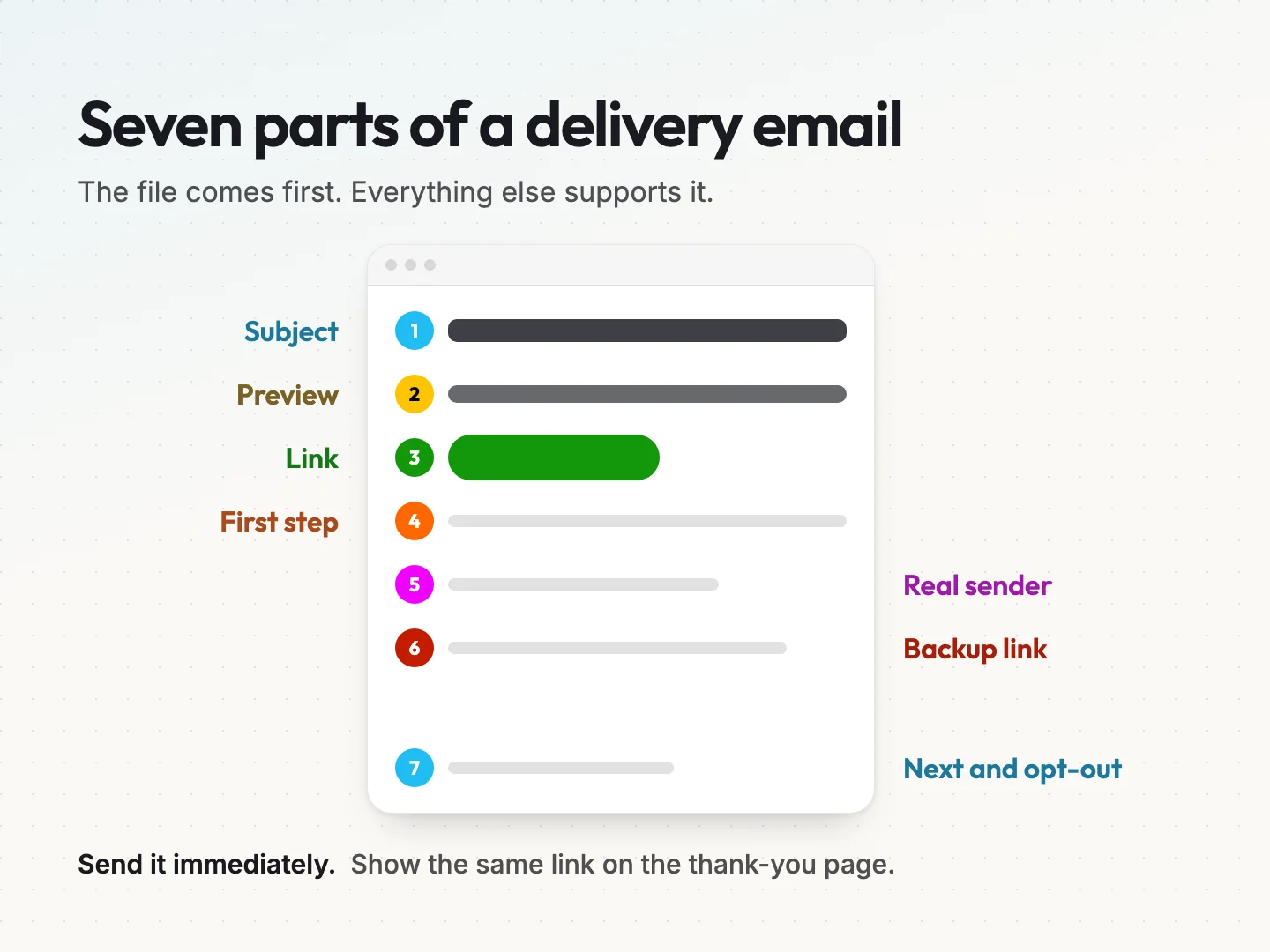
Two things sit outside the email itself. First, show the same download link on the thank-you page right after the form. Some emails land in spam or arrive late, and the thank-you page means nobody waits. Second, send the email immediately. The person is ready to use the file now, not tomorrow morning.
If the delivery email does not arrive at all, the problem is usually the sending setup, not the copy. Trace that setup before rewriting the copy.
Separate the file they asked for from the lessons.
Someone who fills in your form has made one clear request. They asked for the file. That is not the same as agreeing to a course, a newsletter or a sales sequence, and your system should treat it as two separate promises.
Here is the simplest way to handle it. Your form delivers the file to everyone. A second, optional choice on the form, such as a checkbox that says “Send me five short lessons on using the worksheet”, adds people to the follow-up sequence. Only people who chose it get the lessons.
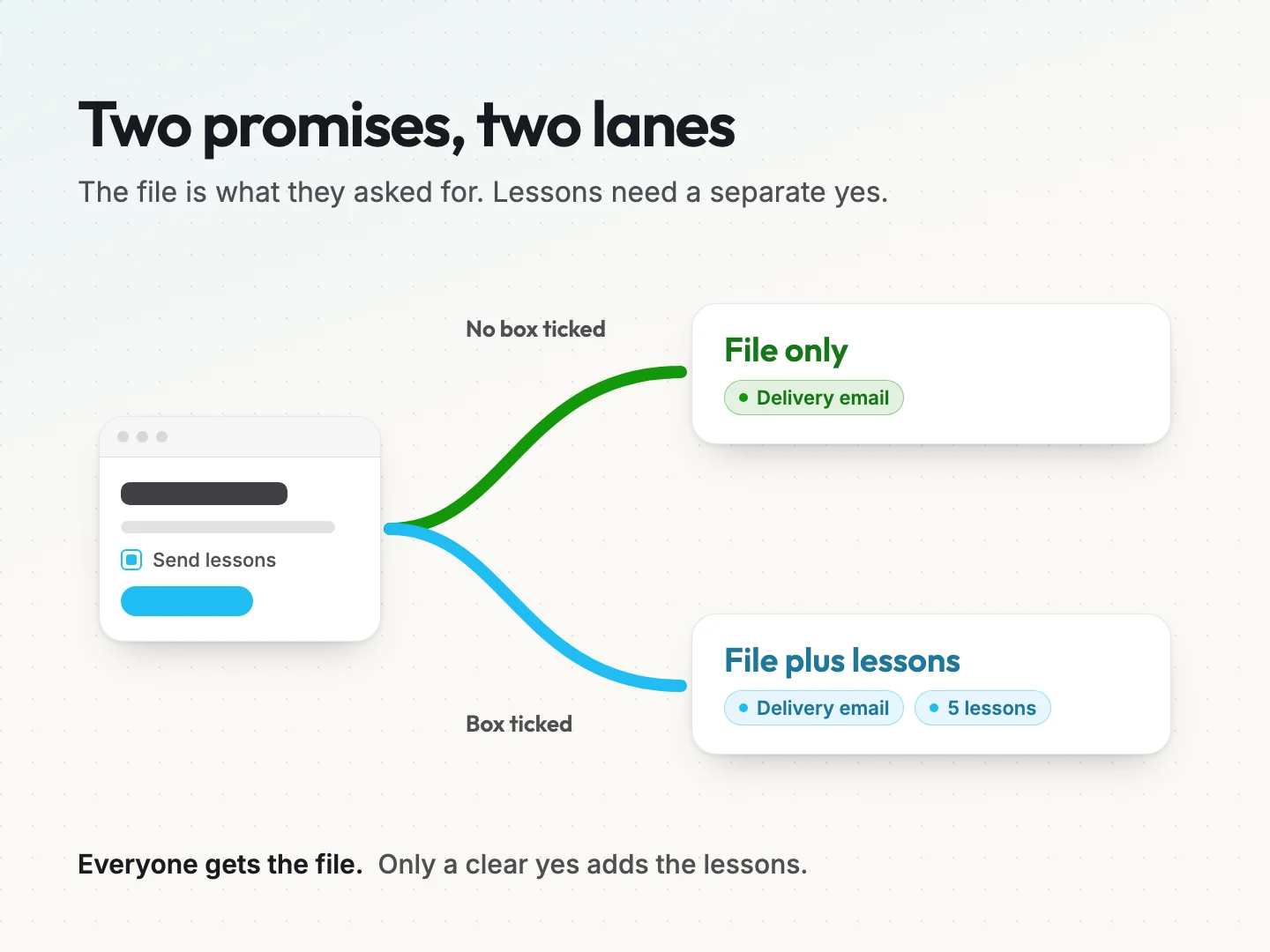
This split does three useful things. It keeps your list honest, because everyone in the sequence wanted it. It lowers spam complaints, because nobody gets emails they did not expect. It also gives you a cleaner signal, since lesson clicks come from people who chose to learn.
If you want to send the lessons to everyone, say so clearly on the form, next to the button. Something like “You’ll get the worksheet now and five short lessons over the next two weeks” works. Then the promise matches what happens. Record what each person agreed to receive.
The rules that apply to these emails.
In the United States, the FTC’s CAN-SPAM compliance guide (August 2023, edited January 2024) sets the baseline for marketing email. Commercial messages need accurate sender details, an honest subject line, your valid physical postal address and a clear way to opt out. Opt-outs must be honored within 10 business days.
The guide also explains that the primary purpose of a message decides how it is treated. A pure delivery email that only sends what was requested may count as transactional. Once you add promotion, or your lessons start selling, treat them as commercial and include everything above. The FTC reads the transactional category narrowly.
Google’s email sender guidelines add rules for Gmail. Since 1 February 2024, every sender to Gmail accounts should authenticate their mail and keep reported spam below 0.3%. Anyone sending 5,000 or more messages a day must also set up DMARC and offer one-click unsubscribe on marketing messages. Most small lists sit well under that volume, but the same habits help every sender.
This is a plain summary, not legal advice. Rules change and other countries have their own, so check the current versions or ask a qualified adviser for your situation.
Plan the five lessons and their timing.
The follow-up sequence is a short series of emails that helps the reader use what they downloaded. Each lesson does one job and links to one thing. Five lessons over about two weeks is a sensible starting point for most service businesses.
Here is the timing this guide uses, counted from the day someone signs up. Day 0 is the delivery email. The lessons follow on day 2, day 4, day 7, day 10 and day 14.
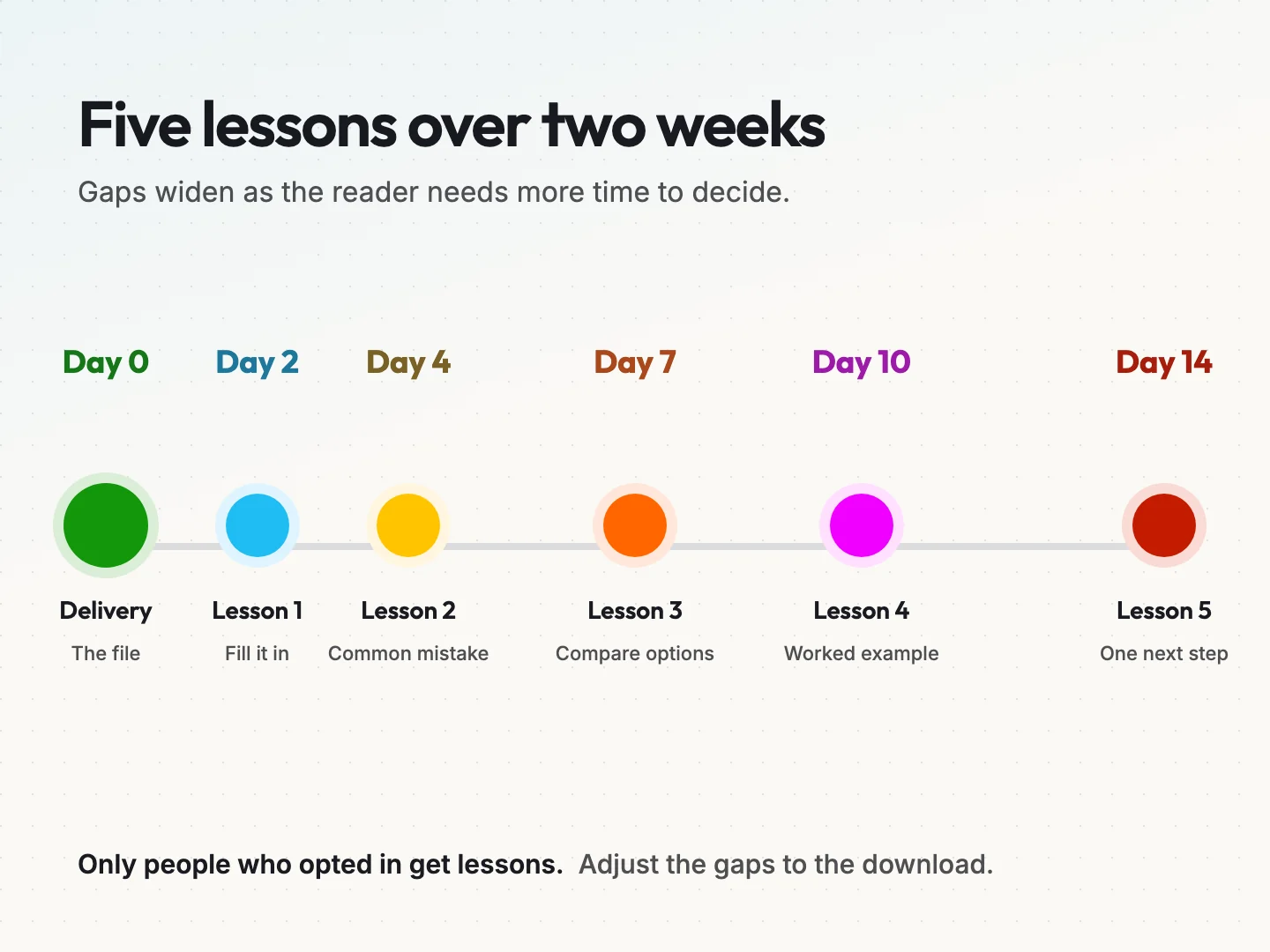
The gaps get wider on purpose. Early on, the reader is still working with the file, so a quick tip helps. Later, they need time to compare options and talk to their family or partners, so you give them room.
Adjust the timing to the download. A short checklist someone finishes in ten minutes can move faster. A planning worksheet that takes a weekend should move slower. If you are unsure, start with the schedule above and change it once you see when people click.
| Day | Job | Who gets it | Stops when | |
|---|---|---|---|---|
| Delivery | 0 | Send the file and one first step | Everyone who signed up | Never skipped |
| Lesson 1 | 2 | Help them fill in the file | Opted in to lessons | They unsubscribe |
| Lesson 2 | 4 | Fix the most common mistake | Opted in, not booked | They book or reply |
| Lesson 3 | 7 | Show how to compare options | Opted in, not booked | They book or buy |
| Lesson 4 | 10 | Walk through a worked example | Opted in, not booked | They book or buy |
| Lesson 5 | 14 | Invite one next step | Opted in, not booked or bought | They book, buy or go quiet |
If you already send a broader welcome series to new subscribers, our email welcome sequence template shows how the two fit together. The lead magnet lessons should run first, and the general welcome can wait until they finish.
The delivery email and five lessons, written in full.
Below is the full sequence for a hypothetical kitchen remodeling contractor. Its free download is a kitchen remodel budget worksheet. Swap in your own business, file and next step. Fields in square brackets are the parts you change.
Each email starts with a small table of rules. A tag is a label your email tool adds to a contact, such as “booked” or “bought”. The rules use tags to decide who gets each message.
Delivery email, day 0.
| Rule | Setting |
|---|---|
| Who gets it | Everyone who submits the form |
| Send | Immediately |
| Stops when | Never skipped |
| Subject | Your kitchen budget worksheet is here |
| Preview | Fill in the first column in ten minutes |
> Hi [First name], here is the kitchen remodel budget worksheet you asked for. > > Button: Download the worksheet. > > Start with the first column. Write a rough number for each line, even if it is a guess. You will tighten the numbers later, and a rough version is far more useful than a blank one. > > If the button does not work, copy this link into your browser: [plain link]. > > I’m [Your name] at [Business name]. You chose to get five short lessons on using the worksheet, so the first one arrives in two days. You can stop them anytime with the link at the bottom. > > If anything in the worksheet is unclear, reply to this email. A real person reads every reply.
For people who did not choose the lessons, remove the paragraph about lessons. Their delivery email ends after the reply invitation and the footer.
Lesson 1, day 2.
| Rule | Setting |
|---|---|
| Who gets it | Contacts who opted in to lessons |
| Send | Day 2 |
| Stops when | They unsubscribe |
| Subject | The one line people leave blank |
| Preview | And why it changes your total |
> Hi [First name], most people who fill in the worksheet skip the same line. It is the allowance for things you find once the old cabinets come out. > > Put a number there now, even a small one. It is the line that keeps a remodel from stalling halfway through. > > Button: Open your worksheet. > > If you have not opened the worksheet yet, that link takes you straight to it. > > Next lesson: the mistake that makes most budgets too low.
Add one rule here. If the contact never clicked the delivery link, send a short resend instead with the subject “Your worksheet link, in case you missed it”. Send it once, then continue as normal.
Lesson 2, day 4.
| Rule | Setting |
|---|---|
| Who gets it | Opted in, not tagged booked |
| Send | Day 4 |
| Stops when | They book or reply |
| Subject | Why most kitchen budgets come in low |
| Preview | It is rarely the cabinets |
> Hi [First name], the most common budget mistake is pricing the things you can see and forgetting the work behind them. > > Cabinets and counters are easy to price. Moving a sink, adding an outlet or patching a floor is harder to picture, so it gets left out. > > Go back to your worksheet and look at the labor column. For every item you are moving or replacing, ask what has to happen behind the wall or under the floor. > > Next lesson: how to compare quotes without getting lost.
Lesson 3, day 7.
| Rule | Setting |
|---|---|
| Who gets it | Opted in, not booked or bought |
| Send | Day 7 |
| Stops when | They book or buy |
| Subject | How to compare two kitchen quotes |
| Preview | Line them up against your worksheet |
> Hi [First name], when quotes arrive, they rarely use the same headings. One lists cabinets by the foot. Another bundles labor into one number. > > Use your worksheet as the common format. Copy each quote into the same rows, then look at what is missing, not only the total. > > A quote that is lower because it leaves out a line is not cheaper. It is incomplete. > > Next lesson: a full worked example, start to finish.
Lesson 4, day 10.
| Rule | Setting |
|---|---|
| Who gets it | Opted in, not booked or bought |
| Send | Day 10 |
| Stops when | They book or buy |
| Subject | A worked example, line by line |
| Preview | One hypothetical kitchen, filled in |
> Hi [First name], here is the worksheet filled in for a hypothetical kitchen. It is an example to show the method, not a price list for your home. > > Button: View the worked example. > > Notice three things. The allowance line is filled in. The labor column has an entry for every item that moves. And the two quotes sit side by side in the same rows. > > Next lesson, the last one: what to do with your finished worksheet.
Keep the worked example honest. Label it hypothetical, avoid real prices unless you can stand behind them, and never present it as a real client’s project.
Lesson 5, day 14.
| Rule | Setting |
|---|---|
| Who gets it | Opted in, not booked or bought |
| Send | Day 14 |
| Stops when | They book, buy or go quiet |
| Subject | What to do with your finished worksheet |
| Preview | One next step, if you want it |
> Hi [First name], this is the last lesson. If your worksheet is mostly filled in, you are in a better position than most people who start a remodel. > > If you would like a second opinion on your numbers, you can book a short call. Bring the worksheet and we will go through it together. > > Button: Book a call. > > If now is not the right time, that is fine. Keep the worksheet. The lessons end here, and you will not get more emails about it.
That closing line matters. It tells the reader the sequence is over, which builds trust for any newsletter you send later.
Adapt the five lessons to your own download.
The kitchen example is only one shape. The pattern underneath it works for almost any service business, because each lesson answers a question the reader meets in order. First they use the file, then they hit a snag, then they compare options, then they want proof the method works, and finally they decide.
Here is how the same five jobs map to a few other common downloads.
| Download | Lesson 1 | Lesson 2 | Lesson 3 | Lesson 4 | Lesson 5 |
|---|---|---|---|---|---|
| Website launch checklist | The step people skip | The launch day mistake | Comparing hosting options | A hypothetical launch, step by step | Offer a launch review |
| Monthly bookkeeping template | Setting up categories | The receipt that gets lost | Software or spreadsheet | A hypothetical month, filled in | Offer a setup call |
| Hiring scorecard | Writing the first criteria | Scoring bias to watch for | Comparing two candidates | A hypothetical hire, scored | Offer a role review |
Keep each lesson to one idea and one link. If you notice a lesson trying to do two jobs, split it or cut the weaker half. Short lessons get read, and a reader who finishes one is more likely to open the next.
Write the lessons in the same voice as the delivery email. If the first message came from a named person, every lesson should too. A sudden switch to a generic company sender makes the sequence feel automated, even when every word is helpful.
Set the stop rules before you switch it on.
Stop rules decide when a contact leaves the sequence early. Write them before you turn anything on, because a sequence without them keeps sending to people it no longer fits.
Here are the five exits every lead magnet sequence needs.
| Exit | What triggers it | What happens next |
|---|---|---|
| Booked | They book a call or consultation | Remove from lessons, send a booking confirmation |
| Bought | They become a customer | Remove from lessons, move to onboarding emails |
| Replied | They reply with a question | Pause lessons until a person answers |
| Unsubscribed | They click the opt-out link | Stop everything marketing, keep the record |
| Went quiet | No opens or clicks on any lesson | Stop after lesson 3, keep in a slower list |
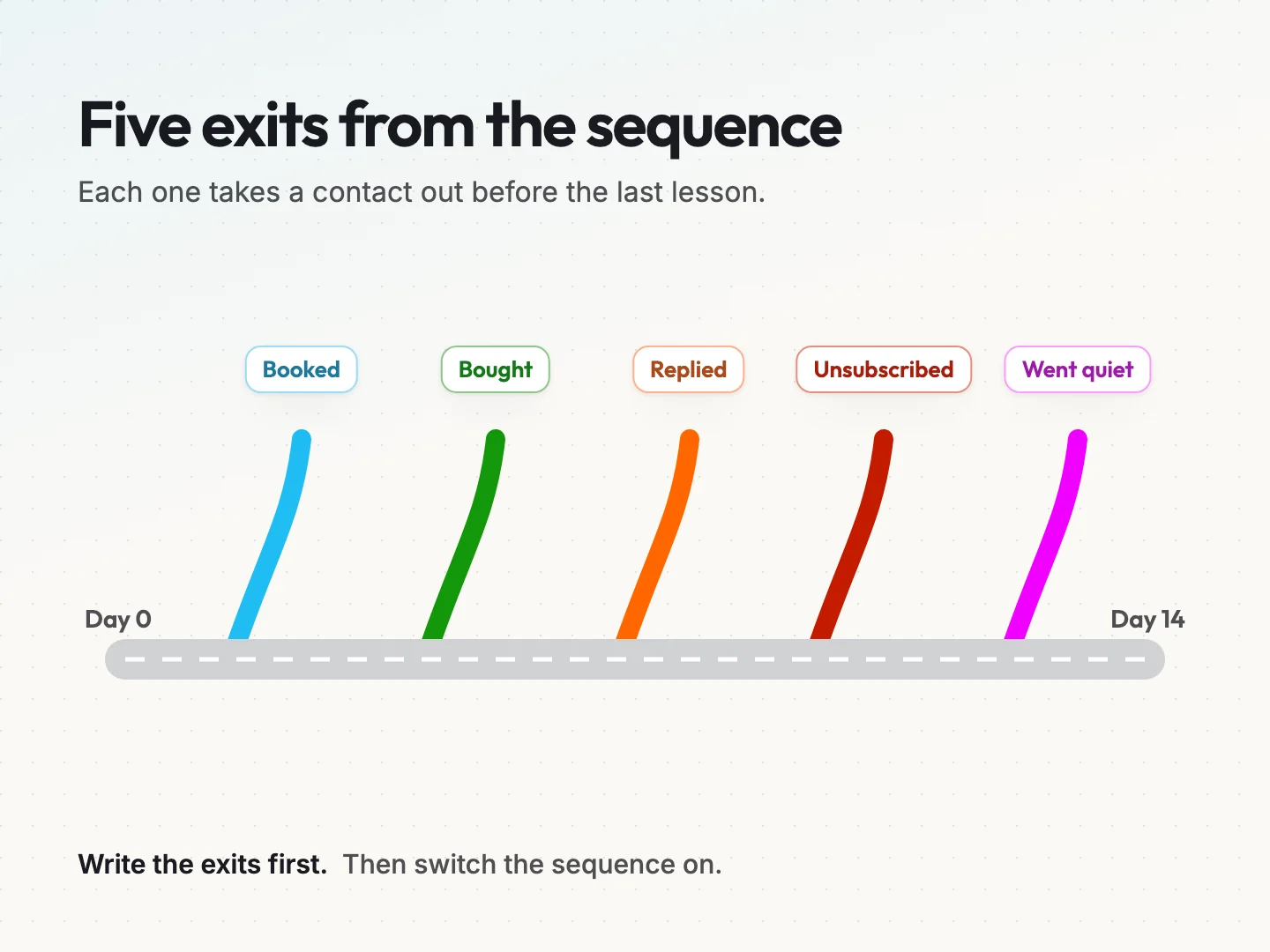
A suppression list is a list of contacts your tool will never email from a given sequence. Use one for current customers, so nobody who already hired you gets a lesson about hiring someone. Our guide on email segmentation covers how to build these groups.
The “went quiet” exit deserves care. Some email tools cannot see opens reliably because of privacy features, so use clicks and replies as your main signals. If someone has not clicked anything by lesson 3, they probably wanted only the file. Stop the lessons and let them be.
Define how timing and recipient behavior affect each email.
Test the whole sequence before real people get it.
A sequence can look perfect in the editor and still break in a real inbox. Run one full test with a real address before you switch it on. Use this checklist.
- Submit the form yourself with a fresh address, once with the lessons box ticked and once without.
- Check the thank-you page shows the download link.
- Confirm the delivery email arrives within a minute or two, and check the spam folder too.
- Click the button and the plain link on a phone and on a laptop.
- Read the sender name, the reply address and the footer. Reply to the email and confirm someone receives it.
- Check the opt-out link works and removes you from the lessons.
- Tag the test contact as booked and confirm lessons 2 to 5 stop.
- Shorten the delays to minutes in a copy of the sequence, so you can see every email in order.
- Read every subject line in a row. Each should make sense on its own.
Repeat the test whenever you change the file, the form or the email tool. Small changes, like a renamed file, are the usual cause of broken links.
Measure what each email does.
Once the sequence is live, look at each email on its own, as well as the sequence as a whole. You want to know which email earns a click or reply and which one people ignore.
Track these signals for every email.
- Link clicks. The clearest sign that a lesson helped. Look at clicks on the main link, not every link.
- Replies. Few in number, high in value. A reply often means someone is close to booking.
- Bookings and purchases. Count the ones that come from contacts in the sequence, and note which lesson they clicked last.
- Unsubscribes. One email with far more opt-outs than the others is telling you something about its subject or timing.
- Spam complaints. These should be close to zero. If they rise, check that your form explains the lessons clearly.
Be careful with open rates. Privacy features in some mail apps can report opens that never happened, so treat opens as a rough guide. Our guide to improving email open rates explains how to read them sensibly.
Review the numbers once a few dozen people have finished the sequence. Fix the weakest email first, usually by changing its subject or making its one link clearer. Change one thing at a time, so you know what made the difference.
Final thoughts.
A lead magnet delivery email is the first promise you keep with a new contact. When it arrives instantly, names the file and gives one clear first step, the reader starts using what you made. The follow-up lessons then feel like help rather than a sales campaign.
The part that sets a good sequence apart is the stop rules. Five useful lessons that end when someone books, buys or loses interest will build more trust than a long sequence that never knows when to quit. Write the rules first, test the whole flow with your own address, and measure each email on its own.
If you would rather have the copy, tags and stop rules set up for you, our email marketing service builds and tests sequences like this one. To talk through your download and what should happen after it, book a call with a specialist.
Was this article helpful?

