Sales pipeline stages are the steps a deal passes through from first enquiry to signed work. Each stage needs three written rules. An entry rule says what must be true for a deal to arrive, one owner is responsible while it sits there, and an exit rule names what the buyer did. Without those, every person counts deals differently.
That last point is where most pipelines go wrong. A stage called “Proposal” can mean the proposal is being written, the proposal was emailed or the buyer read it and asked a question. Those are three different moments, and they lead to three different forecasts.
This guide gives you a seven-stage model for a small service business, with the rules for each stage. You also get a stage entry and exit rule table you can copy, plus a plan for lost and stalled deals. Then you will see how to report on stages so intake, sales and delivery count the same deals.
Sales pipeline stages explained, and what they are not.
A sales pipeline is the set of open deals your business is working on right now, arranged by how far each one has progressed. A stage is one named step in that arrangement. Your CRM, short for customer relationship management software, usually shows the stages as columns on a board, with each deal as a card you drag from left to right.
A stage is not a task list. “Send follow-up email” is a task. “Buyer confirmed the budget range” is a stage change. The task is something you do. The stage describes where the buyer now stands.
A stage is also not a person or an enquiry. That distinction trips up a lot of small teams, so it is worth slowing down on.
Lead vs opportunity, and why the records stay separate.
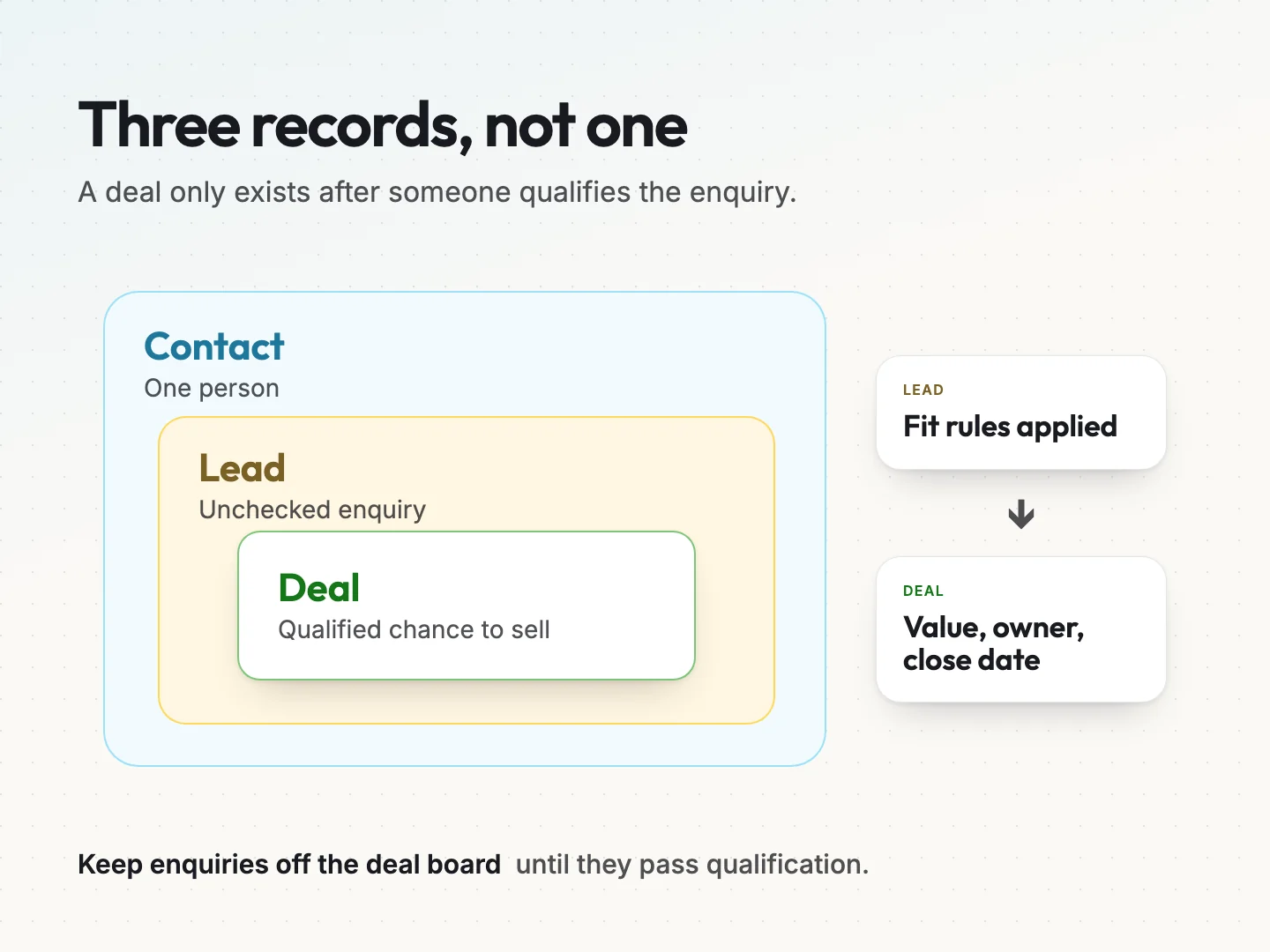
Most CRMs keep three kinds of records, even when they name them differently.
- Contact. A person. Their name, email, phone and company. A contact can exist for years without ever buying.
- Lead. An enquiry that has not been checked yet. Someone filled in a form, called or replied to an email. You do not know yet whether they are a fit.
- Opportunity, or deal. A qualified chance to sell something specific, with an expected value and a close date. Salesforce and several other tools call it an opportunity. HubSpot and Pipedrive call it a deal.
The difference between a lead and an opportunity is a decision. Someone looked at the enquiry, applied your fit rules and said yes, this is worth pursuing. Until that decision happens, the enquiry belongs on a lead list, not on the sales board.
Keeping the records apart protects your numbers. When every form fill becomes a deal, the pipeline fills with people who were never going to buy. Your win rate drops, your forecast inflates and your team stops trusting the board. When every enquiry stays a lead until it passes qualification, the board only shows work that can turn into revenue.
The same person can also appear more than once. A past customer who asks about a new project is one contact with a second deal. If you overwrite the old deal instead of opening a new one, you lose the history of what they bought before.
The reason your teams count different deals today.
If you ask three people in a small business how many deals are open, you often get three answers. That is rarely laziness. It happens because each team watches a different moment.
- Intake counts every enquiry that came in this week.
- Sales counts the deals they are actively talking to.
- Delivery counts the jobs that have been signed and scheduled.
All three numbers are correct for the question each team is asking. The trouble starts when they are reported under the same word, such as “pipeline” or “new business”.
The second cause is stage names that describe seller activity. Here is a hypothetical example. Two salespeople at the same firm both move deals to “Proposal”. One does it when she starts drafting. The other waits until the buyer replies to the emailed proposal. At the end of the month, the first person looks twice as productive and her deals look twice as slow to close. Neither picture is true.
The fix is not a better dashboard. A dashboard only adds up what people entered. The fix is a shared, written definition of each stage that everyone applies the same way.
Give every stage an entry rule, an owner and an exit rule.
A useful stage definition has three parts. Write all three before you rename a single column in your CRM.
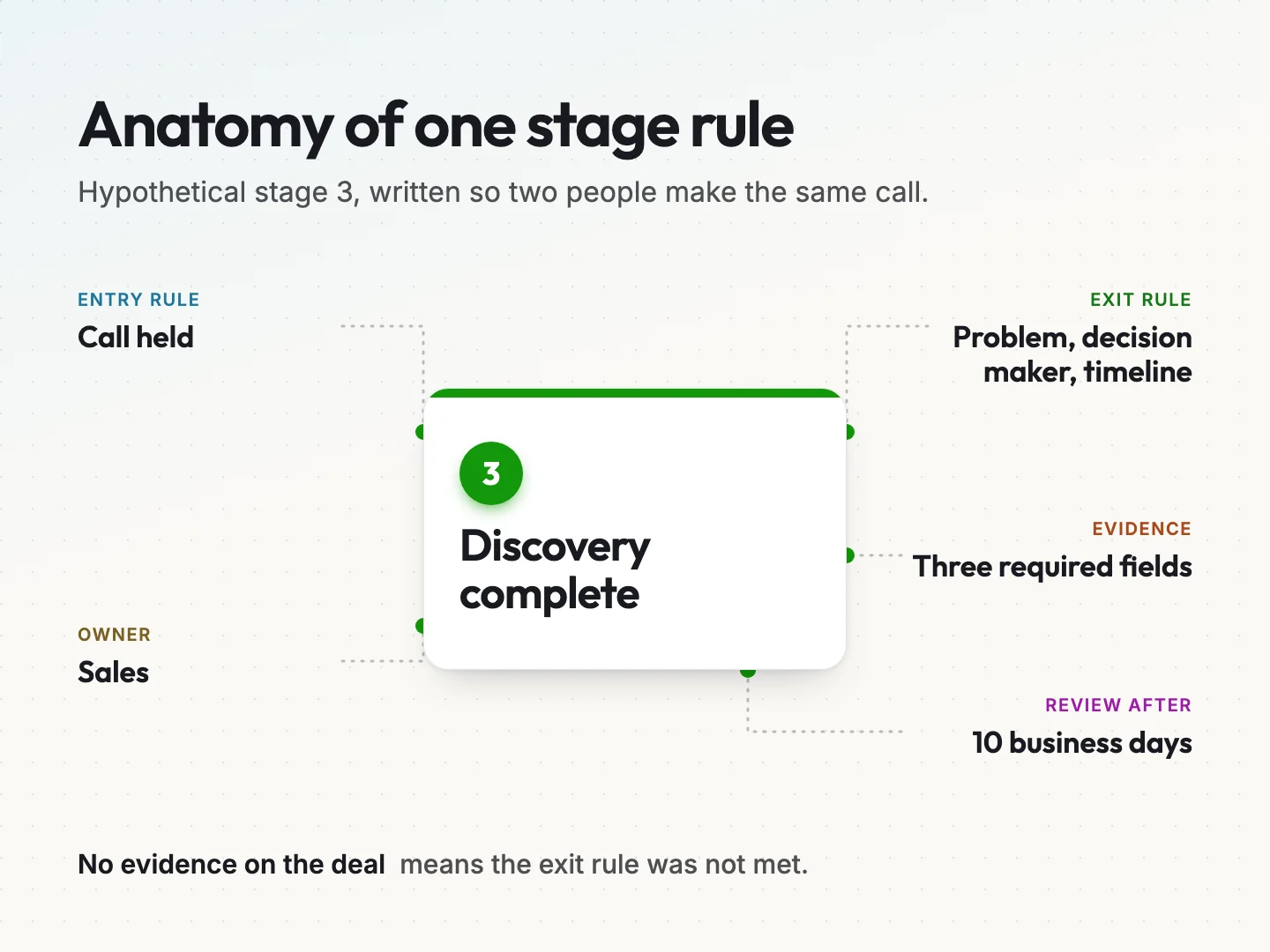
Entry rule. What must already be true for a deal to sit in this stage. It usually matches the exit rule of the stage before it. Writing it separately still helps, because it tells you what to check when a deal arrives that someone moved by hand.
Owner. One named role that is responsible for moving the deal forward while it is in this stage. Not a team, and not “whoever picks it up”. When two people share a stage, each assumes the other is on it.
Exit rule. The observable event that moves the deal on. The best exit rules describe something the buyer did, not something your team did. “Buyer agreed to a discovery call on a set date” works. “Rep feels good about it” does not.
Add a fourth line for evidence. That is the field, note or file in the CRM that proves the exit rule happened. If a manager cannot open the deal and see the evidence, the rule was not met.
Some teams add a fifth line, a time limit. It is how long a deal can sit in the stage before someone reviews it. That is not a rule for the buyer. It is a prompt for you to check whether the deal is still alive.
Three tests keep the rules honest.
- Could two different people read the rule and make the same call on the same deal?
- Is the evidence something the CRM can store, such as a date, a yes or no field or an attached file?
- Does the rule describe a change in the buyer’s position, not only effort on your side?
If a rule fails any of the three, rewrite it before you use it.
Seven sales pipeline stages for a small service business.
The model below is a hypothetical example for a small service business, such as a design studio, an accounting practice or a contractor that quotes larger jobs. Your stage names can differ. What matters is that each one marks a real change and has its own rules.
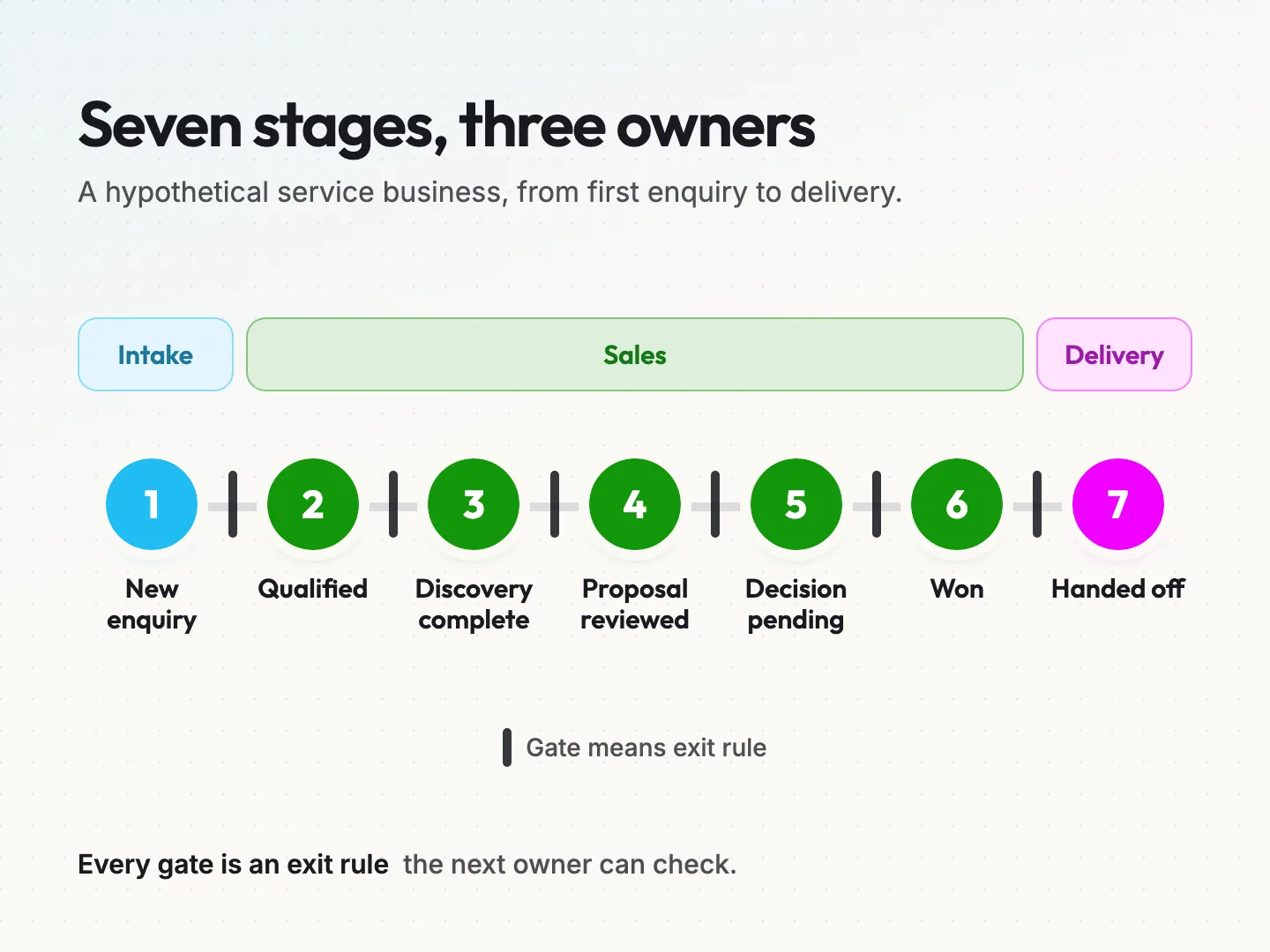
Notice that the first stage belongs to intake, the middle stages belong to sales and the last stage belongs to delivery. The board shows who is holding each deal at a glance.
Stage 1, new enquiry.
- Entry rule. An enquiry is logged with a contact, a source and what the person asked for.
- Owner. Intake, which might be an office manager or whoever answers the phone.
- Exit rule. The enquiry is checked against your fit rules and marked qualified or not a fit.
In many CRMs this stage lives on the lead record, not the deal board. That is fine. The rule still applies. Write the fit questions that decide whether an enquiry should reach a salesperson.
Stage 2, qualified.
- Entry rule. The enquiry passed your fit rules. A deal record now exists with an expected value and an owner.
- Owner. Sales.
- Exit rule. The buyer has agreed to a discovery conversation on a specific date.
Stage 3, discovery complete.
- Entry rule. The discovery conversation took place.
- Owner. Sales.
- Exit rule. The buyer has confirmed the problem, who makes the decision and the timeline. All three are written on the deal.
Prepare the questions before the conversation.
Stage 4, proposal reviewed.
- Entry rule. A proposal or quote has been delivered to the person who makes the decision.
- Owner. Sales.
- Exit rule. The buyer has reviewed the price and agreed to a next step, such as a call to discuss terms.
Notice the stage name. “Proposal sent” only tells you that your team did something. “Proposal reviewed” tells you the buyer did something.
Stage 5, decision pending.
- Entry rule. Price and scope are known to the buyer, and any changes have been discussed.
- Owner. Sales.
- Exit rule. A signed agreement comes back, or the buyer says no.
Stage 6, won.
- Entry rule. A signed agreement and the agreed payment terms are attached to the deal.
- Owner. Sales, until the handoff is accepted.
- Exit rule. Delivery has accepted the handoff note.
Stage 7, handed off.
- Entry rule. Delivery accepted the handoff and has every detail it needs to start.
- Owner. Delivery.
- Exit rule. The kickoff meeting has taken place and the job is now tracked in your delivery tools.
Seven stages suit a business that sells considered services. A shop that sells fixed-price packages online might need only three or four. Cut any stage where nothing about the buyer changes.
Copy the stage entry and exit rule table.
Here is the template. Copy it into a shared document, fill in one row per stage and agree on the wording with everyone who touches a deal. Only then change the stages in your CRM.
Blank template.
| Stage | Entry rule | Owner | Exit rule | Evidence in the CRM | Review after |
|---|---|---|---|---|---|
| 1. | |||||
| 2. | |||||
| 3. | |||||
| 4. | |||||
| 5. | |||||
| 6. | |||||
| 7. |
Filled example (hypothetical service business).
| Stage | Entry rule | Owner | Exit rule | Evidence in the CRM | Review after |
|---|---|---|---|---|---|
| 1. New enquiry | Contact, source and request logged | Intake | Marked qualified or not a fit | Fit result field | 1 business day |
| 2. Qualified | Passed fit rules, deal created | Sales | Discovery call booked | Meeting date | 5 business days |
| 3. Discovery complete | Call held | Sales | Problem, decision maker and timeline confirmed | Three required fields | 10 business days |
| 4. Proposal reviewed | Proposal delivered to decision maker | Sales | Buyer reviewed price, next step agreed | Next step date | 10 business days |
| 5. Decision pending | Price and scope discussed | Sales | Signed agreement or a clear no | Signed file or lost reason | 15 business days |
| 6. Won | Signed agreement and payment terms attached | Sales | Delivery accepted the handoff | Handoff accepted field | 2 business days |
| 7. Handed off | Handoff accepted | Delivery | Kickoff held | Kickoff date | 5 business days |
The review times are placeholders, not benchmarks. Set them from your own history. If your typical job takes six weeks from first call to signature, a review after 15 business days in one stage may be reasonable. If your deals close in a week, it is far too long.
A few habits make the table work in practice.
- Write rules in plain words. If a new hire cannot apply a rule on day one, it is too vague.
- Keep each rule short. Two to four conditions per stage is plenty. Long checklists get filled in from memory.
- Agree on it together. Intake, sales and delivery each sign off on the stages they own and the stages they receive.
- Version it. Put a date at the top of the document. When you change a rule, note what changed and why.
Plan for lost deals, stalled deals and re-entry.
Every pipeline loses deals. If your stages have no defined way out, lost deals stay on the board and quietly distort every number you report.
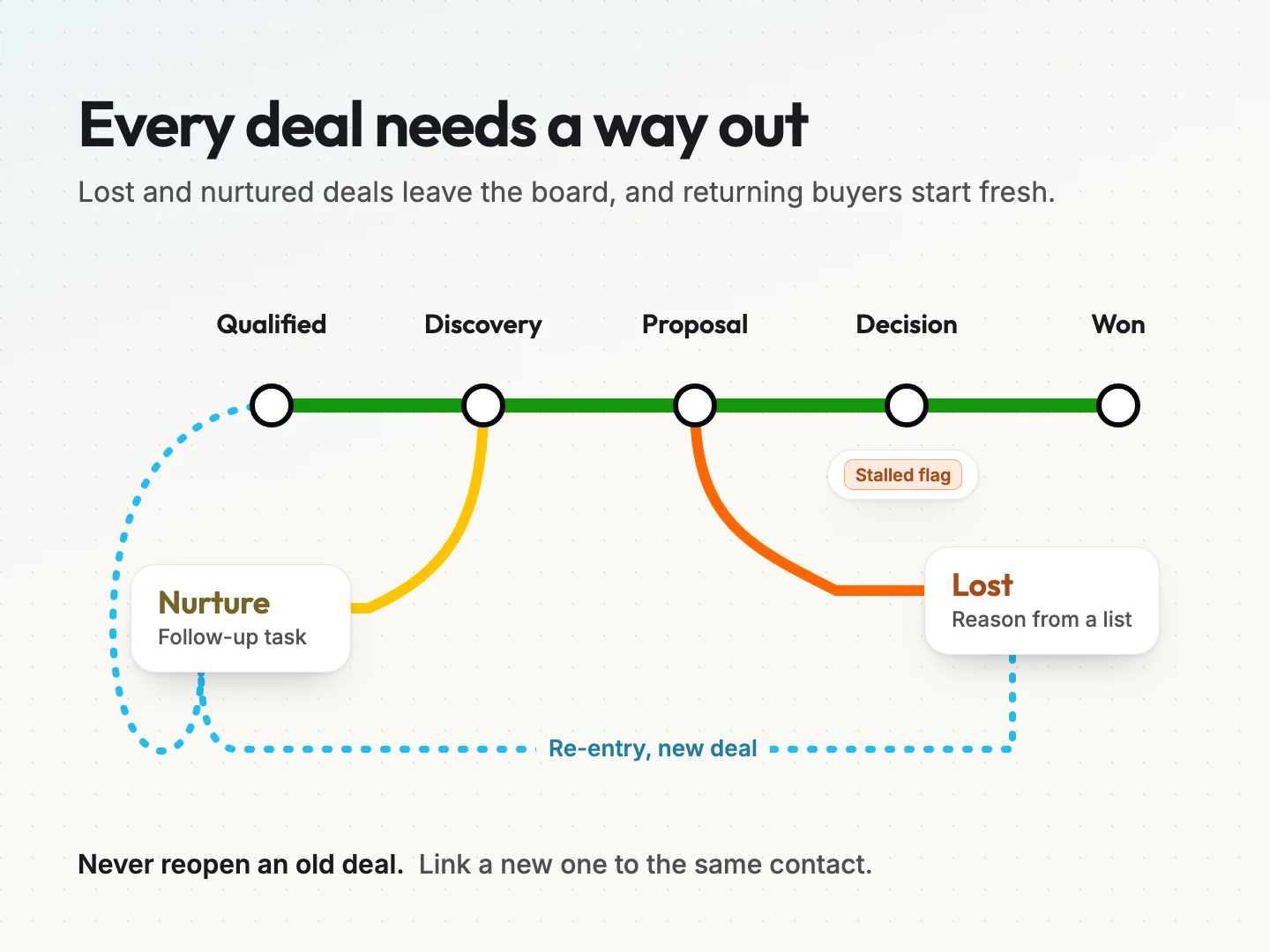
Lost. A deal is lost when the buyer says no, chooses someone else or stops replying after an agreed number of attempts. Record a lost reason from a short fixed list, such as price, timing, chose a competitor, no response or not a fit after all. A fixed list lets you count the reasons later. Free text does not.
Nurture. Some buyers are a fit but not ready. “Call us after the new year” is not a lost deal. It is a future one. Close the current deal as lost with the reason “timing”, and create a follow-up task or move the contact into a nurture email list. Do not leave the deal open with a date six months away. It will sit in your forecast the whole time.
Stalled. A deal is stalled when it has been in one stage longer than the review time in your table. Stalled is not a stage. It is a flag. The owner either gets a buyer action and moves it, or closes it as lost.
Re-entry. When a lost or nurtured buyer comes back, open a new deal at stage 2, qualified, and link it to the same contact. Do not reopen the old deal. The old one records what happened last time, and the new one has its own dates, so your cycle times stay accurate.
Can a deal move backwards? Sometimes it should. If a buyer reviewed your proposal and then the decision maker changed, the deal no longer meets the stage 3 exit rule. Move it back to discovery complete, note why, and let the owner fix the gap. That is more honest than leaving it parked in a later stage.
Hand the won deal to delivery without losing details.
The handoff is where many small businesses lose the details they spent weeks collecting. Sales knows what was promised. Delivery finds out at kickoff, or later.
That is why the model above treats the handoff as its own step. A deal is won when the agreement is signed. It is handed off only when delivery says it has what it needs.
A handoff note can be short. Include these items as fields or as a single structured note on the deal.
- What was sold, matching the signed scope.
- Who the buyer’s day-to-day contact is, and who approves the work.
- Anything promised outside the standard scope, such as a deadline, a meeting or an extra revision.
- Payment terms and when the first invoice goes out.
- The buyer’s own words about the problem from discovery.
- Known risks, such as a tight launch date or a stakeholder who was hard to reach.
Delivery reads the note and either accepts it or sends it back with questions. That one step settles most of the “nobody told us” arguments before the job starts. The same shared record also helps after the job ends, when you want repeat work, which is the subject of our guide to the best CRM for customer retention.
Set the rules up in your CRM.
Once the table is agreed, the CRM’s job is to make the rules easy to follow and hard to skip. Most tools offer two features that help: required fields when a deal enters a stage, and alerts for deals that sit too long.
Required fields on stage entry. HubSpot lets you require specific properties when someone creates a deal in a stage or moves a deal into it. That comes from its guide to setting up pipelines (updated 2026-09-08). If a required property is empty, the user cannot save the change.
That is your evidence column made real. For stage 3 in the table, you could require the decision maker, the timeline and the problem summary.
Stage probabilities. The same HubSpot guide explains that each stage carries a win probability, which drives the weighted amount on the board.
Its default pipeline runs from 20% at “Appointment scheduled” to 100% at “Closed won” and 0% at “Closed lost”. Treat those as defaults, not facts about your business. Replace them with your own rates once you have a few months of clean data. The guide also notes that custom pipelines need a Starter, Professional or Enterprise subscription.
Alerts for idle deals. Pipedrive’s Rotting feature (updated 2026-09-03) lets you set a number of inactive days per stage. A deal that passes that limit is highlighted.
Completed activities, notes, files and email actions reset the count, so a deal can look active because an email was sent even though the buyer has not moved. That is why the review time in your table should be checked against buyer actions, not activity alone.
Plans, names and settings change, so check the current documentation for your own tool before you rely on any of these features.
A few setup choices help in any CRM.
- Keep leads off the deal board. Use the lead or contact record for stage 1 if your tool supports it.
- Make lost reasons a dropdown. Free text cannot be counted.
- Add a handoff accepted field. A simple yes or no that only delivery can set.
- Limit who can edit stages. One person changes the stage list, after the team agrees.
If your CRM also needs to pass deals to your website forms, invoicing or project tools, that is integration work rather than stage design. Our CRM integration service connects those systems, and CRM automation handles the reminders and handoff tasks. If you want a structured way to review stages and reporting with an AI assistant, the free RevOps AI skill is a starting point.
Report on stages with a stated denominator.
A conversion rate is one number divided by another. The second number, the denominator, decides what the rate means. Most confusing pipeline reports leave it out.
Here is a hypothetical month for a small firm.
| Count this month | Number |
|---|---|
| New enquiries logged | 40 |
| Qualified | 22 |
| Proposal reviewed | 9 |
| Won | 4 |
Now look at three ways to report “conversion”.
- Won out of enquiries is 4 out of 40, or 10%.
- Won out of qualified deals is 4 out of 22, or about 18%.
- Won out of proposals reviewed is 4 out of 9, or about 44%.
All three are correct. They answer different questions. The first tells marketing how many enquiries turn into work. The second tells sales how well they convert real opportunities. The third tells you how strong your proposals are once the buyer reads them.
Write the denominator next to every rate you share. “Win rate 18% of qualified deals” is clear. “Win rate 18%” invites an argument.
Two more habits keep stage reports honest.
- Count by cohort. A deal that entered in March and closed in May belongs to the March group when you measure how qualified deals convert. Otherwise a busy month makes the next month look better than it was.
- Track time in stage. Note the date a deal entered each stage. The average days per stage shows where deals slow down, which is more useful than a single overall cycle time.
Review the numbers monthly at first. When a rate jumps or drops, check the stage rules before you celebrate or worry. A change in how someone applies a rule moves the numbers as much as a change in buyers does.
Final thoughts.
Clean pipeline stages are mostly a writing job, not a software job. Once every stage has an entry rule, one owner, an exit rule and the evidence that proves it, your CRM board stops being a guess and starts being a record. Intake, sales and delivery can look at the same number and agree on what it means.
Start small. Copy the table, fill in the stages you already use and test each rule against five real deals from last month. Where two people would make different calls, rewrite the rule. Then change the CRM.
If you would like help turning the table into required fields, alerts and a handoff that delivery accepts, talk to a specialist about setting up your pipeline.
Was this article helpful?