To launch an online community, pick one useful first contribution a member can make and budget the staff time to answer it. Then open in small waves. Write a welcome post that asks for that one action, queue 30 days of prompts in advance and measure how many members contribute, not how many join.
Most launch guides put their energy into the platform and the announcement. Those matter, but they are rarely why a new community goes quiet. It goes quiet when a member posts something, waits a day and hears nothing back. After that, they seldom post again.
This guide plans your launch around that moment. You get a way to choose the first contribution, a simple staff time budget, a full welcome post you can copy and a 30-day prompt queue. Every example here is hypothetical, so swap in your own topic, numbers and people.
Decide what your online community is for.
Before you pick a platform, write one sentence that says what members will get done together. Write it from the member’s side, not your business goals. “A place for our customers” is not a job. “Owners of small dental practices swapping front desk scripts that cut missed appointments” is a job.
A clear job does three things for you. It tells people whether to join. It tells you which posts to remove. It also tells you what the first contribution should be, and that is the decision the rest of this plan hangs on.
Test the sentence with five to ten customers before you build anything. Ask them two questions. Would you join a group that did this? What would you post first? If nobody can answer the second question, the purpose is still too vague.
Decide who the community is for and who it is not for, too. A group for current customers works differently from an open group for anyone in your industry. Customer groups mix support questions with peer advice. Open groups need more moderation and a stronger reason to come back.
Pick a home that matches the job.
Once you know the job, the platform question gets simpler. A hosted community tool or a social group is the quick route when your members already spend time there. Your own website makes more sense when you need paid access, member profiles, courses or your own data. If you are weighing that second route, a membership site built around your community keeps sign up, access and content in one place.
Whatever you choose, check three things before launch. Can you pin a post? Can you see who has never posted? Can you remove a post and message the member privately? If the answer to any of them is no, moderation will be harder than it needs to be.
Choose the first contribution members can make.
The first contribution is the single, small, useful action you ask every new member to take. It sits at the centre of your launch plan. A good one takes a few minutes, helps at least one other member and gives your team something real to reply to.
“Introduce yourself” is the default first contribution, and it is a weak one. Introductions are easy to write, but they rarely help anyone else. They also produce a wall of similar posts that nobody knows how to answer beyond “welcome”.
Compare these hypothetical first contributions for a community of bakery owners.
| First contribution | Easy to do? | Useful to others? | Easy to answer? |
|---|---|---|---|
| Introduce yourself | Yes | Rarely | Only with “welcome” |
| Share your best selling item and what you charge | Yes | Yes | Yes, with a comparison |
| Ask one question you are stuck on this week | Yes | Often | Yes, if staff are ready |
| Post a photo of your display case for feedback | Medium | Yes | Needs a skilled reviewer |
The best options sit in the middle rows. They take minutes, they create something another member can use and they give your team a clear way to reply.
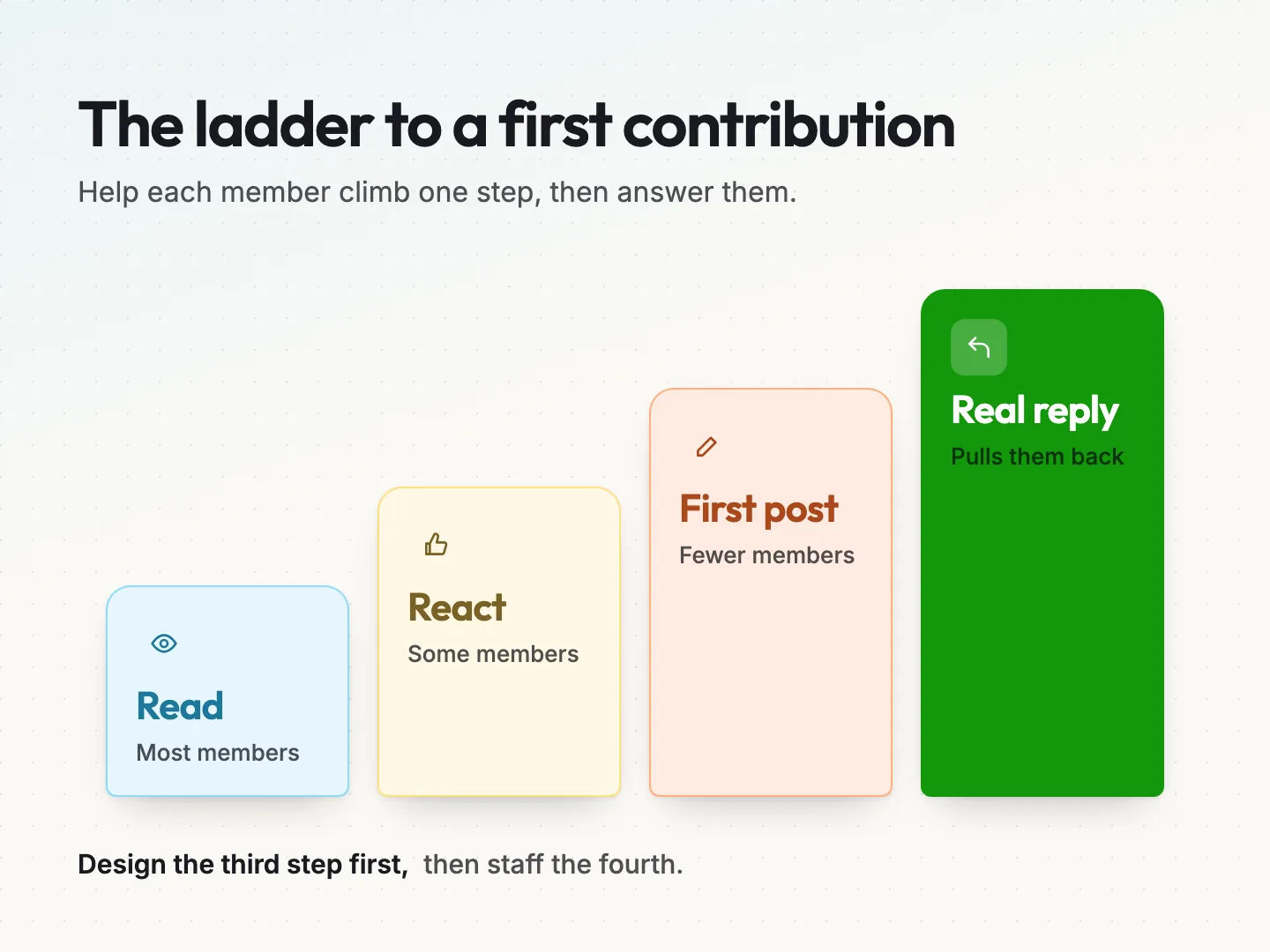
Think of member activity as a ladder. Most people start by reading. Some react to a post. A smaller group makes a first contribution, and the best of those get a reply that pulls the member back. Your first 30 days should help people climb from reading to that first post, then make sure the post gets a real answer.
Write the first contribution as a prompt.
Turn the action into a short prompt with a clear format. A hypothetical prompt might read like this. “Share one thing that sold well for you this month and one thing that did not.” The format makes it easy to start and easy to compare answers.
Keep a second, easier action for people who are shy. Reacting to someone else’s post or answering a poll still counts as a step up the ladder. It shows you who is reading and gives you someone to invite personally later.
Budget the staff time to answer every first post.
This is the part most launch guides skip. Every first contribution needs a thoughtful reply, ideally within one working day. If nobody answers, the member learns that posting here is a waste of time. That lesson is hard to undo.
So before you send a single invitation, work out how much reply time your launch will need. You only need four numbers.
- Members you plan to invite in the first 30 days.
- The share you expect to post at least once. Use a cautious guess and adjust it after the first wave.
- Replies per post. Count the first reply plus one follow up.
- Minutes per good reply. Time yourself replying to three test posts.
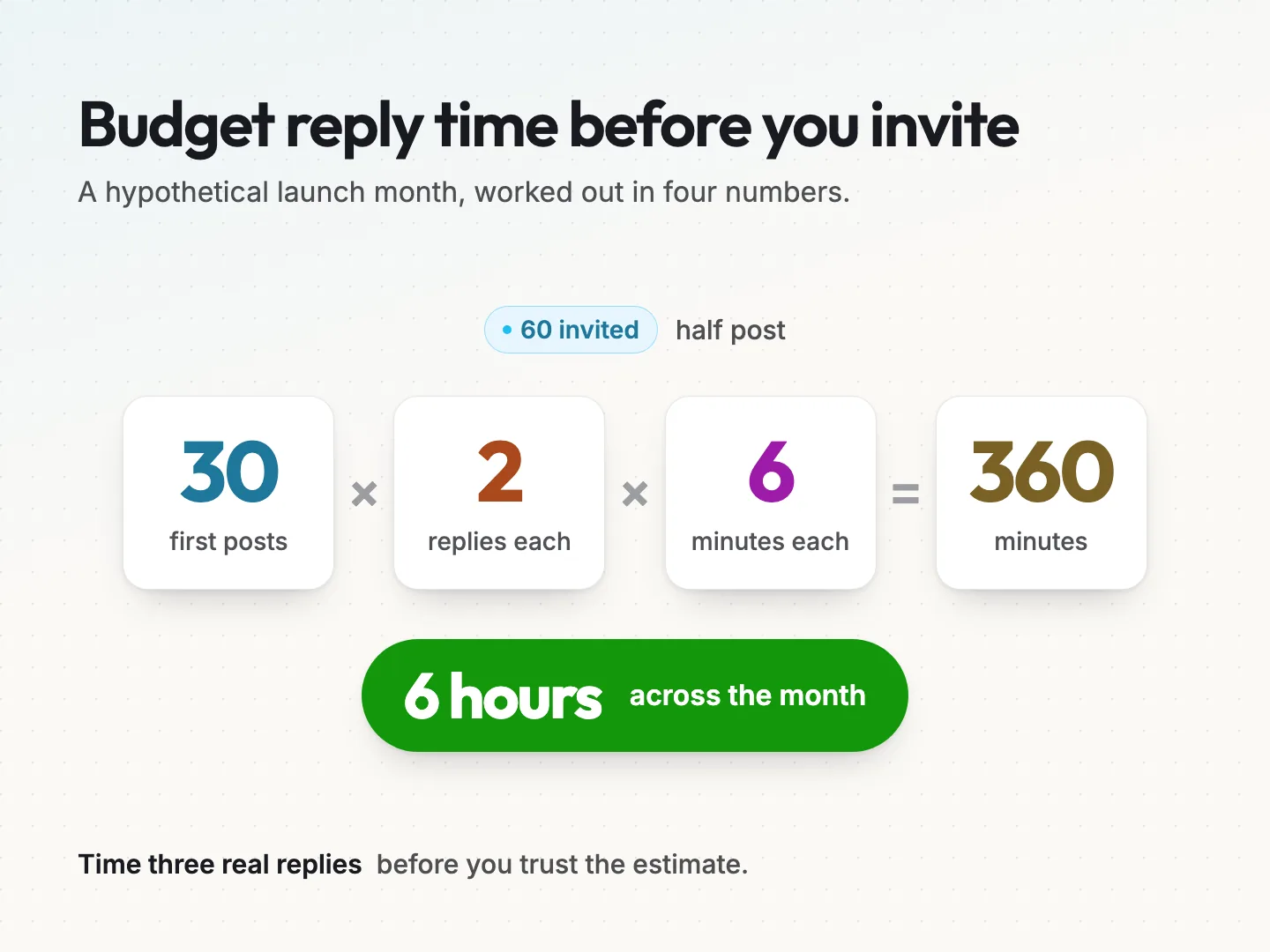
Here is a worked hypothetical example. You plan to invite 60 members and guess that half will post, which gives you 30 first contributions. Each post needs 2 replies, and a good reply takes about 6 minutes. That is 30 × 2 × 6 = 360 minutes, or 6 hours across the month.
Six hours sounds small, but it does not arrive evenly. Most first posts land in the two or three days after each invitation wave. Plan for that by blocking reply time on the calendar for the two days after every wave. Then add the time you need for your own prompts, events and moderation on top.
Decide who replies and when.
Name one person as the community lead for the launch. That person checks the space at set times, such as mid morning and late afternoon on working days. Name a backup for days off. If you have subject experts on staff, give each one a topic to answer, so the lead does not become a bottleneck.
Write down what a good first reply looks like.
A good first reply thanks the member by name, adds something to what they said and asks one follow up question. Where it fits, it also tags another member who can help. Staff should never paste the same welcome line under every post, because members notice.
Here is a hypothetical example from the bakery group. A member writes that cinnamon rolls sell out every Saturday while the sourdough sits on the shelf. A weak reply only welcomes her to the group. A strong reply thanks her, asks whether she has tried a second batch of rolls and tags a member who posted about sourdough pricing.
The strong reply takes a minute longer. It also gives the member a reason to post again, and it introduces two members to each other. That second effect is how a community starts to run without staff answering everything.
Plan for moderation staffing too.
Replies are not the only work. Someone also needs to remove spam, calm a heated thread and answer reports. For a small launch this is usually the same lead, but the rules should be written before day one. Write the moderation rules and escalation steps, and decide how to share the work as the group grows.
Set up the space before anyone arrives.
An empty space feels unsafe to post in. A cluttered one feels confusing. Aim for a short, finished setup with a few clear areas and visible signs of life.
Use this setup checklist before the first wave.
- Three to five topic areas at most. Name them in plain words. You can add more once members ask for them.
- Guidelines in plain English. Say what the community is for, what is not allowed and what happens when someone breaks a rule.
- A pinned welcome post. The full template is in the next section.
- Ten seeded discussions. A seeded discussion is a real thread started by staff or founding members before launch, so new people see conversations instead of blank pages.
- Short profile fields. Ask only for what members need to find each other.
- Tested notifications. Join as a test member and check every email the platform sends.
- A private way to report a problem. Members should be able to flag a post without arguing in public.
Profiles deserve a moment of thought. Members often share more in a small group than they would on a public page. Decide which fields are public, which only members can see and which stay private.
If you approve members before they get in, write those emails now as well. A slow or confusing approval step can lose people before they ever see the welcome post. Write each approval message so people understand what happens next.
Finally, test the whole path as a new member would. Sign up, confirm your email, read the welcome, make the first contribution and wait for a reply. If any step takes longer than you expected, fix it now. Use that end-to-end journey as the test before opening the community.
Write a welcome post that asks for one thing.
Most welcome posts try to say everything. They list the rules, the features, the team and five ways to get involved. Members skim it and leave without doing anything. A better welcome post explains the purpose, asks for the first contribution and tells members what happens next.
Here is a full welcome post you can adapt. The words in square brackets are placeholders.
> Welcome to [community name]. > > This is a place for [who it is for] to [the job members get done together]. It is small on purpose, and every member here was invited. > > Start here. [Your first contribution prompt.] It takes about five minutes. Post it in [topic area] and someone from our team will reply within one working day. > > Not ready to post yet? That is fine. React to a post that helped you or answer this week’s poll. > > How it works here. Be generous, stay on topic and keep private details about clients or staff out of the group. The full guidelines are [linked here]. If something feels wrong, use the report button and we will look at it privately. > > Who is here to help. [Lead name] looks after the community and checks in every working day. [Expert names] answer questions about [topics]. > > What is coming up. This month we will [one or two planned activities, such as a live question session on a set date]. > > Glad you are here. We look forward to your first post.
Notice what the template leaves out. It does not list every feature or every rule. It does not ask members to fill in a long profile. It gives one clear action, a promise about response time and a reason to come back.
Keep that promise realistic. Only promise a reply within one working day if your staff budget covers it. If it does not, promise two working days and keep that promise every time.
Invite founding members in three waves.
Opening the doors to everyone on day one is risky. If a hundred people arrive and few post, the space looks quiet. If many post at once, your team cannot reply well. Waves let you control both problems.
A simple three wave plan looks like this.
- Wave one, founding members. Invite 10 to 15 people who already trust you and like helping others. Brief them personally. Ask each one to make the first contribution and to reply to at least two other posts in their first week.
- Wave two, engaged customers. About a week later, invite people who already open your emails or come to your events. The founding members’ posts give them something to read and answer.
- Wave three, your wider audience. Once replies are reliably fast, announce the community through your newsletter, website and social channels.
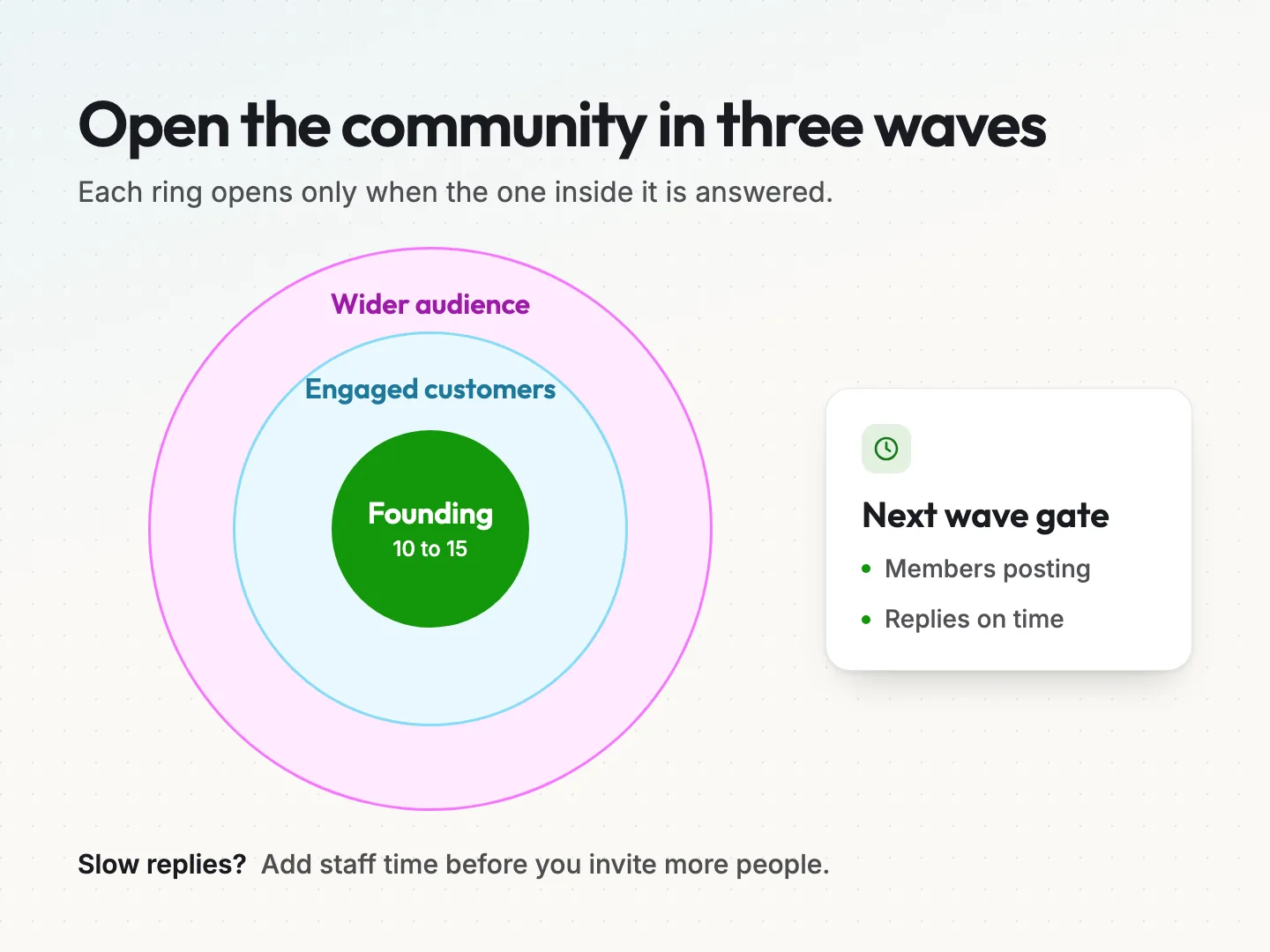
Do not move to the next wave because the date arrived. Move when the current wave is posting and getting replies inside your promised time. If replies are slow, fix your staffing first and invite later.
When you reach wave three, plan how you will announce the community on social media. A short series of posts that shows real conversations usually works better than one big announcement. If your team needs help with that schedule, a social media management service can plan and run it alongside your launch.
Your 30-day prompt queue.
A prompt queue is a list of posts your team writes before launch and publishes on set days. It keeps the space active while members learn the habit of posting. It also prevents the common pattern where launch week is busy and week two goes silent.
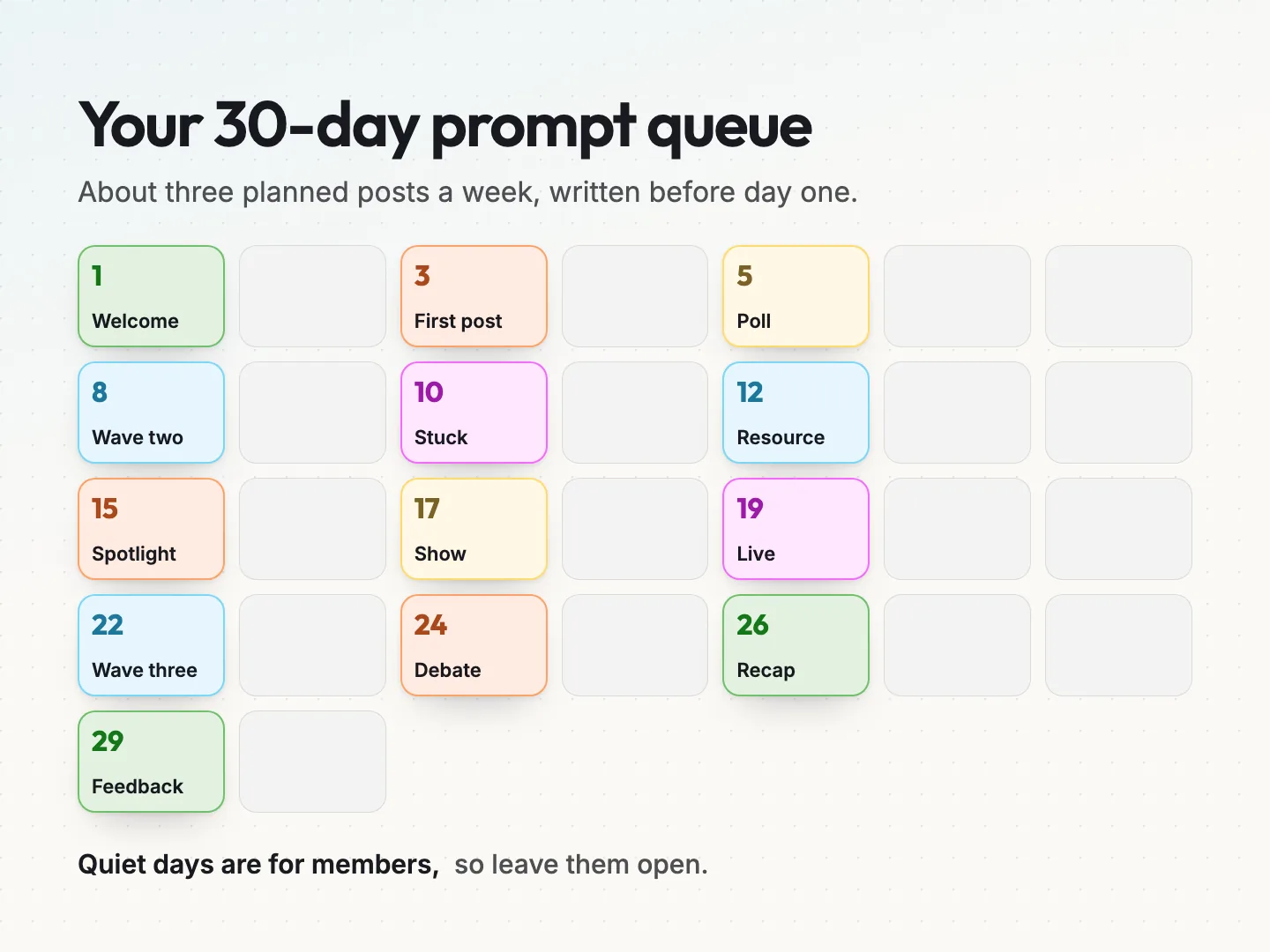
The queue below has about three prompts a week, 13 in total. That gives members a reason to return while leaving room for their own posts. Every prompt is a hypothetical example for a small business owners group, so rewrite each one for your topic.
| Day | Prompt type | Example prompt | Who replies first |
|---|---|---|---|
| 1 | Welcome | Pin the welcome post and ask for the first contribution. | Lead |
| 3 | First contribution | What sold well for you this month, and what did not? | Lead |
| 5 | Easy poll | Which task eats most of your week? Pick one. | Lead |
| 8 | Wave two welcome | Welcome new members by name and point to two good threads. | Lead |
| 10 | Stuck question | What is one question you are stuck on this week? | Expert |
| 12 | Resource | Share one checklist your team uses and ask members for theirs. | Expert |
| 15 | Spotlight | Thank a member whose post helped others and say why. | Lead |
| 17 | Show and tell | Post a photo of something you changed this month. | Founding member |
| 19 | Live session | Announce a 30 minute live question session and collect questions. | Expert |
| 22 | Wave three welcome | Welcome the wider audience and repeat the first contribution prompt. | Lead |
| 24 | Debate | Would you rather raise prices or add a service? Explain your choice. | Founding member |
| 26 | Recap | List the three most useful answers from this month. | Lead |
| 29 | Feedback | What should we change about this community next month? | Lead |
Running the queue day to day.
- Write every prompt before day one. Keep them in a shared document with the date, the topic area and the person who replies first.
- Schedule posts where your platform allows it. If it does not, put each one on the lead’s calendar.
- Answer your own prompt. Add your answer as the first comment, so members can see the format.
- Move a prompt if members are busy. If a member thread is going well, let it breathe and post the prompt a day later.
- Swap weak prompts. If a prompt gets no replies within two days, note it and try a different type next time.
Spotlights and recaps matter more than they seem. They show new members what a good post looks like. They also tell existing members their effort was noticed, which makes the next contribution more likely.
The numbers to watch in the first 30 days.
Sign ups are the easiest number to watch and the least useful. A community with 200 members and no posts is not working. A community with 30 members who all post is. Measure contribution and response first.
| Measure | How to work it out | Why it matters |
|---|---|---|
| First contribution rate | Members who posted at least once ÷ members who joined | Shows whether the first action is easy enough |
| Reply time | Hours from a first post to its first reply | Shows whether your staff budget is holding |
| Member to member replies | Replies written by members ÷ all replies | Shows whether the group can start running without you |
| Return visits | Members who came back in a second week ÷ members who joined | Shows whether there is a reason to return |
| Staff hours used | Hours logged against the budget | Shows whether the budget was realistic |
Review these numbers once a week during the launch. Look for the gap that matters most. If people join but do not post, simplify the first contribution. If they post but replies are slow, add staff time before the next wave. If staff write nearly every reply, ask founding members to answer more.
Keep the measures in a simple spreadsheet. Five numbers once a week takes minutes, and it turns opinions about the launch into a clear decision about what to fix.
Plan the second month before day 30.
The launch month proves whether the basic loop works. Members post, someone answers and some of them come back. The second month is about making that loop depend less on your staff.
In the last week of the launch, sit down with your five measures and answer four questions.
- Which first contribution worked best? Keep it in the welcome post and drop the others.
- Which prompts got the most replies? Repeat those types next month and retire the quiet ones.
- Which members answered others without being asked? Thank them privately and invite them to host a prompt or a live session.
- Did the staff budget hold? If it ran over, either add hours or slow down the next round of invitations.
Then write the next 30-day queue using what you learned. It can be lighter, perhaps two prompts a week, if members are starting their own threads. Keep the weekly review going, because the measures will tell you when the community is ready to open to a wider audience.
Common mistakes when launching an online community.
These mistakes are easy to make in a busy launch month. Each one has a simple fix.
- Launching to everyone at once. Use waves, and only move on when replies are fast.
- Asking only for introductions. Ask for a contribution that helps someone else.
- No named owner. Give one person the job and a backup, with time blocked on the calendar.
- Too many topic areas. Start with three to five and add more when members ask.
- A quiet second week. Write the full prompt queue before day one.
- Counting members instead of contributors. Track the first contribution rate and reply time.
- Promising replies you cannot give. Set a response time your budget can keep.
Gradual’s guide on how to plan a community launch is a useful second read on launch shapes and founding members. It was published in July 2026 and is written for teams using its own platform, so adapt its examples to your tools.
Final thoughts.
A new online community lives or dies on a small moment. A member posts something useful and someone answers it well. Everything in this plan, from the first contribution to the staff budget and the prompt queue, exists to make that moment happen again and again.
Start small. Pick one first contribution, time a few replies, write the welcome post and fill the 30-day queue before you invite a single person. Then open in waves and let the weekly numbers tell you when to grow.
Want help planning the launch, building the space on your own site or running the first month of prompts? Talk to a specialist about what your community needs.
Was this article helpful?