



To repurpose a blog post into social media posts, first write down what the article claims and where its advice stops. Then give each post its own teaching job: one helps the reader judge, one helps them prepare and one explains an exception. Rewrite each for its platform, review it and link back.
That one step, giving every post a different job, is what most repurposing advice leaves out. The usual tip is to pull quotes, make a carousel and post a thread. That fills a calendar, but a follower who sees all three posts learns the same point three times. A new format does not make a new lesson.
This guide shows you the three-job method with one running hypothetical example. You get a claims sheet you can fill in, a prompt you can paste into an AI assistant, a four-check review and a simple spacing plan. It works for a small team, or for one person who does marketing on Tuesday afternoons.
Most repurposed posts say the same thing three times.
Most repurposing starts with the format. You decide you need a LinkedIn post, an Instagram carousel and a Facebook update, and then you squeeze the article into each one. Because every version starts from the same summary, every version ends up teaching the same summary.
You can see it in the drafts. The hook changes, the image changes and the hashtags change. The point underneath stays identical. A follower who sees the carousel on Monday and the text post on Thursday has no reason to stop scrolling the second time.
There is a second problem that is easier to miss. When you shorten an article, the qualifications go first. “This works for most homes” becomes “This works.” A careful article turns into a set of posts that promise more than the article did. That can hurt trust with exactly the people you want to keep.
The fix is to plan the lessons before the formats. Ask what the reader will learn from each post that they could not learn from the others. Choose the platform after you know the job.
Give each social post a different teaching job.
A teaching job is the one thing a post helps the reader do. Three jobs cover most practical blog posts, and each pulls a different part of the article forward.
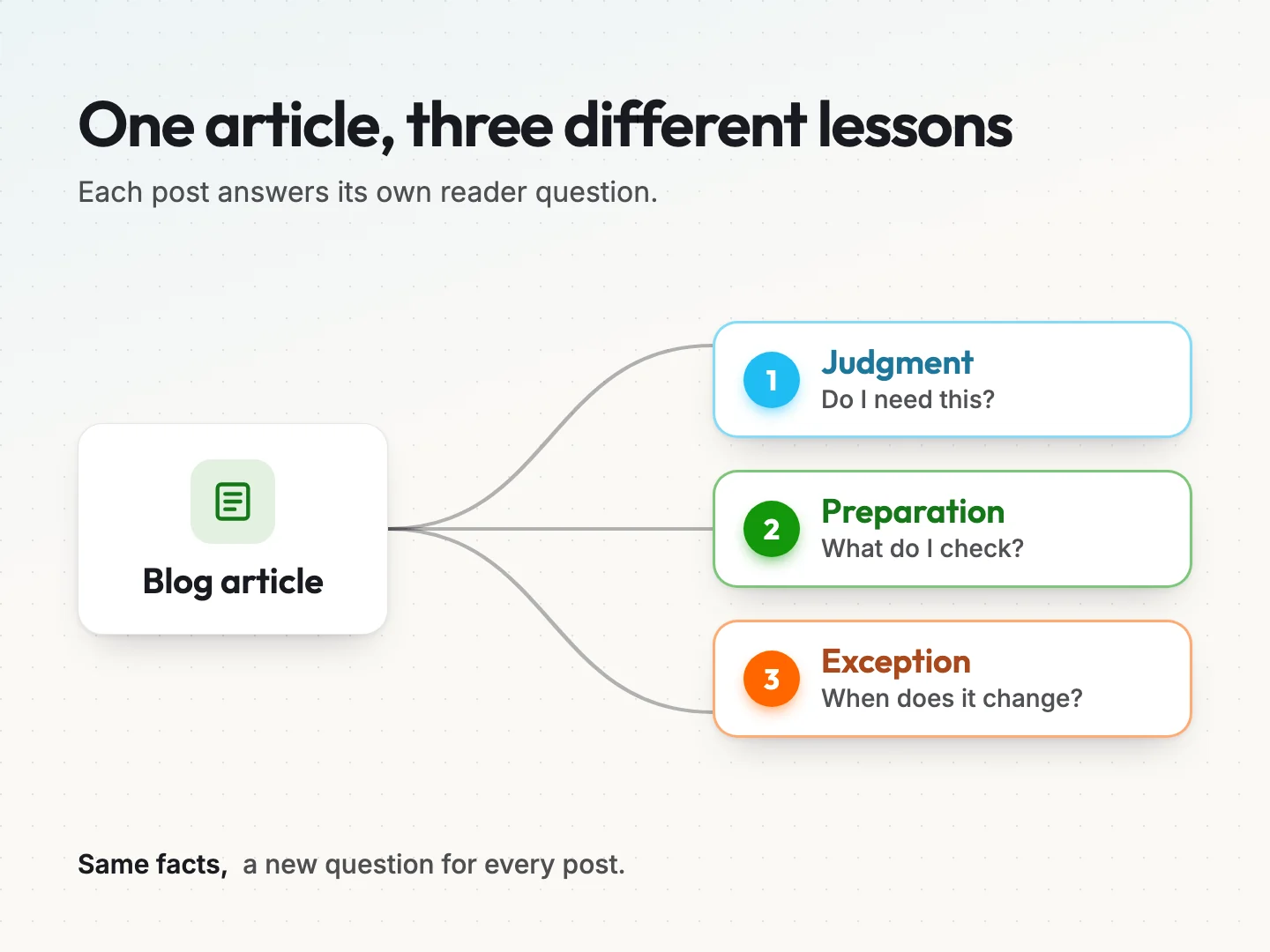
- The judgment post. It helps the reader decide whether the article’s advice applies to them right now. It answers “Do I need to do something?”
- The preparation post. It helps the reader get ready to act. It answers “What do I check or gather before I start?”
- The exception post. It explains when the usual advice changes. It answers “When does the normal rule not apply to me?”
Each job uses the same supported facts from the article. None of them needs a new claim. What changes is the reader’s question, so each post earns its own place in the feed.
A running hypothetical example.
Here is the example used through the rest of this guide. It is hypothetical. A heating and cooling company publishes an article on how often to replace a home air filter. The article gives a usual schedule, lists signs that a filter is due and names situations that call for more frequent changes, such as pets or a renovation.
- The judgment post helps a homeowner decide whether their filter is due today.
- The preparation post tells them what to check before they buy a replacement.
- The exception post explains why a home with pets or recent building work may need a shorter schedule.
Three posts, three lessons, one article. A follower who sees all three knows more than a follower who sees one.
Build a claims sheet before you write a single post.
A claims sheet is a short record of what the article says and what it does not say. It only takes a few minutes, and it protects every post you write from it. You fill it in once, then every draft and every AI prompt works from the sheet instead of from memory.
Copy this table into a document or a spreadsheet and fill one row per claim.
| Claim in the article | Where it appears | Limit or condition | Source named in the article | Allowed in a post? |
|---|---|---|---|---|
| The usual replacement schedule | Opening section | Standard filters in a typical home | Manufacturer guidance the article links | Yes, with the condition |
| Signs a filter is due | Section 2 | Visual check only | None, practical advice | Yes |
| Pets shorten the schedule | Section 4 | Depends on number of pets | Manufacturer guidance | Yes, as “may need” |
| Filters lower energy bills | Not in the article | Not supported | None | No |
The last row matters most. It records something a post might be tempted to say that the article never claimed. Writing it down makes it easy to spot in a draft later.
Keep these columns even if you shorten the rest.
- The claim in plain words. Write it the way a customer would say it.
- The limit. Who it applies to, under what conditions and what the article left open.
- The source. If the article cites a figure, note the source and its date. A post that repeats the figure should carry the same source.
- Allowed or not. A yes, a no or a yes with the condition attached.
If your article has no limits at all, read it again. Most practical advice has at least one “it depends”, and that is usually where the exception post comes from.
Write the judgment post.
The judgment post meets the reader before they have decided to care. Its only job is to help them answer one question about their own situation. It works best as a short text post or a single image with a caption.
A simple structure for it has four parts.
- Name the decision. Open with the question the reader is quietly asking.
- Give the test. Offer two or three signs they can check for themselves.
- State the condition. Say who this applies to, taken straight from the claims sheet.
- Point to the article. Tell them where the full answer lives.
In the hypothetical air filter example, the judgment post might read like this.
> Not sure if your air filter is due? Hold it up to a light. If you cannot see light through it, or it looks grey across the whole surface, it is probably time. That rule fits standard filters in a typical home. Our full guide covers the usual schedule and when to change sooner.
Notice what it leaves out. It does not list every sign, the schedule or the exceptions. Those belong to the article and the other two posts. A judgment post that tries to teach everything turns back into a summary.
If you publish on LinkedIn, review the hook and line breaks for that platform.
Write the preparation post.
The preparation post is for the reader who has already decided to act. It tells them what to check, gather or measure before they start, so the task goes smoothly. It is the kind of post people tend to save, because they need it at the moment they act.
Build it around a short list.
- What to look up first. The one detail people usually get wrong.
- What to have ready. Tools, numbers or information they need on hand.
- What to avoid. One common mistake, stated plainly.
Keep the list to three to five items. More than that and the post reads like a manual.
In the hypothetical example, the preparation post tells homeowners to check the size printed on the edge of the old filter. It also tells them to note the airflow arrow and take a photo before removing it. None of that is new information. It sits in the article already, but most readers skim past it. The preparation post lifts it out and gives it its own moment.
This is also the post where a simple image helps most. A photo of the printed size on a filter edge does more than a paragraph. If you need the same image in several platform sizes, check that every crop keeps the important part visible.
Turn the exception into a six-slide carousel.
The exception post explains when the usual advice changes. It suits a carousel because an exception needs a little build up. The reader has to know the normal rule before the exception makes sense.
A carousel is a post made of several images or pages that the reader swipes through. On LinkedIn this is usually a document post, where you upload a PDF and each page becomes a slide.
LinkedIn’s Help page on uploading and sharing documents lists PowerPoint, Word and PDF files, with a limit of 100 MB and 300 pages. It also says you cannot edit the document after posting. The page showed “last updated 3 years ago” when this guide checked it on October 13, 2026, so confirm the limits before you rely on them.
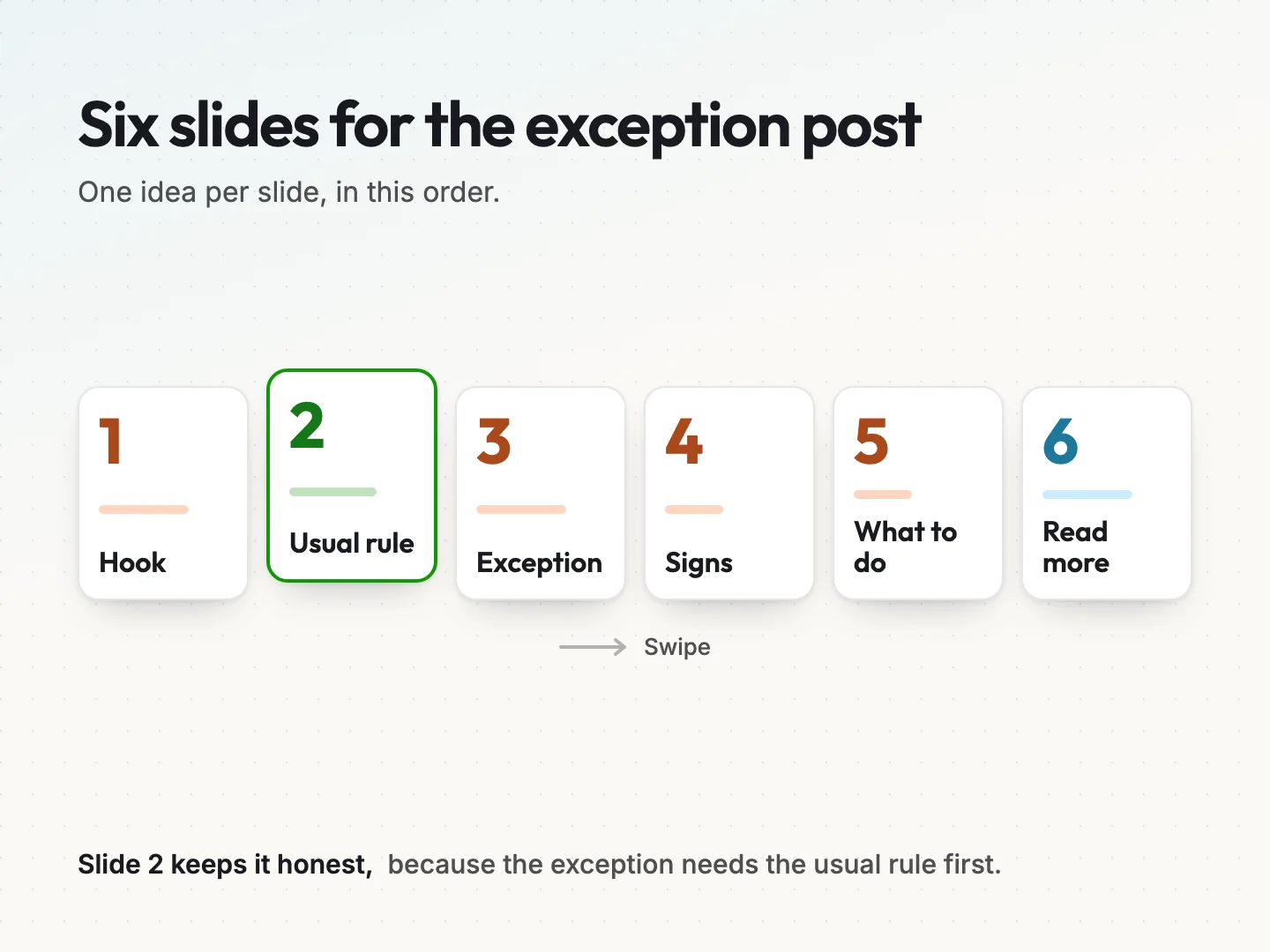
Six slides are enough for most exceptions. Here is a structure you can reuse.
- Hook. Name the reader who is the exception. “Have pets? Your filter schedule is different.”
- Usual rule. State the normal advice in one line, with its condition.
- The exception. Say who it does not fit and why, in plain words.
- The signs. Two or three things the reader can check.
- What to do. One clear action that fits the exception.
- Read more. Point to the article for the full detail.
Put one idea on each slide and keep the text short enough to read in a few seconds. A carousel that crams the whole article into small slides is harder to read than the article.
Slide 2 is the one people skip when writing, and it is the one that keeps the post honest. Without the usual rule, the exception reads like a new claim. With it, the reader understands that the article covers both cases.
Match each job to the right platform.
Once you know the three jobs, choose where each one goes. A job does not belong to one platform, but some pairings work better than others for most small businesses.
| Teaching job | Format that suits it | Platforms where it often fits | What to watch |
|---|---|---|---|
| Judgment | Short text post or single image | LinkedIn, Facebook, Google Business Profile | Keep the condition in the first lines |
| Preparation | Checklist image or short list | Instagram, Facebook, Pinterest | Make the list readable on a phone |
| Exception | Carousel or document post | LinkedIn document post, Instagram carousel | Include the usual rule before the exception |
Treat this as a starting point, not a rule. Where your customers already spend time matters more than any table. A local service business may get more from a Google Business Profile update than from a carousel nobody sees.
You do not need every platform either. Three posts on the one platform your customers use is better than one post each on three platforms nobody checks. If you are building a weekly rhythm around these posts, the guide to a content calendar template shows how to fit them into a schedule your team can finish.
A three-job repurposing prompt you can copy.
An AI assistant can draft the three posts quickly, as long as it works from your claims sheet and not from a vague summary. Paste the prompt below into the assistant you use, then paste your article and your claims sheet where the brackets ask.
> You are helping a small business turn one blog post into three social media posts. Each post must teach something different.
> Here is the article: [paste the full article].
> Here is the claims sheet. Only use claims marked as allowed, and keep every condition attached: [paste the claims sheet].
> Write three posts.
> Post 1 is a judgment post for [platform]. Help the reader decide whether this advice applies to them now. Name the decision, give two or three signs they can check and state who it applies to.
> Post 2 is a preparation post for [platform]. Help a reader who has decided to act get ready. Give three to five things to check, gather or avoid.
> Post 3 is an exception post written as six carousel slides. Slide 1 names who the exception is for. Slide 2 states the usual rule with its condition. Slides 3 to 5 explain the exception, the signs and what to do. Slide 6 points to the article.
> Do not add facts, figures or promises that are not in the claims sheet. Do not repeat the same opening in two posts. Write in plain, friendly English for [describe your customer]. End each post with a pointer to the full article.
Treat what comes back as a first draft. The assistant will sometimes round a condition away or reuse a hook. The review in the next section catches both.
If you want a ready-made planning helper, the social content planner AI skill gives you a structured way to plan posts across a week. Teams that want this to run every time a post goes live can look at the blog to social and newsletter draft workflow, which creates drafts for a person to approve.
Check every draft before it goes out.
Every draft gets the same four checks, whether you wrote it or an assistant did. They take a few minutes per post and they catch the problems that cost trust later.
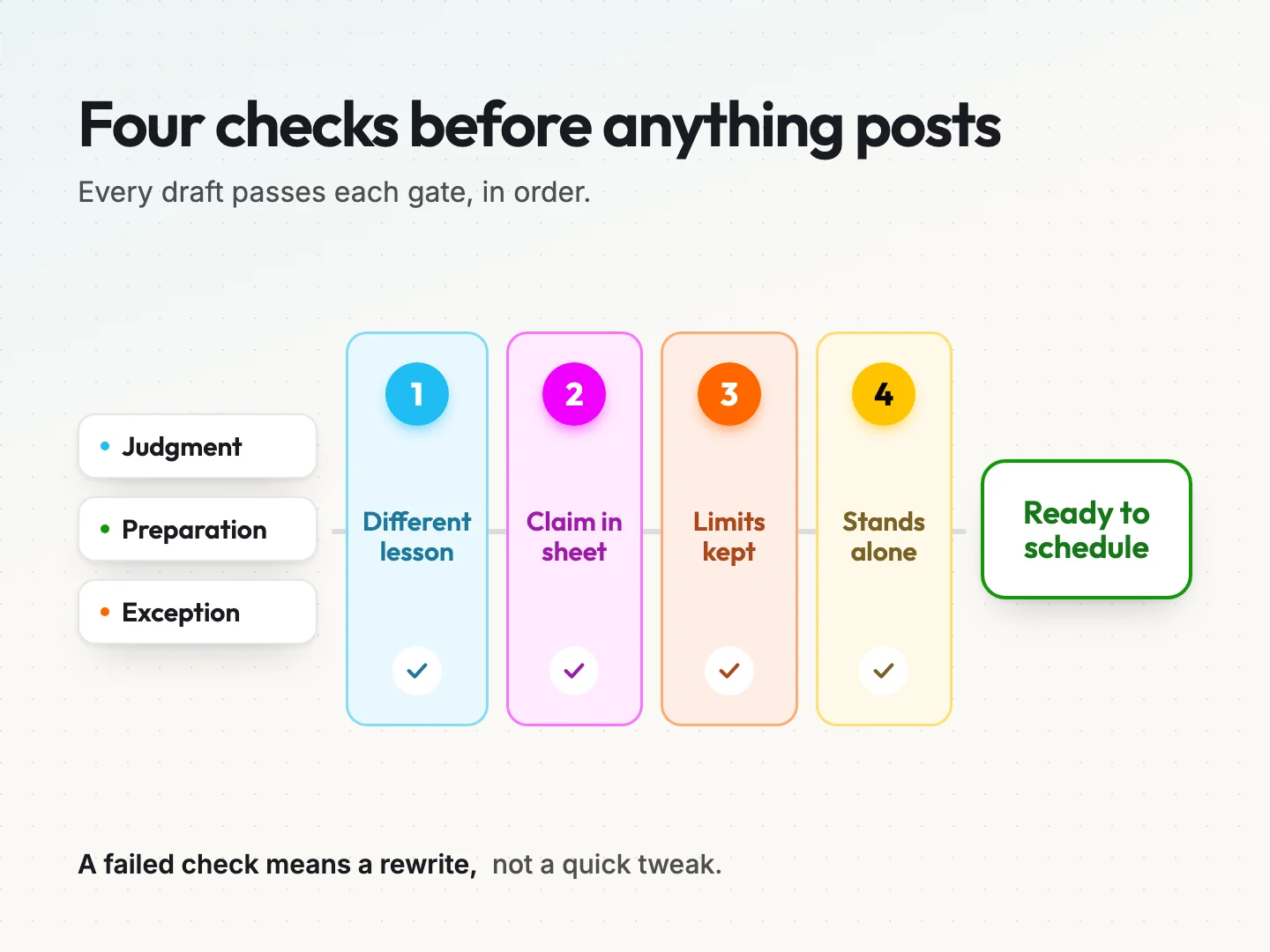
- A different lesson. Read the three posts side by side. Could a follower learn something new from each one? If two posts teach the same point, rewrite one around its job.
- Every claim in the sheet. Check each statement against the claims sheet. Anything that is not there comes out, even if it sounds true.
- Limits kept. Make sure every condition survived the shortening. “Most homes” should not have become “every home”.
- It stands alone. Read each post as if you had never seen the article. It should make sense on its own and point clearly to where the reader can learn more.
Then look at each post where it will appear. Open the platform’s preview if it has one, or view the image on your phone. A carousel that reads well on a laptop can be too small to read in a feed.
If more than one person signs off on posts, record who checks what and when. That stops drafts from waiting in someone’s inbox for a week.
Space the posts out and link back to the article.
Three posts published on the same day compete with each other. Spread them out so each one gets its own moment, and so a follower meets the article more than once from different angles.
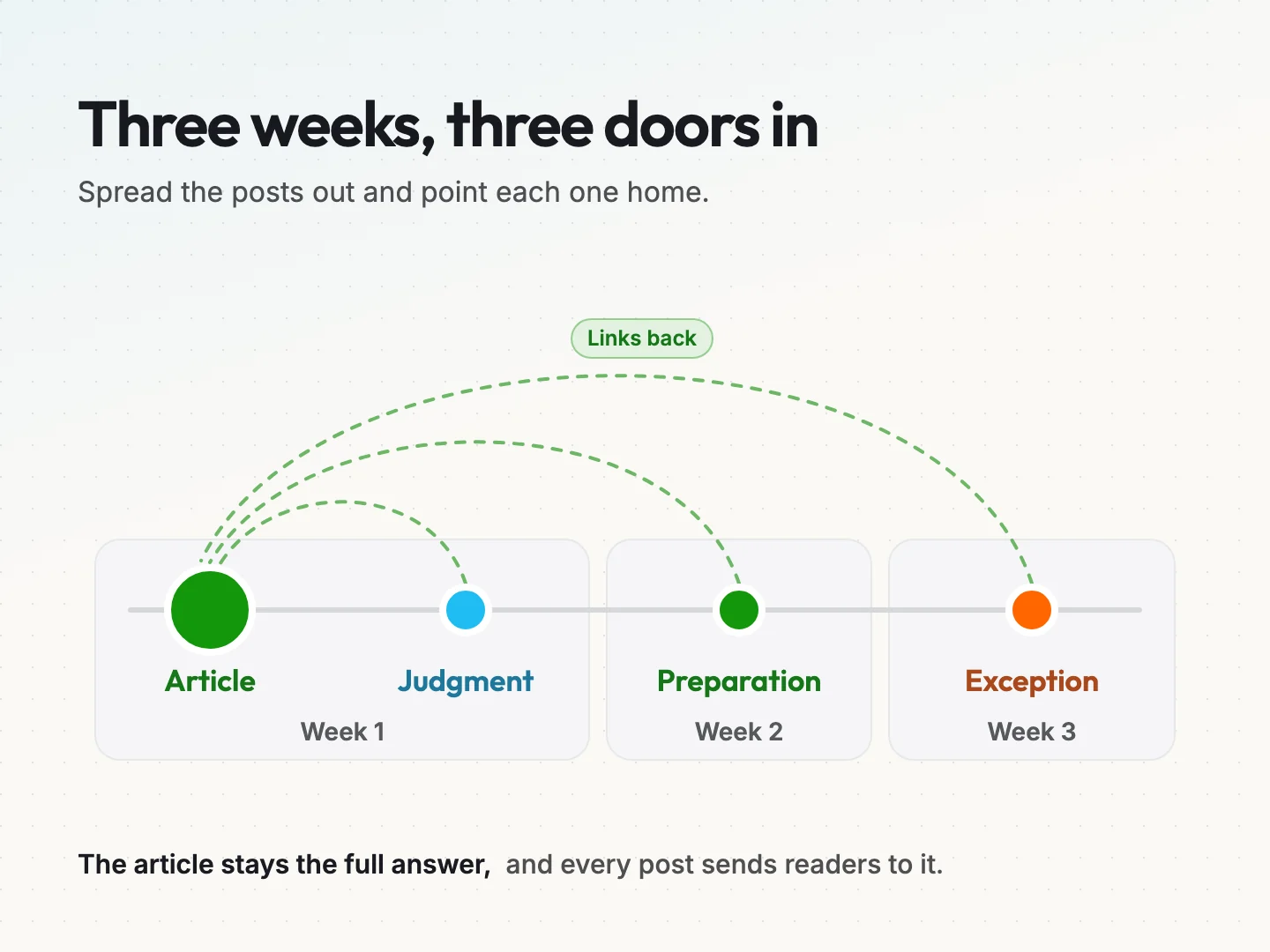
A simple plan works for most small businesses.
- Week 1. Publish the article, then the judgment post a day or two later.
- Week 2. Publish the preparation post.
- Week 3. Publish the exception carousel.
Every post points back to the article. That is how the posts send readers to your website, where they can find your services. The article stays the full answer, and the posts are three doors into it.
You can return to the same article later with a new angle. AuthoredUp’s guide to repurposing content for LinkedIn, updated August 11, 2026, suggests spacing a reused idea about 4 to 6 weeks apart with a fresh angle. That is one company’s advice, not a platform rule, so watch how your own followers respond.
Articles that stay true for years are the best ones to repurpose again and again. The guide to creating evergreen content explains how to write articles that hold up long enough to earn a second round of posts.
A blog post with only one idea.
Some articles make only one point. A short news update or a single tip does not have three lessons inside it. Forcing three posts out of it gives you three weak posts.
In that case, write one strong post and stop. Choose the job that fits best, usually the judgment post, and make it as useful as you can. One post that teaches something is worth more than three that repeat it.
You can also treat the gap as a signal. If your articles keep producing only one post, they may be too thin to help readers much. Adding a section on preparation or exceptions often makes the article better for search and for customers at the same time.
Here is a quick way to check before you start.
- Can you name a decision the article helps with? That is your judgment post.
- Does the article tell readers what to check or gather? That is your preparation post.
- Does it say when the advice changes? That is your exception post.
Three yeses means three posts. Fewer than three means fewer posts, or a better article.
Final thoughts on repurposing a blog post.
Repurposing works best when you stop counting formats and start counting lessons. One article, a short claims sheet and three clear jobs give you posts that each earn their place in a follower’s feed. They also stay as careful as the article they came from.
Start with the next article you publish. Fill in the claims sheet, name the three jobs and paste the prompt into your assistant. Run the four checks, then spread the posts over three weeks with a link back each time.
If you would rather have the planning, writing and scheduling handled for you, our social media management service turns your articles into posts that teach, and keeps them consistent across platforms. To talk through your blog and the channels your customers use, book a call with a specialist.
Was this article helpful?


